
Participant
November 14, 2016
Answered

Dreamweaver CC 2017 PHP mysqli Code Highlighting Dark Theme

  • November 14, 2016
  • 1 reply
  • 1086 views

Why doesn't the "Dark" Code Theme in Dreamweaver CC 2017 (Build 9315) highlight PHP mysqli functions in a different color similar to the "Light" theme?

For example, in these two screen shots, $mysqli->real_escape_string() and $mysqli->query() appear as white/gray text in the "Dark" theme and green in the "Light" theme.

Dark Theme Code Highlighting

Light Theme Code Highlighting

Possible bug?
This topic has been closed for replies.
Correct answer Nancy OShea

I don't know why it does what it does.  I got a different Brackets theme from Github.

Brackets Themes

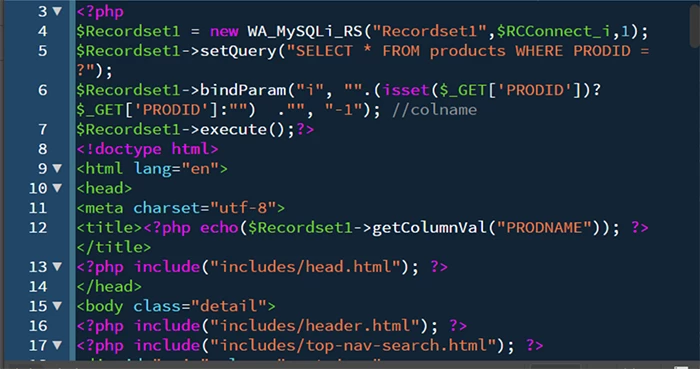
Mine is clled RubyBlue.   It's a high contrast DarkTheme as shown below.

Close DW.

On Windows: Use your File Manager and navigate to

Program Files /Adobe/ Dreamweaver CC 2017/www/extensions/default/DarkTheme/main.less and package.json.

Rename above files to old_main.less and old_package.json.

Drop the RubyBlue's main.less file into folder above.  Same for the package.json file.

Restart DW and voila!  New code colors.

Nancy O.

1 reply

Nancy OShea
Community Expert
Nancy OSheaCommunity ExpertCorrect answer
Community Expert
November 15, 2016

I don't know why it does what it does.  I got a different Brackets theme from Github.

Brackets Themes

Mine is clled RubyBlue.   It's a high contrast DarkTheme as shown below.

Close DW.

On Windows: Use your File Manager and navigate to

Program Files /Adobe/ Dreamweaver CC 2017/www/extensions/default/DarkTheme/main.less and package.json.

Rename above files to old_main.less and old_package.json.

Drop the RubyBlue's main.less file into folder above.  Same for the package.json file.

Restart DW and voila!  New code colors.

Nancy O.

Nancy O'Shea— Product User & Community Expert