


Participant
November 2, 2016
Answered

Dreamweaver CC 2017 Preferences/Properties windows too large to view on screen

  • November 2, 2016
  • 5 replies
  • 6320 views

I just installed Dreamweaver CC 2017 on a Windows 7 machine (I had been using the previous client, so this was not a fresh installation).

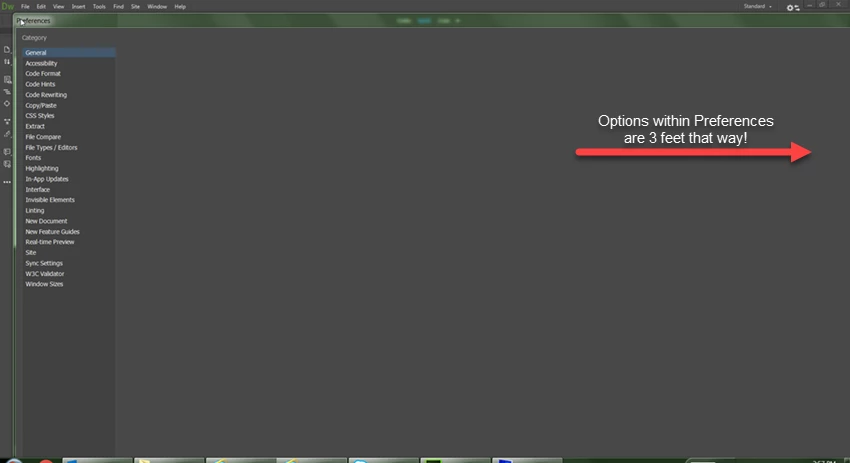
I went to check the Preferences (Edit --> Properties) and Page Properties (File --> Page Properties) and both windows are so large that I cannot view any of the preferences on the screen. Relative to my monitor (27"), the windows would be approximately five to six feet wide if they were physical squares. There is no way to use either of these, and probably any other popup window like this, until I figure out what is wrong.

My resolution is 1920 x 1080, and I had zero issue with the previous installation of Dreamweaver CC. I've rebooted my machine and tried all the mundane little things I could think of. This is a work laptop, so I don't have complete control over it and my options are somewhat limited (I can't uninstall/install the application without going through the help desk for admin rights).

Does this sound at all familiar? You can't even see the preferences when a window opens, they are 2 to 3 feet to the right out in nowhere land. Argh!
This topic has been closed for replies.
Correct answer lnayal

Been there... It does not work for me and for many others.

Thanks


Hi,

Latest DW 18.0 with full Hi DPI support on Windows is now Live.

More details are available below

October 2017 release to Dreamweaver CC is here

Thank you,

Lalita

5 replies

Participating Frequently
December 19, 2016

We have addressed High DPI issues encountered with the latest patch available 17.0.1

Please note that this is not full support of High DPI monitors but we have fixed the layout issues seen.

For more details click here

apnam45983044
Participant
December 8, 2016

Hey Everyone,

this problem does not have to do anything with windows 7 or 100% scale, i'm facing same problem, i'm using Windows 10 and at 100% scale, still unable to modify some text in split mode live editor, and in split mode if i edit the text from code i'm unable to see the change until i close the file and reopen it.

hopefully in next release they will resolve this problem, i'm going to DW 2015 version.

Thanks,

BenPleysier
Community Expert
Community Expert
December 9, 2016

Here is an article that I happened to come across. I have not tried the fix so please be careful. Adobe App Scaling on High DPI Displays (FIX) | Dan Antonielli

Wappler is the DMXzone-made Dreamweaver replacement and includes the best of their powerful extensions, as well as much more!
Inspiring
December 9, 2016

Been there... It does not work for me and for many others.

Thanks

Inspiring
November 10, 2016

Same here.

I would have never thought that Adobe would release a product without checking for BASIC compatibility and if it was a knows issue they should have resolved it before releasing.

The offered "solution" to upgrade to Win10 is ridiculous!

So is the second "solution" to use glasses...

Participant
November 27, 2016

same with me,

yesterday 20161127 installed cc17, Lenovo p540 Workstation wiht wqxhd Display ips. Windows 7.

totally unusable Interface because distorted Display in prefereces, filemanager, .... many menus not usable.

to me, unbelievable what Adobe is releasing.

greetings from Stuttgart ,Germany.

Nancy OShea
Community Expert
Community Expert
November 27, 2016

I posted a Hi-DPI workaround in the Photoshop Forum mainly for legacy Creative Suite users.  But it might work for you, too. 

Creative Suite, Hi-DPI Scaling Workaround

Nancy

Nancy O'Shea— Product User & Community Expert
Participant
November 7, 2016

I thought the whole idea behind Creative cloud is to remain up to date with the creative suite applications. Now I find that I can not use Dreamweaver 17 in a display mode greater that 100% in window 7.
In our office we are running Win7 enterprise and do not intent to upgrade to win10.
Just about everyone inhouse runs a "Medium" 125% display size. I am finding several incompatibilities with any display greater that 100%. Not only does the preferences window display improperly, the file manager in the files menu will not display the correct file selection (when a file is selected,a file 3 above is what opens)

Adobe.. please see what can be done to keep CC applications compatible with the "preferred" windows version 7.
In the meantime am forced to rollback to dreamweaver 15 as the display at 100% is too hard to work with these tires eyes.
Thank you for your consideration on customer satisfaction with your products.
Jim Ellington

Silverwulf
Known Participant
November 7, 2016

"

jimrell wrote:

Not only does the preferences window display improperly, the file manager in the files menu will not display the correct file selection (when a file is selected,a file 3 above is what opens)


Similar to what we've experienced. Sounds like you're seeing the same thing I was referencing above.

Silverwulf
Known Participant
November 2, 2016

I have a colleague who just updated this morning and asked me to come take a look at her screen just an hour or two ago.

She was having this same issue. She has dual monitors and it was still several feet off of her screen just to see the preferences.

She was also experiencing a problem when clicking on files in the file view. When she clicks on a folder or file to open, it would open a different file or folder. The files were misaligned some how. But it stayed in the same order. In other words, if the file that opened was three spots away from the one she wanted to open, she could move up three spots and it would open the one she wanted.

I have no idea if the two problems are related or not.