Start with one of the Bootstrap Starter Templates. You can customize responsive Bootstrap layouts however you wish.
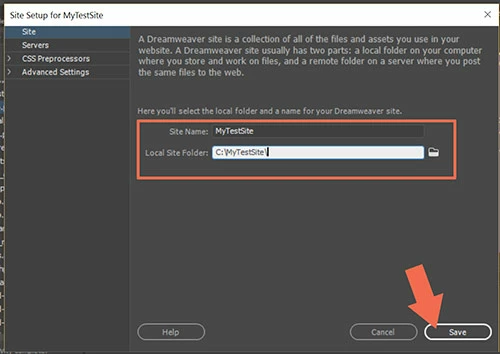
First define your local site folder. Example: C:\MyTestSite by going to Site > New Site.
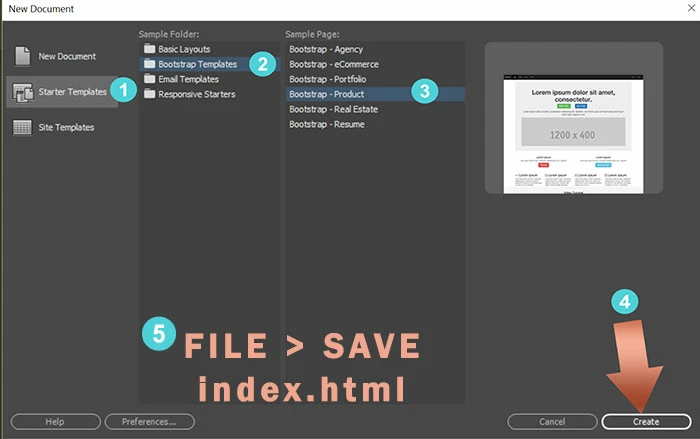
Next, go to File > New > Starter Templates. Choose one of the Bootstrap Layouts.
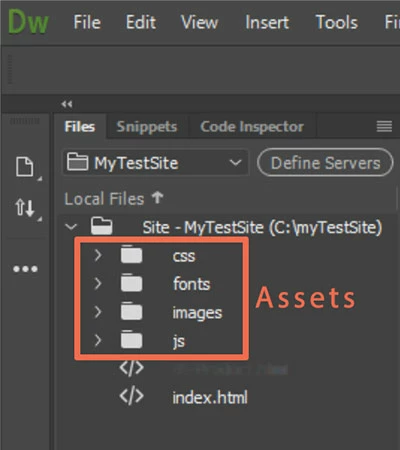
After saving your newly created starter layout, DW will create Assets folders for you which can be seen in your Files Panel (F8).
You now have a working starter site to which you can add your own custom styles, scripts, images, backgrounds, colors, Typekit fonts, etc.... There's no limit to what you can do with Bootstrap layouts and a little imagination.
For more on working with Bootstrap's 12-box grid system, consult the online tutorials below.
W3 Schools - Intro to Bootstrap
http://www.w3schools.com/bootstrap/
Tutorial Republic - Bootstrap for Beginners
http://www.tutorialrepublic.com/twitter-bootstrap-tutorial/
Bootstrap in DW CC tutorials
https://helpx.adobe.com/dreamweaver/how-to/make-style-web-page.html
Design responsive websites using Bootstrap





 AdChoices