
janelc16304869
Participating Frequently
December 12, 2017
Answered

dreamweaver cc 2018 crashes when opening on windows 10

  • December 12, 2017
  • 4 replies
  • 10612 views

this is the screen I get when launching dreamweaver. how do I fix it?
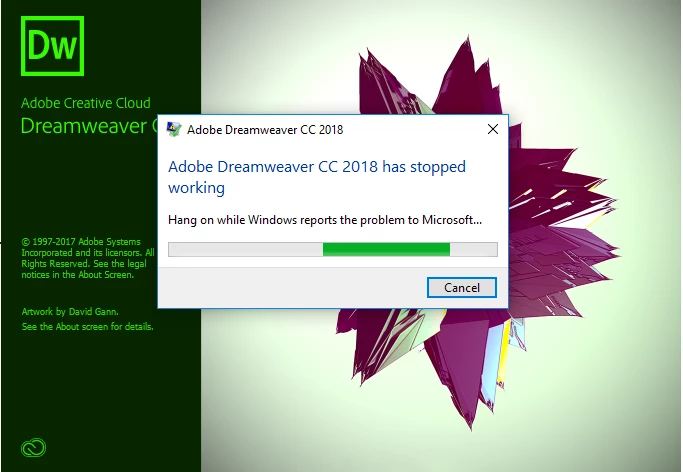
I have uninstalled all of CC apps and adobe cloud and reinstalled. didn't fix it.

also installed program an a different windows 10 machine and same exact issue. other apps install and run perfectly. just an issue with dreamweaver.

    This topic has been closed for replies.
    Correct answer TruskaWeb

    Hi,

    As requested above could you please share the crash logs with us to look into the issue.

    Thanks


    Since I opened the ticket, having had several weeks of regular hassle, it has not gone wrong so I have no crash therefore no logs to send.

    A good thing yes, but I am still wondering what might have been wrong. I am not aware of anything I did to resolve the issue.

    I was going to keep going till the start of next week then close the ticket if no more hassle.

    I guess the ticket can be closed – and if it happens again I can reopen it and send a log

    Thanks

    David

    4 replies

    LilGames
    Inspiring
    August 8, 2018

    I am beyond frustrated. Experiencing the same problem and it doesn't matter what I do to try and rectify the situation:

    Windows 7 Home (legit, all up to date)

    Tried Dreamweaver 2018, 2017, 2016, 2015 etc...

    Tried uninstalling, restarting computer, using the clean up tool, etc. NOTHING WORKS. Fresh installs still launch, then crash. Tried running as administrator, and all it did was take longer to launch and crash.

    I need this app to work! I am paying for it!

    Nancy OShea
    Community Expert
    Community Expert
    August 8, 2018

    Without much to go on, I'm guessing it's caused by a missing or corrupted DLL file.  Please open your Windows Event Viewer to see which faulting module is causing DW to crash. 

    Lavasoft & Bins utility are 2 known culprits effecting Photoshop, Dreamweaver, After Effects and other Adobe software.  See link below for details on how to fix it.

    Photoshop crashes with Lavasoft Chrome extension or Bins utility installed

    If neither Lavasoft or Bins are present on your system, please post back with more details from your crash logs.

    Nancy O'Shea— Product User & Community Expert
    LilGames
    Inspiring
    August 8, 2018

    I don't know what Lavasoft or Bins are, so presumably I don't have either. (I'm the only user of this system, use Photoshop every day without issue).

    Event viewer log for Dreamweaver:

    Faulting application name: Dreamweaver.exe, version: 18.2.0.10165, time stamp: 0x5afef9a8

    Faulting module name: imshelper.dll, version: 1.0.0.12, time stamp: 0x5b10054d

    Exception code: 0xc0000005

    Fault offset: 0x000000000000b32f

    Faulting process id: 0x38b8

    Faulting application start time: 0x01d42f49edeaba74

    Faulting application path: C:\Program Files\Adobe\Adobe Dreamweaver CC 2018\Dreamweaver.exe

    Faulting module path: C:\Program Files (x86)\Common Files\Adobe\Adobe Desktop Common\LCC\x64\imshelper.dll

    Report Id: 58c47a24-9b3d-11e8-a739-9e56eaae419c

    So, looks like imshelper.dll is the culprit?

    Community Manager
    December 14, 2017

    Hello Jane,

    We regret the inconvenience caused due to this crash on launch.

    We would need crash dump to dig into the issue. To get a crash dump, below are the steps to follow

    1. Press Win+R and enter regedit and press Enter key to open Registry editor
    2. Go to HKEY_LOCAL_MACHINE\SOFTWARE\Microsoft\Windows\Windows Error Reporting\
    3. Create a new key LocalDumps
    4. Inside LocalDumps create a new Expandable String value and name it DumpFolder and provide path of the folder on your desktop where you want the dump to created.
    5. Create a DWORD 32Bit value and name it DumpType and provide 1 as the value.
    6. Close Registry Editor

    You can refer to the following MS article for more info on the same: https://msdn.microsoft.com/en-us/library/windows/desktop/bb787181(v=vs.85).aspx

    Next time Dreamweaver crashes, it will create a crash dump in the path provided in the registry.

    Once you have shared the crash dump, you can delete the DumpFolder key if required from HKEY_LOCAL_MACHINE\SOFTWARE\Microsoft\Windows\Windows Error Reporting\ in registry.

    You can share the dmp file with me at lnayalatadobedotcom

    We will try our best to resolve this issue.

    ~Lalita

    janelc16304869
    Participating Frequently
    January 4, 2018

    Lalita,

    did you ever get the dmp file that was sent?

    Preran
    Community Manager
    Community Manager
    February 22, 2018

    For all those of you still facing issues after restoring preferences, or doing a clean install, send me your Adobe ID, location, and phone number over a private message along with the URL of this post. To send a private message, click my picture and use the Message button.

    Thanks,

    Preran

    Jon Fritz
    Community Expert
    Community Expert
    December 12, 2017

    One note on installing multiple versions, well, two notes...

    1. Only 1 version can run at a time. If you do get the latest up and running, you'll need to close the older version to work in the newer version and vise versa.

    2. If you install a newer version than what you have currently installed, make sure to click the Advanced Options link in the installer dialogue window. That will allow you to turn off the "Remove Older Versions" checkbox so you can keep your older versions while learning if the newer version is worth your trouble (some have found it isn't).

    Jon Fritz
    Community Expert
    Community Expert
    December 12, 2017

    Weird.

    When you uninstalled, did you use the Adobe Cleaner Tool?

    Use the Creative Cloud Cleaner Tool to solve installation problems


    Sometimes corrupt files are left behind in your user account and will affect new installations. You should be able to use it for DW alone, without having to uninstall the other programs in CC.

    janelc16304869
    Participating Frequently
    December 12, 2017

    yes i used that.

    Jon Fritz
    Community Expert
    Community Expert
    December 12, 2017

    Are you able to install one of the older versions of DW by chance?

    From the CC Desktop App...

    1. Click the Apps tab
    2. Click the small triangle next to DW's Install Icon

    3. Choose Other Versions
    4. Pick CC 2015

    See if that one will run for you. If it does, at least you'll be able to get your work done while troubleshooting continues. CC 2015, 2017 and 2018 can all be installed on the same machines at the same time under a single subscription, so you can continue troubleshooting with Adobe on the latest, while using an older version.

    janelc16304869
    Participating Frequently
    December 12, 2017

    yes, I tried installing the other versions and same issue.