


vesid82761895
Participant
January 2, 2018
Answered

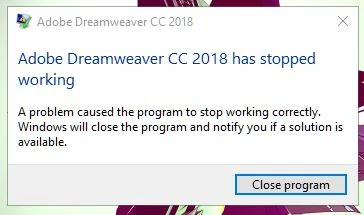
Dreamweaver CC 2018 has stopped working

  • January 2, 2018
  • 1 reply
  • 1213 views

Hello,

Recently every time I start Dreamweaver CC 2018 I get the error message below saying it has stopped working. I ran into this issue a week or so ago and uninstalled/re-installed Dreamweaver and that fixed the issue but now it will not work. I have also uninstalled/re-installed Creative Cloud program and that did not fix the issue either. Any help would be greatly appreciated! Thanks.
Bryan

    This topic has been closed for replies.
    Correct answer Nancy OShea

    Close DW and try Restore Preferences.

    Unusual behavior in Dreamweaver? Try restoring preferences.

    Nancy

    1 reply

    Nancy OShea
    Community Expert
    Community Expert
    January 3, 2018

    Please open your Windows Event Viewer and check for the Faulting Module that's causing DW to crash. 

    Nancy

    Nancy O'Shea— Product User & Community Expert
    vesid82761895
    Participant
    January 3, 2018

    Thanks for your help Nancy!

    Faulting module path: C:\Windows\SYSTEM32\ucrtbase.dll

    Full Error Description

    Faulting application name: Dreamweaver.exe, version: 18.0.0.10136, time stamp: 0x59cb9662

    Faulting module name: ucrtbase.dll, version: 10.0.10586.1176, time stamp: 0x59ba0879

    Exception code: 0xc0000409

    Fault offset: 0x00000000000685f8

    Faulting process id: 0x2bfc

    Faulting application start time: 0x01d384242906435c

    Faulting application path: C:\Program Files\Adobe\Adobe Dreamweaver CC 2018\Dreamweaver.exe

    Faulting module path: C:\Windows\SYSTEM32\ucrtbase.dll

    Report Id: 9c8d8504-0abc-4cab-859f-b5a16fc45865

    Faulting package full name:

    Faulting package-relative application ID:

    Nancy OShea
    Community Expert
    Nancy OSheaCommunity ExpertCorrect answer
    Community Expert
    January 3, 2018

    Close DW and try Restore Preferences.

    Unusual behavior in Dreamweaver? Try restoring preferences.

    Nancy

    Nancy O'Shea— Product User & Community Expert