roseg73505219
Participant
July 4, 2018
Answered

Dreamweaver CC 2018 spell check won't work

  • July 4, 2018
  • 2 replies
  • 2019 views

I have seen some posts about this, but am still a bit sick.

I have an HTML page and put is some deliberate typos by randomly tapping keys in a place between a <p> and a </p> - so there are spelling mistakes and it should whinge.

The only way to get sensible behavior is to put it in design view! If I am in Live, the menu option is grey; If I am in Code, it bounces to split and highlights nothing. If I am in the more-rendered half of the split the menu option is grey.

Is this a bug? If so, how do we get it into to fix pipeline?

In the mean time, how about Adobe fixing the page at

https://helpx.adobe.com/dreamweaver/using/spell-check-web-page.html

This topic has been closed for replies.
Correct answer Nancy OShea

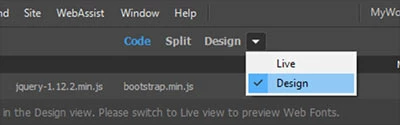
Switch to Design View from the document toolbar.   See screenshot.

2 replies

Participant
August 23, 2018

Spell check doesn't work properly in Design mode either (not using Dreamweaver CC 2018 on Windows 10, anyway). Spell check doesn't allow you to save additions to your personal dictionary and Ignore All operates exactly like Ignore, so spell checking takes forever. The chance of overlooking an aberration is increased enormously. I have tried split mode between Code and Design and Design mode alone.

Nancy OShea
Community Expert
Community Expert
August 23, 2018

I spell chec k in Word before I bring content into DW.

Nancy O'Shea— Product User & Community Expert
Nancy OShea
Community Expert
Nancy OSheaCommunity ExpertCorrect answer
Community Expert
July 4, 2018

Switch to Design View from the document toolbar.   See screenshot.

Nancy O'Shea— Product User & Community Expert
roseg73505219
Participant
July 6, 2018

Is it me, but, is Adobe going do do something about this do you think? Even if it is a little as fixing its help page?

Nancy OShea
Community Expert
Community Expert
July 6, 2018

There are a number of features that don't work in Live View.  I have no idea what Adobe's plans are.  If you want to submit a feature request,  you can do it directly from DW's Help menu.   See screenshot.

Nancy O'Shea— Product User & Community Expert