Participant
January 29, 2019
Answered

Dreamweaver CC 2018 themes

  • January 29, 2019
  • 1 reply
  • 462 views

Hi.

New to DW CC and saw the themes. I like the dark theme except that for some reason, if I open an existing file from my site, the background of the design view is dark grey making it hard to read the text etc. If I change the theme, it changes too. If I open a new page, it's fine. White background and everything else is dark.

Any idea on how to resolve this?

    This topic has been closed for replies.
    Correct answer Nancy OShea

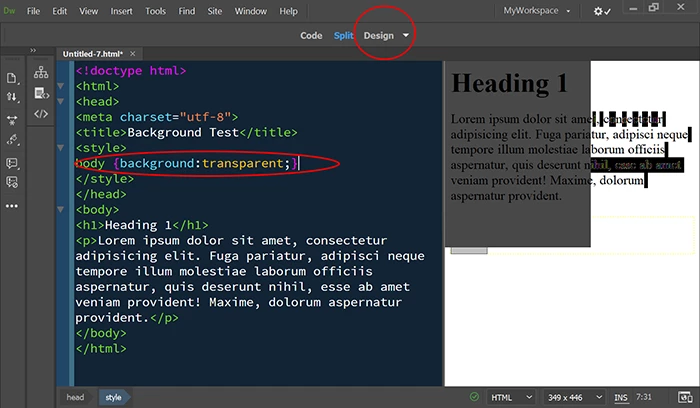
    OK.   On latest version of DW CC 19.01, I can confirm that CSS background: transparent creates problems in Design view.  See screenshot.

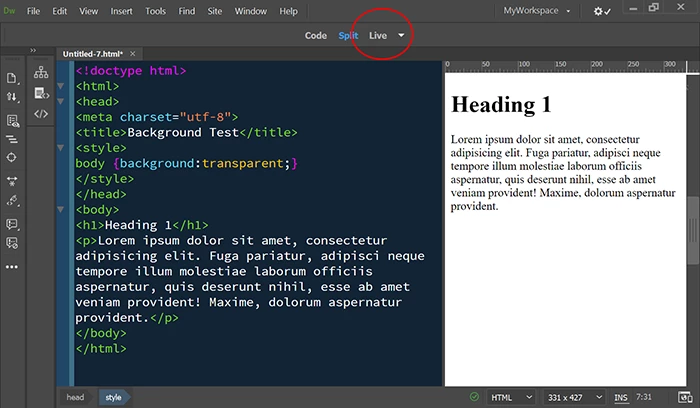
    However, there is no problem in Live view.

    I almost never use background:transparent in my workflow.  Maybe that's why I never noticed this before.

    1 reply

    Nancy OShea
    Community Expert
    Community Expert
    January 29, 2019

    FYI, the current CC version is 19.01.  You might want to update to the latest version.

    I have not encountered any problems with page backgrounds in either dark or very dark interface themes.  My guess without more to go on is that you have code errors that need attention.  Or possibly, your document has a transparent CSS background.

    Nancy O'Shea— Product User & Community Expert
    Nancy OShea
    Community Expert
    Nancy OSheaCommunity ExpertCorrect answer
    Community Expert
    January 29, 2019

    OK.   On latest version of DW CC 19.01, I can confirm that CSS background: transparent creates problems in Design view.  See screenshot.

    However, there is no problem in Live view.

    I almost never use background:transparent in my workflow.  Maybe that's why I never noticed this before.

    Nancy O'Shea— Product User & Community Expert
    Participant
    January 30, 2019

    I've confirmed it's the transparent layer in the css. However, I still have the question of why it is only affected on existing files and not new files that use the same template and css.

    Oh well. At least it's fixed for now.

    Thanks for the help.