Participant
June 6, 2018
Answered

DreamWeaver CC 2018 upload issue

  • June 6, 2018
  • 1 reply
  • 437 views

I just updated to Dreamweaver CC 2018 a couple of days ago at work.  I got my site migrated over.  When I try to upload an individual file to my test server it works fine, but when I try to move a folder, it takes the folder, but not any of the folder's contents (the children). I assume it's a parameter setting, but I can't find it.  I located the parameter setting and turned it on, but it keeps failing.  It will move the top level folder, and one sub folder, then fails on all other sub-folders and contents then turns the dependent file parameter prompt back off.

[Here is the list of all Adobe forums... https://forums.adobe.com/welcome]

[Moved from CS6 & earlier Creative Suites to specific program forum... Mod]

    This topic has been closed for replies.
    Correct answer Nancy OShea

    I assume you're using a local testing server like Wamp, Mamp or Xampp?

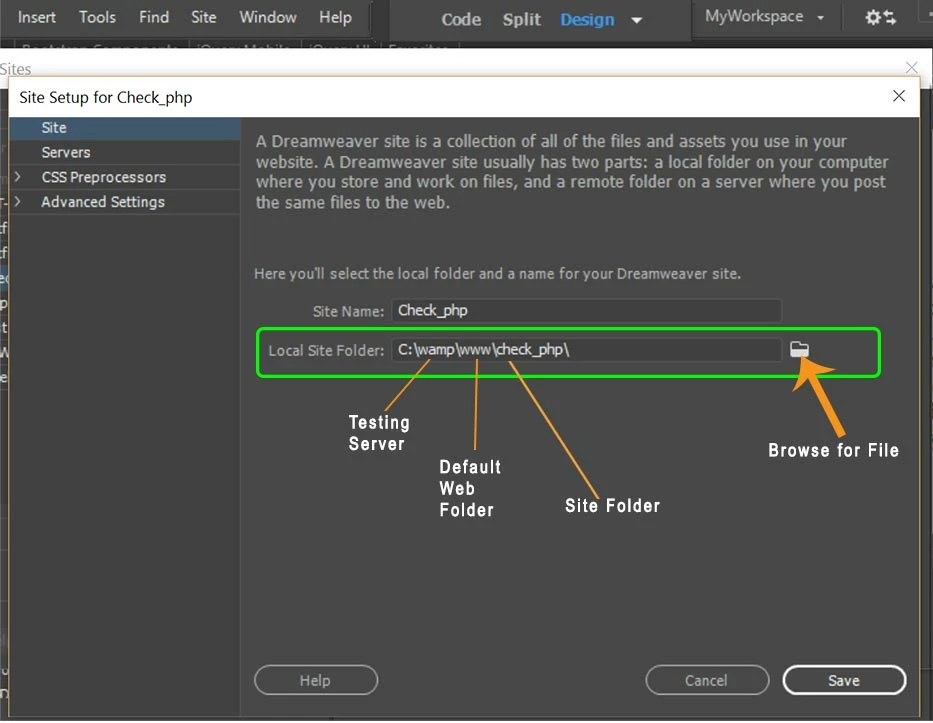
    I  keep my local site in the local testing server's default web directory (www on Wamp or htdocs on Mamp & Xampp).  Any changes I make are automatically saved to the testing server.  No duplicate files and no need to PUT files to testing server.

    If this is your set-up and you still can't create a folder or move folders around on your testing server, this implies a permissions problem on that server.

    1 reply

    Nancy OShea
    Community Expert
    Nancy OSheaCommunity ExpertCorrect answer
    Community Expert
    June 6, 2018

    I assume you're using a local testing server like Wamp, Mamp or Xampp?

    I  keep my local site in the local testing server's default web directory (www on Wamp or htdocs on Mamp & Xampp).  Any changes I make are automatically saved to the testing server.  No duplicate files and no need to PUT files to testing server.

    If this is your set-up and you still can't create a folder or move folders around on your testing server, this implies a permissions problem on that server.

    Nancy O'Shea— Product User & Community Expert