Participant
October 7, 2020
Answered

Dreamweaver CC 2019, how to find files in my site by file name

  • October 7, 2020
  • 2 replies
  • 1075 views

In find menu, I only can find functions that find files by tags contained in the file. But I need function that find by file name.


Thanks.

 

    This topic has been closed for replies.
    Correct answer Jon Fritz

    That particular search field is only available on Macs.

    Windows users don't get that option in their Files window...


    ...there currently is no function within DW's Find & Replace Tool that can find by file name alone, and then make changes to only those pages. You could highlight the files you want to work with, within the Files window (using Ctrl + Click to highlight multiple files), hit Ctrl + Shif t+ F, then change the Find In to "Selected Files In Site"...


    ...obviously this is not ideal on medium to large sites, but it's all we have to work with currently.


    Make sure to add your voice to other feature requests, or start a new one here: 


    https://dreamweaver.uservoice.com/forums/379458-adobe-dreamweaver-ideas 

    2 replies

    Nancy OShea
    Community Expert
    Community Expert
    October 7, 2020

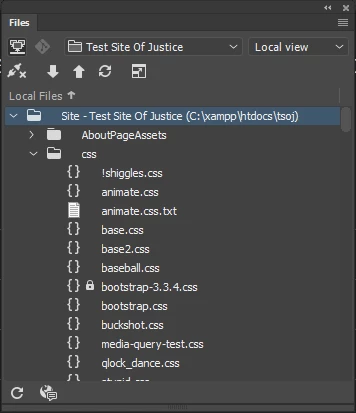
    The DW Files Panel (F8) sorts filenames alphabetically in either ascending ↑ or descending ↓ order.   To change sort order, click the Local Files arrow and scroll to the filename.


    Alternately, use your operating system's file manager or Adobe Bridge to search for specific files on your hard drive.


    Nancy O'Shea— Product User & Community Expert
    Shanti Arts
    Inspiring
    February 29, 2024

    Is there a way to search for filenames on the remote site? There's no search on the left (remote) side of the Files Panel. I'm on a mac, so I see the search bar on the right.

    Nancy OShea
    Community Expert
    Community Expert
    February 29, 2024
    quote

    Is there a way to search for filenames on the remote site?

    By @Shanti Arts

    ======

    Not with Dreamweaver.

    Only defined sites with files stored in your computer's Local Site Folder can be searched by Dreamweaver.


    If your web hosting plan includes C-Panel or similar server file management tools, you might use that.  Ask your hosting provider what they recommend.


    Nancy O'Shea— Product User & Community Expert
    Community Expert
    October 7, 2020

    The find file function is in the File Manager.  Click on Window --> Files .  Right above the file listing is a search box.

    Jon Fritz
    Community Expert
    Jon FritzCommunity ExpertCorrect answer
    Community Expert
    October 7, 2020

    That particular search field is only available on Macs.

    Windows users don't get that option in their Files window...


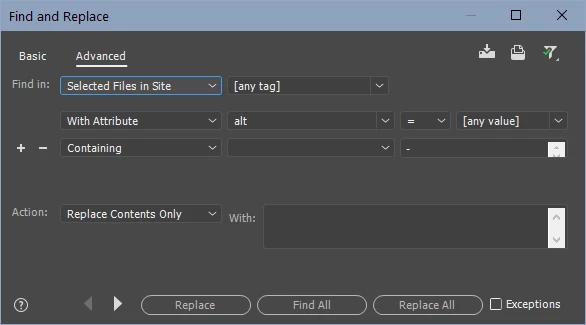
    ...there currently is no function within DW's Find & Replace Tool that can find by file name alone, and then make changes to only those pages. You could highlight the files you want to work with, within the Files window (using Ctrl + Click to highlight multiple files), hit Ctrl + Shif t+ F, then change the Find In to "Selected Files In Site"...


    ...obviously this is not ideal on medium to large sites, but it's all we have to work with currently.


    Make sure to add your voice to other feature requests, or start a new one here: 


    https://dreamweaver.uservoice.com/forums/379458-adobe-dreamweaver-ideas