

PSTricenarian
Participating Frequently
May 6, 2019
Answered

Dreamweaver CC 2019 lag on Mac

  • May 6, 2019
  • 4 replies
  • 3062 views

I've noticed lately Dreamweaver CC 19.1 has been slow to respond on my Mac (OS 10.14.4). Scrolling large php files can be slow and jerky; the scroll bar can suddenly jump to the beginning or end of the file. When I switch from a different application (e.g. Chrome) back to Dreamweaver I get the spinning rainbow wheel for a few seconds and sometimes there is a big lag in typing text and then seeing in on screen.

I like Dreamweaver, it's easy to use, I like the code-hinting, I've been using it for years. But at this stage, I'm happy to just spend a bit of time customising myself with an alternative like Textastic - which would be a little annoying but it would also mean no ongoing subscription payments.

I've noticed this issue following the update to CC 2019. Do I have to do some ongoing deletion of preferences files every other day to fix this?

[Discussion moved from Adobe Creative Cloud to Dreamweaver support forum]
This topic has been closed for replies.
Correct answer Nancy OShea

benjipotter400  wrote

Scrolling large php files can be slow and jerky; the scroll bar can suddenly jump to the beginning or end of the file.

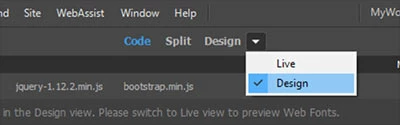
Turn off Live View especially when working with PHP files. 

4 replies

Participating Frequently
January 28, 2021

I have also issues with Dreamweaver in my Mac Pro 5.1 2012. It takes long time to be able to write something, the CPU seems to be working hard. When I open a new file the same thing happens. Dreamweaver seems to be heavy for the Intel Xeon 2 x 3.1 GHz CPUs (12 core). The app iStatus menu says that the load can be up to 1 300 % at highest. Maybe my computer is too old? I run Big Sur 11.1, installed via Open core. This CPUs are around 10 years old by now. The same problem in Mojave. Even latest Photoshop has problems with beach ball in every move and step. Even closing the app gives beach ball. The load on CPUs is around 100 % every time you do something. Well, I have probably to buy an new computer. But what can I choose when Apple-prices are extremely high today?

PSTricenarian
Participating Frequently
May 6, 2019

Hi,

I only ever use Code view but I have made sure Design view is selected. They largest file size I have been working on is only 59Kb (although some can be 2-3k lines of code).

But I have, embarrassingly, solved my own problem. It was a simple matter of having too many files open at the same time. I had multiple files open in Dreamweaver at the same time as I was making tweaks of various files on website (approximately 20) I closed other files and no there's no lag.

I just assumed my 16GM of RAM could cope with that. Obviously not, I assume each time I focused back on Dreamweaver after testing in a browser that Dreamweaver reloads (or checks for changes) on every open file (not just the file that is currently on screen), hence the 10-12 second delay before I could start doing anything?

Lesson learned.

Thanks for your suggestions Nancy OShea

TeKno_Ziz
Participant
February 13, 2020

This is not my issue. Slowness is unbearable. Truly embarrassing. 2019 and now 2020. Only one file open (HTML) at a time. Hesitations, delays in updating, code not highlighting when you click on something. Forced to use another product. 24GB Core i5 2017 27" iMac, you would think that it would be powerful enough to run. Any other thoughts? I have fought with this for a couple of years, my bad for not addressing this issue sooner.

Nancy OShea
Community Expert
Community Expert
February 14, 2020

I have no problems with slowness in DW.  It must be something different on your end.

  • My local site folder resides on my primary hard drive, not a networked or cloud drive.
  • Non-essential background processes are turned off while I work.
  • Documents are free of code errors.


Nancy O'Shea— Product User & Community Expert
Nancy OShea
Community Expert
Nancy OSheaCommunity ExpertCorrect answer
Community Expert
May 6, 2019

benjipotter400  wrote

Scrolling large php files can be slow and jerky; the scroll bar can suddenly jump to the beginning or end of the file.

Turn off Live View especially when working with PHP files. 

Nancy O'Shea— Product User & Community Expert
Preran
Community Manager
Community Manager
May 6, 2019

Hi benjipotter,

Thank you for sharing your feedback. We haven't heard of a whole lot of performance issues with DW on Mac OS, so I will need to know more to investigate your case.

You mention large PHP files in your post - can you provide us with an approximate file size of these pages? Also, are you trying to access these files from a network location?

Deleting preference files regularly isn't something you should be doing regularly. To be sure, do the issues with slowness get resolved every time you restore preferences?

Thanks,

Preran