


Participant
March 12, 2023
Question

Dreamweaver CC 2022 Hangs Loading Site Cache

  • March 12, 2023
  • 3 replies
  • 1000 views

Hi, 

I'm running on a Windows 11 machine with 32 GB RAM and plenty of C:\ space.


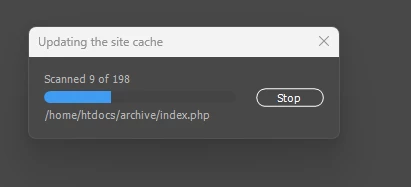
Dreamweaver CC 2022 is hanging on "updating the site cache". I tried uninstalling and reinstalling, as well as the fixes at https://community.adobe.com/t5/dreamweaver-discussions/using-dreamweaver-cc-2021-latest-version-hangs-while-loading-for-hours-then-crashes/m-p/11825548 . (Previously it hung "loading the site cache", but with the fixes, it hangs "updating the site cache".  The Stop button doesn't work to have it stop loading, the blue circle just spins. Thanks for any help.
 

This topic has been closed for replies.

3 replies

Nancy OShea
Community Expert
Community Expert
March 17, 2023

"I have the same problem. Dreamweaver does not start AT ALL. So I cannot disable the site cache.

Is there another way to disable it?"

===========

@MStoykeBerlin,

I'm not sure you have the same problem as @steward39


It's more likely you have another issue.


Start with Restore Preferences. That fixes most problems.

https://helpx.adobe.com/dreamweaver/kb/restore-preferences-dreamweaver.html


Failing that, use Adobe Cleaner Tool to wipe DW off your system. 

Restart computer.

Do a clean reinstall.

https://helpx.adobe.com/creative-cloud/kb/cc-cleaner-tool-installation-problems.html


Hope that helps.  If not, post back and we'll explore other options.


Nancy O'Shea— Product User & Community Expert
Participant
March 17, 2023

I have the same problem. Dreamweaver does not start AT ALL.

So I cannot disable the site cache.

Is there another way to disable it?
E.g. via regedit?

Nancy OShea
Community Expert
Community Expert
March 13, 2023

It appears to be getting STUCK on the ARCHIVE folder.


Uncheck the box for Enable Site Cache from Manage Sites panel.  Advanced Settings > Local Info.


Nancy O'Shea— Product User & Community Expert