Inspiring
August 20, 2017
Answered

Dreamweaver CC can't find existing sites

  • August 20, 2017
  • 1 reply
  • 3315 views

Hi everybody,

I built several web sites using templates with Dreamweaver 2015. Unfortunately my hard drive went and I was forced to get a new Mac Mini, but I had all the files backed up on my external drive so nothing was lost. I then downloaded and installed the latest version of Dreamweaver CC 2017.0.1 along with several plug-ins. Now, when I try to work on the existing templates Dreamweaver says there are no defined sites, which is ridiculous because in order to create a template you have to first define a site. When I try to save changes the child pages don't reflect the changes. When I try to access the plug-ins it won't allow me. It's as if all the sites have disappeared, or been lost.

Any ideas on what could be wrong and how I can resolve this problem? The files were never modified, so that could not be the problem. I can't modify a single template, for any site I built.

Thanks so much for any help you can provide.

Mark

    This topic has been closed for replies.
    Correct answer Nancy OShea

    Hi to the both of you.

    The only files I have access to are those saved to my external drive, and there are no .ste files there. I never exported anything before the hard drive failed and lost everything. The Apple store was unable to recover anything:(

    The question is, where do I go from here? I have the .dwt file, so there's no need to recreate it. What I need to do, I think, is create a new site with the same name and then save the same .dwt file over the existing one. I would then have to attach the template to the appropriate pages, which were created using the same template. All the regions should match, right?

    Would this be the best approach to take,? Any suggestions are appreciated, thanks for your time and effort.

    Kind regards,

    Mark


    Child pages have code at the top that references the template.dwt from which they were spawned.  If that path is the same, you do NOT need to re-attach them to your template.dwt. 

    • But the sites must be defined.  Site > New Site...
    • Your site files need to be moved from old drive or externals to your new hard drive.
    • And Templates must be inside the Templates folder.

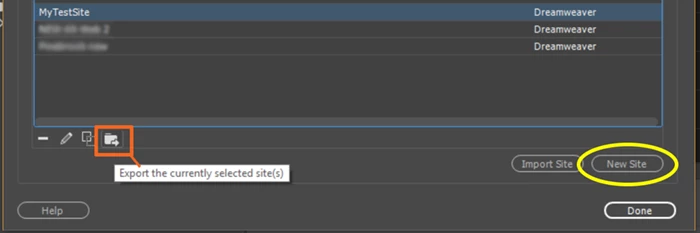
    After your sites are defined,  immediately export site definitions for safekeeping (see screenshot).   I do this whenever I create new sites or edit FTP login details.  

    1 reply

    Nancy OShea
    Community Expert
    Community Expert
    August 20, 2017

    Did you properly define your local site folder?

    In your Files Panel, are you in the local site folder?

    And is your TEMPLATES folder at site root level.  Template.dwt files must be in the Template folder or they won't work.

    Nancy

    Nancy O'Shea— Product User & Community Expert
    Inspiring
    August 20, 2017

    Hi Nancy, thanks for responding. Based on your comments I have everything correct. Also, when I look under View - Manage Sites not a single site I've created appears, there is nothing showing.

    I came across this article when looking for help, Site Defenitions lost on upgrade to Dreamweaver CC 2017

    Participating Frequently
    August 20, 2017

    Latest version of DW available is 17.5 which has Git support with in DW.

    Is your issue resolved by downgrading?

    As you had got new Mac mini, did you export site definitions in DW CC 2017?

    If you don't see your sites in Manage Sites dialog that mean your sites are not defined in CC 2017.

    See if this link helps How to import and export Dreamweaver site settings