Participant
February 21, 2018
Answered

Dreamweaver changing font awesome icon tags <i></i> to <em>

  • February 21, 2018
  • 1 reply
  • 2347 views

I realize that the original italics tag was <i></i> and is now <em>, so I get why Dreamweaver is changing the tag when I'm working in code view. The problem is nowadays when working with font icons we are using the <i> tag in code to display icons ie...<i class="fa fa-clock"></i>. Is there a way to get Dreamweaver to stop auto-correcting the code every time I click on a line of code that includes the icon code? I don't really want to turn auto correct off completely.

Thanks,

-Ron

    This topic has been closed for replies.
    Correct answer anissa_thompson

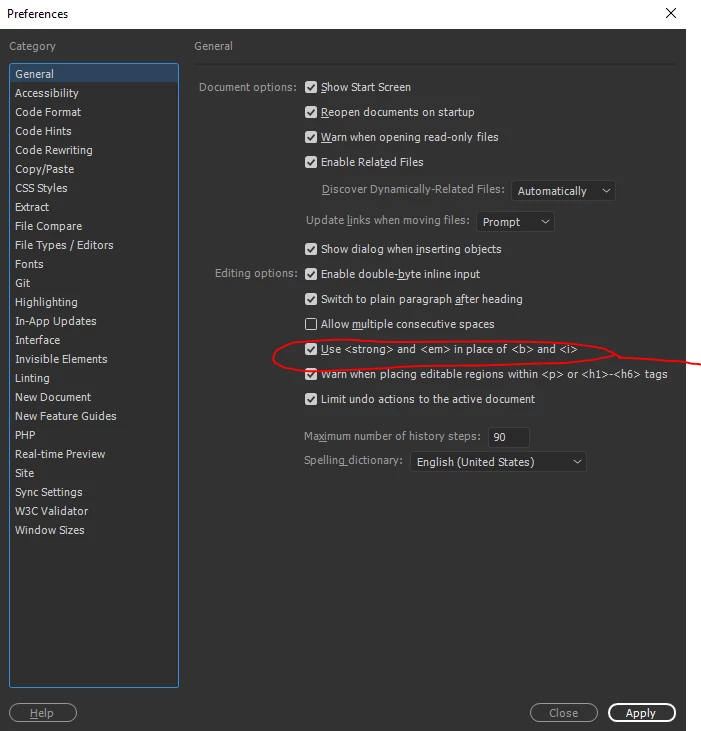
    I'm assuming you have checked the preferences panel (mine shown here is on Win 10 version):

    I had the same issue as well, but actually Font Awesome works fine with both <i> and <em>, and I now use the <em> tag with all of my Font Awesome shortcuts:

    example:

    <em class="fa fa-user">& nbsp;</em>

    1 reply

    Jon Fritz
    Community Expert
    Community Expert
    February 21, 2018

    Obviously, if you use the old Italic button from the Properties menu, DW will drop in an <em> as it should, but it shouldn't be changing <i></i> to <em></em> when you click on the code in Code View. That sounds to me like you may have other errors in your code that DW doesn't know how to reconcile, so it tries to fix the <i> tags.

    Run your code through the validator at http://validator.w3.org/nu or under File > Validate > Current Document in DW to make sure your code is clean and DW isn't just trying to help repair some issue in your source.

    I do not have the same behavior occurring in CC2018 under Windows 7.

    rdracingAuthor
    Participant
    February 21, 2018

    Thanks for the quick response, but this is not an isolated issue and it doesn't happen 100% of the time. It's been occurring in many projects over the past couple of years.

    My guess as to why this happens would be that while I'm editing a line in code view that contains the <i class=""> the code is temporarily incorrect (as I'm typing) so it auto corrects it. For this reason, I would just like to shut off auto correct only for the italics tag and not completely.


    I'm also using CC2018 but on a Mac running High Sierra 13.3.

    anissa_thompson
    Community Expert
    anissa_thompsonCommunity ExpertCorrect answer
    Community Expert
    February 22, 2018

    I'm assuming you have checked the preferences panel (mine shown here is on Win 10 version):

    I had the same issue as well, but actually Font Awesome works fine with both <i> and <em>, and I now use the <em> tag with all of my Font Awesome shortcuts:

    example:

    <em class="fa fa-user">& nbsp;</em>

    Hope this helps! Make sure to press "✔ Correct Answer" on this post if this answers your question. Happy Creating!Anissa • @anissat