


Participant
June 15, 2022
Answered

Dreamweaver Class selector is useless

  • June 15, 2022
  • 5 replies
  • 306 views

Clicking the Class selector on the properties panel for classesis is useless. No scroller on window, no PageDown/Up. Only row by row scroll with arrows. This bug is from ver. 2017. Not repaired yet, unfortunatelly!

This topic has been closed for replies.
Correct answer Nancy OShea

Yes.  Sadly, it's been that way for a very long time.  I complained about it many years ago.  Fast forward to 2022 and DW is only minimally maintained now.  No new features are planned. 


I fear that posting bug reports here is futile given that nobody at Adobe intends to do anything about them.  At this point, DW is what it is. 


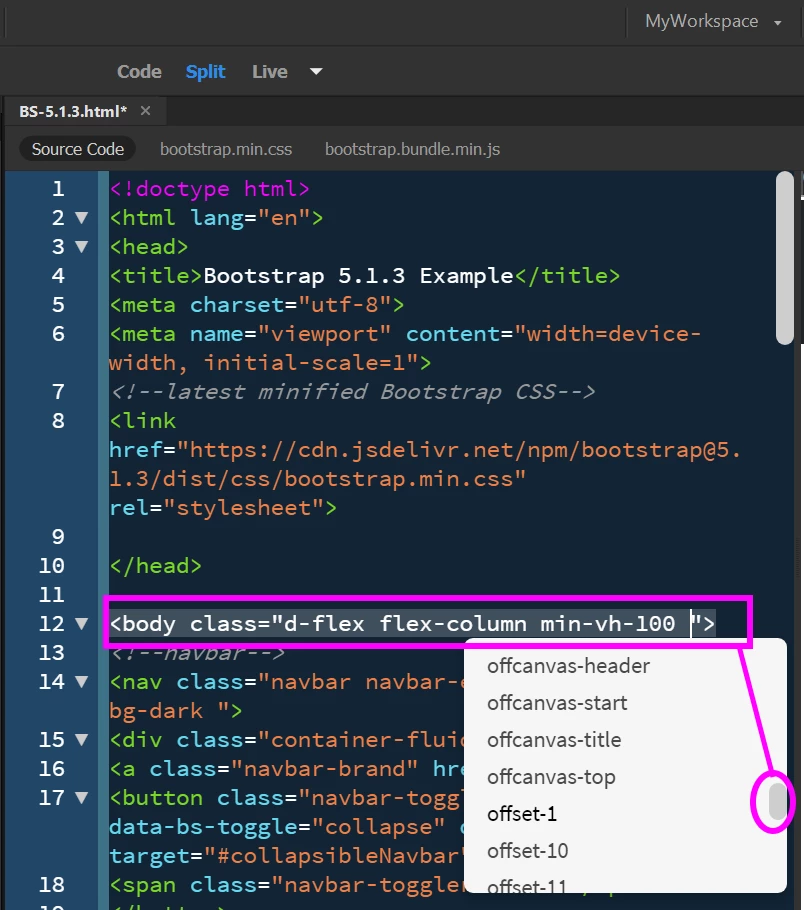
Use Code View with code hints and auto-code completion.  Selecting from a long list of classes is much faster than clumsy panels.  See screenshot.


Hope that helps.


5 replies

Nancy OShea
Community Expert
Community Expert
March 28, 2023

Dreamweaver has never been an IDE. 


When you need an IDE, consider the following:

Eclipse,

Code Lobster,

Rapid PHP Editor,

NetBeans,

Visual Studio,

Zend Studio.


Hope that helps.


Nancy O'Shea— Product User & Community Expert
Participating Frequently
March 28, 2023

It's strange isn't it! Ever since the 'new' design started, so many useful features have either been deprecated or their implementation has been mangled in some way. I don't know about you, but I remember the fight to get code-folding back after they inexplicably dropped it... that shold have been a big red flag to the way things would turn out right there I guess! My main gripe these days, when I am absolutely forced to use DW for something legacy that's till setup to use it, is the position of code-hints above classes (the ones with methods i.e. PHP, not the ones with styles) and the like. I remember before the absolute mangling of DW when not only did code-hints for such classes NOT obscure the code class you were writing to call the class, but it also used to put the parameter you were currently adding in bold. It was great little features like that, that made DW the really useful IDE it was at the time. Now, it's frustrating (to say the least) just to do the thing that DW is allegedly produced (and paid for) to do. Hence the rise of VS Code I guess. I have no idea why Adobe decided to abandon the the type of production quality that brought it to the fore as a tool to begin with (under Macromedia) but it is extremely sad to see an old friend slowly lose its faculties simply because no-one wants to put the time in to care for them anymore... or more likely, the money. I'm in 2023, and I'm actually considering (despite being swamped with real work I need to do) finally moving everything away from the run-down care-home known as DW to somewhere sunny where the staff are nice, and actually care about more than maximising profit. End of an era! Thanks for all your bits and pieces over the years Nancy... I don't think I've actually talked WITH you very much, but I've certainly been appreciative of the odd snips of advice and info you've provided. Good luck with the future.

Participant
June 19, 2022

Thank you, Nancy!

Nancy OShea
Community Expert
Nancy OSheaCommunity ExpertCorrect answer
Community Expert
June 15, 2022

Yes.  Sadly, it's been that way for a very long time.  I complained about it many years ago.  Fast forward to 2022 and DW is only minimally maintained now.  No new features are planned. 


I fear that posting bug reports here is futile given that nobody at Adobe intends to do anything about them.  At this point, DW is what it is. 


Use Code View with code hints and auto-code completion.  Selecting from a long list of classes is much faster than clumsy panels.  See screenshot.


Hope that helps.


Nancy O'Shea— Product User & Community Expert
AmySykes
Known Participant
June 15, 2022

Hi Valentin, Do you have Creative Cloud?