


Dreamweaver commands, javascript, find/replace, and DWR - can't f/r a line break
Hello all, I've been trying to find a solution to this for a few days and haven't been successful.
I have multiple XML files that I need to edit. I've been successful in using javascript to create a command in Dreamweaver that replaces simple things like so:
dreamweaver.setUpFindReplace({
searchString: "<track type=\"General\">",
replaceString: "<info>",
searchWhat: "allOpenDocuments",
searchSource: true,
useRegularExpressions: true
});
dreamweaver.replaceAll();
However, I am trying to also replace the following code and cannot get it to work:
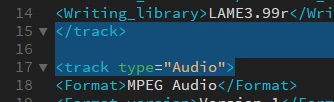
I need to replace </track> with </info>, but I need to NOT replace all of the </track> tags, just the one before type="Audio" and/or type="Video" when they exist.
I have tried the following, to no avail:
1. Javascript code with line breaks (\n or \r\n)
Tried multiple combinations of \n and \r\n but nothing would work.
dreamweaver.setUpFindReplace({
searchString: "</track>\r\n\r\n<track type=\"Audio\">",
replaceString: "</info>\r\n\r\n<track type=\"Audio\">",
searchWhat: "allOpenDocuments",
searchSource: true,
useRegularExpressions: true
});
dreamweaver.replaceAll();
2. DWR saved search query and dreamweaver.setUpComplexFindReplace()
I used the method described here: Adobe Dreamweaver CS5 & CS5.5 * dreamweaver.setUpComplexFindReplace()
I created a DWR like so:
<?xml version="1.0"?>
<dwquery>
<queryparams matchcase="false" ignorewhitespace="false" useregexp="false" wholeword="false" textonly="false" />
<find searchmode="allOpenDocuments">
<qtext qname="</track>
<track type="Audio">"Audio qconvertednls="true" qtagname="[any tag]"">" qraw="true" qtagname="[any tag]"></qtext>
</find>
<replace action="replaceText" param1="</info>
<track type="Audio">" param2=""/>
</dwquery>
Then I used the complex code in the javascript. Again, this did not work.
So far, the only way I've gotten this to work is to write the simple javascript find/replace code and make that into a command, then write the more complex search query and save it as a DWR, then run that on the files. Not the most elegant solution.
I'm wondering why the javascript can't recognize the blank line. Any guidance will be much appreciated. I know I am missing something relatively simple, but I am not familiar enough with javascript to figure it out. Thanks!
 AdChoices