Participant
March 12, 2018
Answered

Dreamweaver corrections not showing online

  • March 12, 2018
  • 2 replies
  • 490 views

I've been using Dreamweaver for years, and up until about a month ago had no trouble updating website pages I created offline, then using the PUT command to transfer them to the online website. Now, when I do that, everything seems fine at my end, but the changes do not show up online. I have refreshed the page view many times, I have tried two browsers, Safari and Foxfire, I have checked the server connection: it tests fine, and the PUT and GET commands seem to work, but nothing changes online. I had support at my website provider try it from their end, and they were able to make changes without a problem, and those showed up on my browsers, but the GET command did not bring those changed pages to my home computer. I was able to make changes using their Control Panel File Manager, but that's all code, and I don't know much code. Something is broken and I can't figure it out. Thanks for any advice.

    This topic has been closed for replies.
    Correct answer Nancy OShea

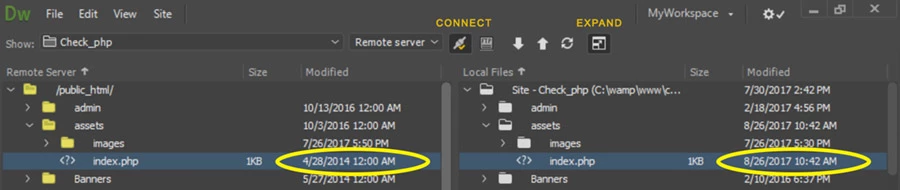
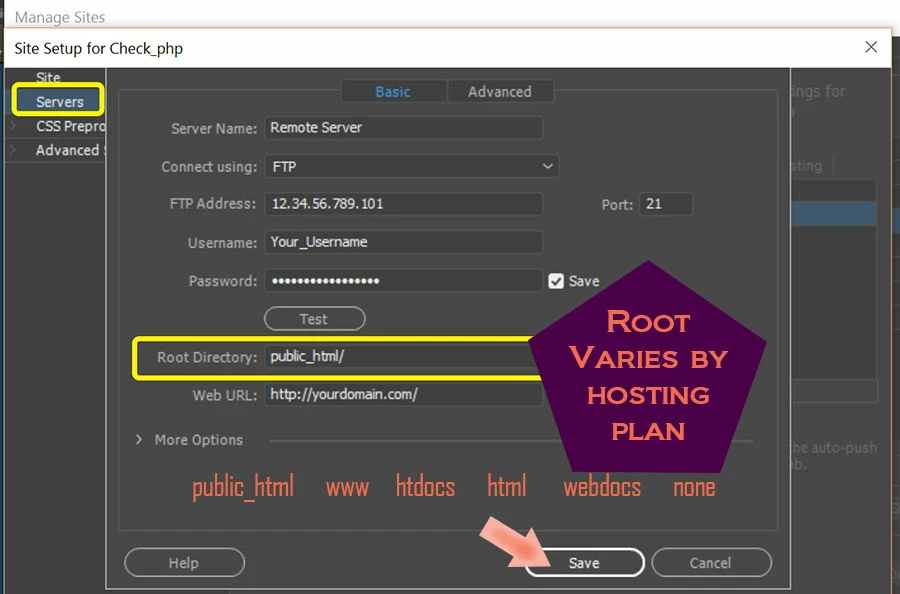
    Are you uploading files to your server's root directory?  This varies by hosting plan.  My root is public_html.  See screenshots.

    Assuming your site is properly defined, you can expand your Files Panel to show contents of remote server side-by side with your local site.  Compare the last modified time & date stamps to ensure everything is what it should be.

    2 replies

    Nancy OShea
    Community Expert
    Nancy OSheaCommunity ExpertCorrect answer
    Community Expert
    March 13, 2018

    Are you uploading files to your server's root directory?  This varies by hosting plan.  My root is public_html.  See screenshots.

    Assuming your site is properly defined, you can expand your Files Panel to show contents of remote server side-by side with your local site.  Compare the last modified time & date stamps to ensure everything is what it should be.

    Nancy O'Shea— Product User & Community Expert
    Participant
    March 12, 2018

    I should add that I'm using Dreamweaver 18, the latest version from CC, on the latest Mac operating system using a year-old iMac.

    BenPleysier
    Community Expert
    Community Expert
    March 13, 2018

    Adding to Nancy's reply, make sure that the left hand side shows the Remote and not the Testing server. I have a faint suspicion that you have been sending the files to the latter location.

    Wappler is the DMXzone-made Dreamweaver replacement and includes the best of their powerful extensions, as well as much more!
    Participant
    March 13, 2018

    Thanks, Nancy! Your answer solved my problem. I added "html_public/" in the root directory on the server info panel, and now changes are showing up correctly! Much appreciated.