Participant
Jan 2, 2020 6:12 PM UTC
Answered

Dreamweaver CS4 has no provision to create links in the properties inspector

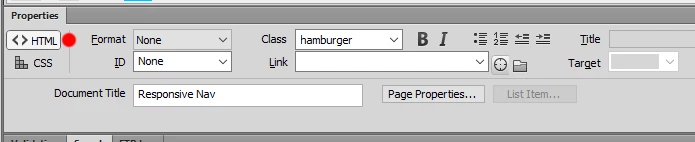
I have just purchased a second hand copy of Dreamweaver CS4. When I look at the properties inspector there is no provision to create a link. The box where the link is typed in is missing and worse than that, there is no "Point to file" icon so I can't drag a link either


I have been using CS3 portable where these items are visible

Can anyone please tell me how to overcome the problems please?

This topic is closed to new replies. Start a new post to keep the conversation going.
Jon Fritz
Jon FritzCorrect answer
Community Expert
Jan 2, 2020 6:42 PM UTC

Both should still be there. That particular functionality has been one of the few things that has remained unchanged over many versions of DW since CS3 and is still in the most recent version of CC.

My only guess would be that you may have the CSS option activated, rather than HTML (a pair of buttons that I think were available in CS4), on the left side of the Properties Window. 


4 replies

Nancy OShea
Community Expert
Community Expert
Jan 2, 2020 6:43 PM UTC

Which operating system?

Did you define a local site folder?


Translate
Nancy O'Shea— Product User & Community Expert
WhinoAuthor
Participant
Jan 3, 2020 11:15 AM UTC

Thanks Nancy for your help. Jon_Fritz solved it


I appreciate your reply

Regards

Tony

Translate
Jon Fritz
Community Expert
Jon FritzCommunity ExpertCorrect answer
Community Expert
Jan 2, 2020 6:42 PM UTC

Both should still be there. That particular functionality has been one of the few things that has remained unchanged over many versions of DW since CS3 and is still in the most recent version of CC.

My only guess would be that you may have the CSS option activated, rather than HTML (a pair of buttons that I think were available in CS4), on the left side of the Properties Window. 


Translate
WhinoAuthor
Participant
Jan 3, 2020 11:14 AM UTC

Thankk you so much Jon_Fritz. That must be the only item I didn't click. Problem solved straight away:-)


I'm very grateful for your help

Regards

Tony

Translate