Participating Frequently
December 5, 2017
Answered

Dreamweaver CS5.5 and responsive cloud interaction

  • December 5, 2017
  • 3 replies
  • 586 views

I am running win 10 and using DW CS5.5.  I need to convert my two sites to being responsive.  Will the DW cloud based responsive software input my DW CS5.5 and their templates?

This topic has been closed for replies.
Correct answer Nancy OShea

No.

If your current site isn't responsive yet, you'll need to rebuild it with a responsive layout.

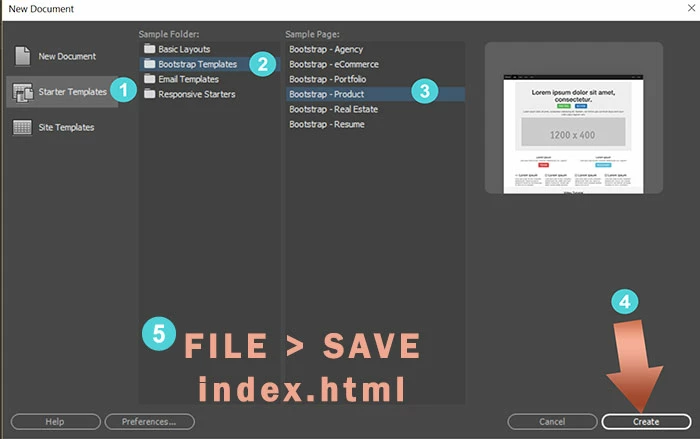
Go to File > New > Starter Templates.  Pick one and hit the Create button.

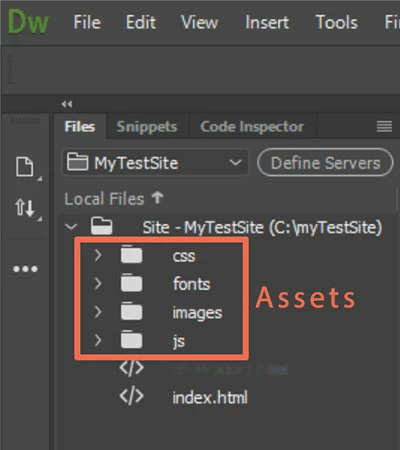
Once saved, DW creates Assets folders for you as seen in your Files Panel.

3 replies

Nancy OShea
Community Expert
Community Expert
December 5, 2017

Despite its name, Creative Cloud is not cloud-based software.  DW CC downloads and installs on your computer the same as Creative Suite products did.   The only difference is the payment and distribution model.  You do not need to be online 24/7 to use it. 

Nancy

Nancy O'Shea— Product User & Community Expert
pziecina
Legend
December 5, 2017

Dreamweaver is a code editor, and it is for the user to update their code in order to build a responsive site. No matter which version you use, you can create a responsive layout if you know what you are doing.

Later versions of Dw do include responsive starter layouts, and dw 2015 onwards uses the bootstrap framework to do this, but that is not the only method available to you. If you do not wish to use bootstrap, and would prefer to forgo the cost of a cc subscription, a cheaper alternative may be to use a project7 layout building extension, of which i would recommend the ones that uses flexbox for its layout system -

http://www.projectseven.com/products/tools/hmy/index.htm

also look at -

http://www.projectseven.com/products/templates/pagepacks/css-builder2/index.htm

Nancy OShea
Community Expert
Nancy OSheaCommunity ExpertCorrect answer
Community Expert
December 5, 2017

No.

If your current site isn't responsive yet, you'll need to rebuild it with a responsive layout.

Go to File > New > Starter Templates.  Pick one and hit the Create button.

Once saved, DW creates Assets folders for you as seen in your Files Panel.

Nancy O'Shea— Product User & Community Expert