Participant
September 11, 2017
Answered

Dreamweaver: Defalut Target_blank Hyperlinks

  • September 11, 2017
  • 4 replies
  • 5821 views

I copy text with hyperlinks to Dreamweaver. I need all hyperlinks with target _blank. How can I set target_blank to the default target in Dreamweaver. I use the newest version of Dreamweaver.

This topic has been closed for replies.
Correct answer Jon Fritz

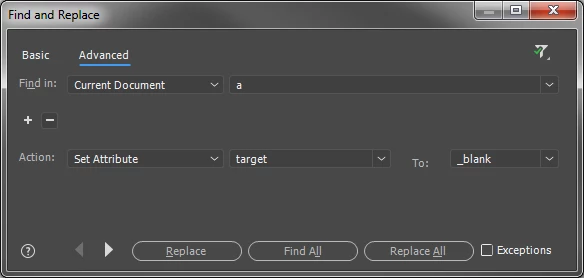
You can do this pretty easily using the Find & Replace tool...

1. Hit Ctrl + Shift + F to open the F&R window.
2. Click the "Advanced" tab

3. Under "Find In", change the dropdown menu to "Current Document"

4. Next to the "Find In" field, set the tag to "a"
5. Hit the - icon to get rid of any additional function
6. For "Action" choose "Set Attribute"
7. set the next box to "target"
8. For the "To:" box, choose "_blank"
9. Hit "Replace All" and target="_blank" will be added to all links on the page.
4 replies

Participant
January 15, 2020

It doesn't matter WHY she wants it. No one has answered the question. Can this be setup in DW, that when she creates a hyperlink, the DEFAULT is "_blank"? I need this also and the <base target... is not working within the LMS I use. If someone could actually answer the question, that would be great.

Nancy OShea
Community Expert
Community Expert
January 15, 2020

I'm afraid not.  The link target attribute in the HTML Properties Panel is empty by default. 

You need to populate the target field yourself.

  • Or use Find & Replace as described by Jon_Fritz_II in the Correct Answer above. 
  • Or create a custom code snippet.


Nancy O'Shea— Product User & Community Expert
Participant
March 2, 2021

Thanks You

Colin Holgate
Inspiring
September 12, 2017

alexanderh23349409

I think  https://forums.adobe.com/people/Jon%20Fritz%20II answered your exact question. You can mark his reply as Correct, if you agree.

If I read it correct, Alex is the only user of the page, so the question of whether target _blank everywhere is  a good idea shouldn't apply to his case.

Nancy OShea
Community Expert
Community Expert
September 11, 2017

If all your links go to target_blank, it won't be long before your users will have a lot of opened windows or tabs in their browsers.   See screenshot. 

Is that something you really want to inflict on people?

I think target_blank should be used rarely if at all and only on  outbound links that take people to another website.

Nancy O'Shea— Product User & Community Expert
Participant
September 11, 2017

I don't use Dreamweaver to develop a webpage. I use it as a html editor to create news.

Nancy OShea
Community Expert
Community Expert
September 11, 2017

It's irrelevant what you use DW for.  All I'm saying is sticking target_blank on ALL links is not a nice thing to do to people. 


Nancy O'Shea— Product User & Community Expert
Jon Fritz
Community Expert
Jon FritzCommunity ExpertCorrect answer
Community Expert
September 11, 2017

You can do this pretty easily using the Find & Replace tool...

1. Hit Ctrl + Shift + F to open the F&R window.
2. Click the "Advanced" tab

3. Under "Find In", change the dropdown menu to "Current Document"

4. Next to the "Find In" field, set the tag to "a"
5. Hit the - icon to get rid of any additional function
6. For "Action" choose "Set Attribute"
7. set the next box to "target"
8. For the "To:" box, choose "_blank"
9. Hit "Replace All" and target="_blank" will be added to all links on the page.