Nesoor
Participant
May 2, 2017
Answered

Dreamweaver doesn't find automatically ids and classes ?

  • May 2, 2017
  • 1 reply
  • 2255 views

Hello Dreamweaver members !

I am trying Dreamweaver for a few days now but I have some issues.

When I am editing my css file Dreamweaver isn't finding the ids and classes that I have in my html/php files.

In other IDE I type a # or a . and than its showing me which ids and classes I used.

Does Dreamweaver has this option too ?

Also when I export my remote sites on the PC and import them on the laptop each site is asking me for a local folder.

I have over 60 sites so do I really have to create for each site a local folder or is there an option that Dreamweaver creates this automatically ?

This topic has been closed for replies.
Correct answer Nancy OShea

You gave up way too early.

If your site is defined, a critical 1st step for working with DW, it will keep track of & manage assets for you.

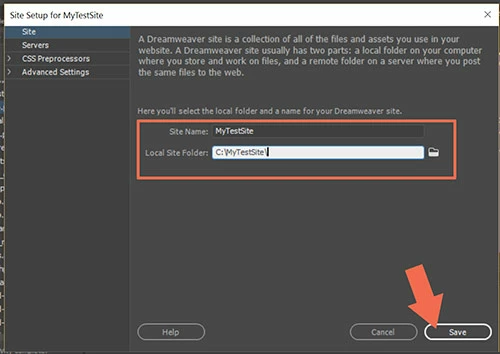
Go to Site > New Site.  See screenshots.

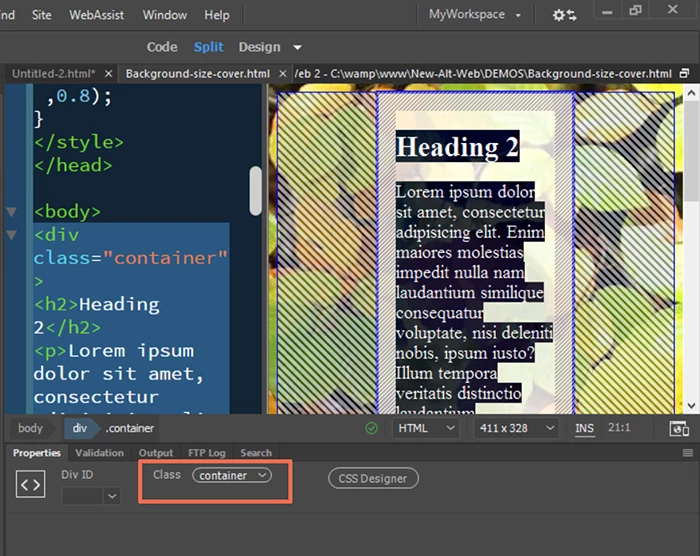
IDs & Classes are in your Properties Panel (Window > Properties or Ctrl+F3),

1 reply

pziecina
Legend
May 2, 2017

Dreamweaver relies a lot on users working in a defined site for its functionality to work, so it will be necessary to define all your sites. I know it does not help now, but with the next version of Dw it will be possible to use git to push files to the remote on one computer, and then pull files to another. Though i have not checked if that functionality is part of the incorporation of git.

As for the id and class problem, this may be because the files are not in a defined site, but it should work for html files. I do remember reading that php files did have a problem doing this, but i thought it had been fixed. Can you check that you are using the latest version 2017.1, (that is .1 not the prior version which was .0.1).

Nesoor
NesoorAuthor
Participant
May 10, 2017

Hey Pziecina,

Thanks for your reply.

I have decided to use a different editor because Dreamweaver does not fits my needs due to lack of features and bugs.

I appreciated that you tried to help !

Nancy OShea
Community Expert
Nancy OSheaCommunity ExpertCorrect answer
Community Expert
May 10, 2017

You gave up way too early.

If your site is defined, a critical 1st step for working with DW, it will keep track of & manage assets for you.

Go to Site > New Site.  See screenshots.

IDs & Classes are in your Properties Panel (Window > Properties or Ctrl+F3),

Nancy O'Shea— Product User & Community Expert