
whcressall
Known Participant
October 16, 2019
Answered

Dreamweaver doesn't update when code changed

  • October 16, 2019
  • 1 reply
  • 572 views

Ver 19.2.1 does not update the preview pane even though code was directly edited. I'm not talking about images or script...I'm talking about text. 19.2.1 is a pig in terms of performance. Premiere, After Effects, Audition still rocket fast. Dreamweaver is after this update slow and unresponsive.


Not going to uninstall reinstall. I have work to do.


Windows 10 Pro 64 1903 i7-4790K 4Ghz 16GB ram

[Moderator Note: Branched out of the Welcome thread]
    This topic has been closed for replies.
    Correct answer Nancy OShea

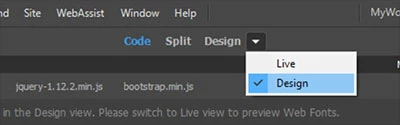
    In Live View, save work often with Ctrl+S and refresh with F5.  Or switch to Design which is faster for editing.  See screenshot.


    1 reply

    Nancy OShea
    Community Expert
    Nancy OSheaCommunity ExpertCorrect answer
    Community Expert
    October 16, 2019

    In Live View, save work often with Ctrl+S and refresh with F5.  Or switch to Design which is faster for editing.  See screenshot.


    Nancy O'Shea— Product User & Community Expert
    whcressall
    Known Participant
    October 25, 2019

    Thanks for getting back to me so quickly. That may well be the issue. But I'm on a deadline so I simply went back to DW CS6 which works. I may come back to DW CC 2019 - I may not. DO us a favor and get off this fast update track. It's useless and disruptive. If I wanted to use a bunch of Beta software I'd get a job at Adobe. I'm working, I need stability and predictability. Adobe provides neither.

    Nancy OShea
    Community Expert
    Community Expert
    October 25, 2019

    I don't work for Adobe.  I'm a volunteer forum participant and fellow product user like you.  If you have complaints, I suggest you submit them where they will be seen by the concerned product team.  


    Nancy O'Shea— Product User & Community Expert