Participant
December 17, 2016
Answered

Dreamweaver - ID entered in Element Display does not appear in Selectors

What can I do please?

    This topic is closed to new replies. Start a new post to keep the conversation going.
    Nancy OShea
    Nancy OSheaCorrect answer
    Community Expert
    December 17, 2016

    OK.

    Answers to layout questions are in your code.  A link to your problem page is the quickest way to get help here.

    An un-closed HTML tag can often cause alignment issues.

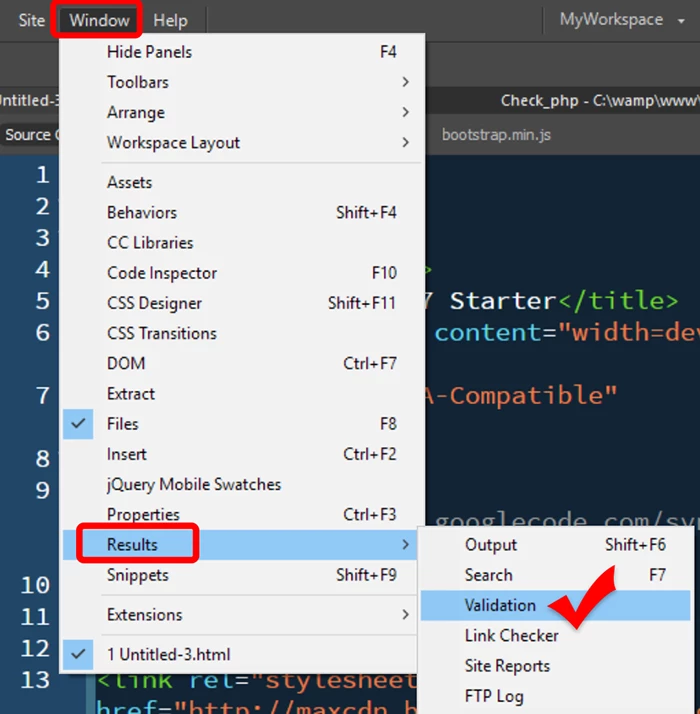
    You might want to check your code for errors.  See screenshots.

    Click the large triangle to check current document.  A green check mark in a circle denotes your HTML code is good.   A red X in a circle means  you have code errors.

    Nancy

    Nancy O'Shea— Product User & Community Expert

    4 replies

    burakcAuthor
    Participant
    December 17, 2016

    Hi,

    Thank you vm for replying Nancy

    I'm in 2017.

    I was trying to make a #menulink ID to be able to ultimately make my nav links more easy to use in a mobile device. I finally was able to create it but with another name #menulink2. The problem was that when I chose #menulink the first time I did not link it to my CSS and so the next time I would put #menulink in the field the pop-up to assign it to the CSS as source would not appear. It would appear when I would enter anything else into the field than #menulink as such.

    I am in Live mode.

    I have the Selectors panel visible when I would do this and the selector #menulink2 would appear after assigning to CSS as desired.

    I am a novice but it seems to have worked.

    I do have another issue now and that is that all the different levels of text on my page are centred, but the nav items are just off center. The blue border when selecting it does not extend all the way to the left side as all the other elements do. I have display: block selected and have width: 100% and text: center. I would like to know why wouldn't the blue border extend all the way to the boundary in Live view since 100% is selected for width.

    Translate
    Nancy OShea
    Community Expert
    Nancy OSheaCommunity ExpertCorrect answer
    Community Expert
    December 17, 2016

    OK.

    Answers to layout questions are in your code.  A link to your problem page is the quickest way to get help here.

    An un-closed HTML tag can often cause alignment issues.

    You might want to check your code for errors.  See screenshots.

    Click the large triangle to check current document.  A green check mark in a circle denotes your HTML code is good.   A red X in a circle means  you have code errors.

    Nancy

    Translate
    Nancy O'Shea— Product User & Community Expert
    burakcAuthor
    Participant
    December 17, 2016

    Thanks Nancy

    Translate
    Nancy OShea
    Community Expert
    Community Expert
    December 17, 2016

    I'm sorry.  I don't understand the question.  Can you elaborate?

    • Which version of DW?
    • What are you trying to do that you can't?
    • Are you in Code, Design or Live mode?
    • Which Panels are you using?

    Nancy

    Translate
    Nancy O'Shea— Product User & Community Expert