reiver11
Participant
April 10, 2019
Answered

Dreamweaver keep "snapping" to the top of the page.

  • April 10, 2019
  • 1 reply
  • 1315 views

I'm running DW 18.2 and my site's main page is pretty long with a lot of images. For some time now...if I'm anywhere within the page and I insert an image, break,  or table it 'jumps' back to the top of the page...rather than staying in place. This gets very annoying as I have to scroll back down the page with every insert I make.

Any idea if this is correctable through a setting?

This topic has been closed for replies.
Correct answer Nancy OShea

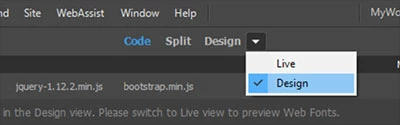
Switch the document toolbar from Live to Design view as shown in this screenshot.

1 reply

Nancy OShea
Community Expert
Nancy OSheaCommunity ExpertCorrect answer
Community Expert
April 10, 2019

Switch the document toolbar from Live to Design view as shown in this screenshot.

Nancy O'Shea— Product User & Community Expert
reiver11
reiver11Author
Participant
April 10, 2019

It was already in Design view. But switching to Live and back to Design fixed it. Thanks !