carolg28179787
Participant
February 11, 2018
Answered

Dreamweaver library not working with MailChimp

  • February 11, 2018
  • 1 reply
  • 955 views

I used one of MailChimp's embedded forms to include in a Dreamweaver website I'm building. The form works great -- sends the email to MailChimp list. It even displays the success message below the form after the user clicks the submit button.

The problem is that I turned the code into a library component in Dreamweaver. Now, when you fill out the form, the user is directed to a mailchimp page that lists the success or failure.

I don't want the user directed to a mailchimp page -- I like the first scenario where the success is inline with the form.

Has anyone experienced problems with making a MailChimp form a library item? Why would making it a library item change the behavior?

This topic has been closed for replies.
Correct answer anissa_thompson

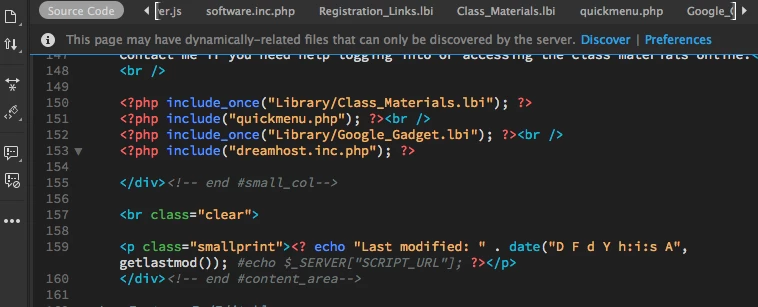
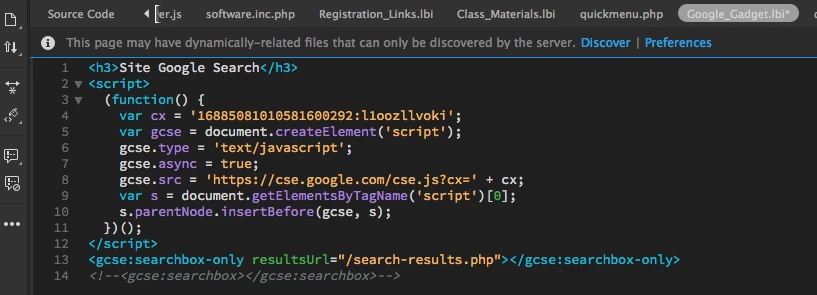
Actually, you can use scripts inside of Library Items if the entire script is referenced inside the .lbi file and doesn't need to call to the <head> of the page for reference; I have a few on several websites (for example, added Google search boxes or AddThis content sharing buttons):

I definitely agree with Nancy OShea about using Server Side Includes wherever possible; in fact, you can even "mix-and-match" if you have existing .lbi files that you don't feel like renaming/relocating, but that have code you still want to use:

SSIs don't care what the file extension is, so long as it can read the contents of the file; in this way, you're also not limited to Dreamweaver's Library restrictions about what can and can't be included in the .lbi in order for its content to be recognized and rendered.

1 reply

Nancy OShea
Community Expert
Community Expert
February 11, 2018

I don't like the proprietary Library items in DW for a lot of reasons.  Library Items cannot contain scripts and can only be used inside the <body> tag of your document.   For me, that's a huge limitation.

If you want greater efficiency without the limitations imposed by Library Items, look at using Server-Side Includes.  They work on the server and are ideal for sitewide elements like headers, menus, footers and forms. 

Alt-Web Design & Publishing: Server-Side Includes with PHP

Nancy

Nancy O'Shea— Product User & Community Expert
anissa_thompson
Community Expert
anissa_thompsonCommunity ExpertCorrect answer
Community Expert
February 12, 2018

Actually, you can use scripts inside of Library Items if the entire script is referenced inside the .lbi file and doesn't need to call to the <head> of the page for reference; I have a few on several websites (for example, added Google search boxes or AddThis content sharing buttons):

I definitely agree with Nancy OShea about using Server Side Includes wherever possible; in fact, you can even "mix-and-match" if you have existing .lbi files that you don't feel like renaming/relocating, but that have code you still want to use:

SSIs don't care what the file extension is, so long as it can read the contents of the file; in this way, you're also not limited to Dreamweaver's Library restrictions about what can and can't be included in the .lbi in order for its content to be recognized and rendered.

Hope this helps! Make sure to press "✔ Correct Answer" on this post if this answers your question. Happy Creating!Anissa • @anissat