


Known Participant
March 20, 2017
Question

Dreamweaver Newbie: Help With Text...

  • March 20, 2017
  • 1 reply
  • 773 views

I’m trying to figure out my way around Dreamweaver and I have some issues I can’t quote figure out, primarily related to modifying text.
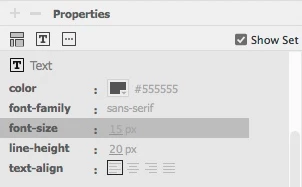
On the right of side of Dreamweaver there is a “Properties” panel that appears to allow me to adjust things like font color, size, family, alignment, etc.  But the options are greyed out and I can’t figure out how to make them active.  If I have a section of text that I want to change, I highlight the text (ensuring the orange box is active so I can actually modify the text, but the different parameters remain greyed out.  If I go in and change the actual code (text-align for example), the selected parameter in the “properties” sidebar will then change but I still can’t edit the text by clicking on the item I want to change.

How do I make that active?

I also read that I can change the text for the entire page by going to file-> page properties and modifying the Appearance (CSS) section.  However when I make changes there nothing changes.  How do I make those take effect?

The document I’m editing is one of the built in email templates (Email Responsive) to give you an idea of what I'm working with.

Any help is appreciated.  I'm using Dreamweaver 2017.0.1 on Mac.

Thanks!

This topic has been closed for replies.

1 reply

Nancy OShea
Community Expert
Community Expert
March 21, 2017

Do you know how to work with CSS stylesheets yet?  That's required knowledge to use DW.  Ideally, you want to create a global CSS file for your entire web site to which all your HTML documents are linked.  1 CSS file makes your work easier and more consistent.

Related links & tutorials:

See CSS How to

CSS Fonts

Nancy

Nancy O'Shea— Product User & Community Expert
Known Participant
March 21, 2017

Not really, I'm just figuring this out as I go...

As I said, I'm using the built in templates that came with Dreamweaver when you create a new document.

Also, these are for email messages so I'm not sure if that's different than when working on a website since I'm assuming it all has to be in the code that goes into the email.

I guess I'm confused why those toolbar items are greyed out... I'm used to working in Photoshop or other apps where if you have something highlighted, then the tool that adjusts that thing isn't greyed out.

Thanks!

BenPleysier
Community Expert
Community Expert
March 21, 2017

Have a look at the Beginner section of Dreamweaver tutorials | Learn how to use Dreamweaver CC and work your way through the videos.

Having said that, you need a working knowledge of HTML and CSS if you are serious in building a website. See HTML Tutorial and CSS Tutorial

Wappler is the DMXzone-made Dreamweaver replacement and includes the best of their powerful extensions, as well as much more!