Participant
July 24, 2018
Answered

Dreamweaver not opening the current htm file...

  • July 24, 2018
  • 2 replies
  • 424 views

I just noticed that Dreamweaver may not be opening the current file from our website.

I needed to update a WWE card and double clicked the file in my list of files on the server.

My local file opened and not the more recent file on the server.  I tried several things short of copying the file from the server to local in Win-Explorer.

I finally had to delete my local file, and then when I "check In" the file, the current ver loaded.

This will be a big pain if I cannot trust Dreamweaver to pull the current version on our website.

My local htm file was a month earlier than what my assistant posted.  I would have lost his changes had I not discovered this issue.

He said he had noticed this issue too.  He thought he resolved it by right-clicking the file and using Get.

That did not work for me.  Am I going to have to compare file dates from now on?

Thanks.  (subscription ver.)

    This topic has been closed for replies.
    Correct answer Nancy OShea

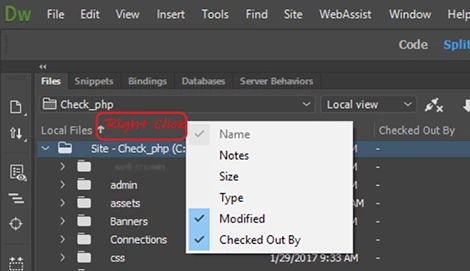
    Right click near the top of your Files Panel (see screenshots).

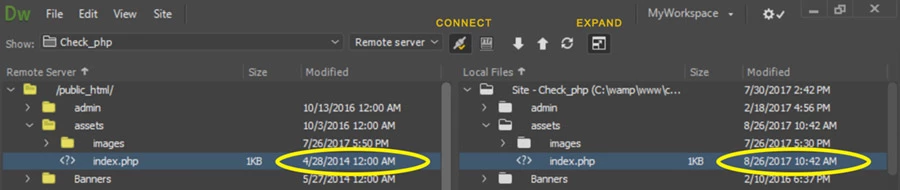
    Expand your files panel and compare the last modified time and date stamps.   In a collaborative environment, all members should use correct check-in/check-out procedures.   If the file is not checked-in by the last  person who used it,  you should not be able to get it.

    2 replies

    Nancy OShea
    Community Expert
    Nancy OSheaCommunity ExpertCorrect answer
    Community Expert
    July 24, 2018

    Right click near the top of your Files Panel (see screenshots).

    Expand your files panel and compare the last modified time and date stamps.   In a collaborative environment, all members should use correct check-in/check-out procedures.   If the file is not checked-in by the last  person who used it,  you should not be able to get it.

    Nancy O'Shea— Product User & Community Expert
    FlugelmanAuthor
    Participant
    July 26, 2018

    Thanks for the expanding Modified and Checked Out By.   We always check in and out. I never really use the Get.   This was just an attempt to get around an issue.  Either the program was not updating properly or I was in a folder structure that looked exactly like the one I was updating.  I would like to think it was my problem and not Dreamweaver.  I can fix my problems.  Thanks for your help/suggestions.  I will continue and be vigil.

    B i r n o u
    Legend
    July 24, 2018

    check in / check out and put / get are not at all the same meanings or the same purposes

    the first pair is used during collaborative work (and is defined in the site preferences) and thus avoids overwriting the versions updated in the meantime by one of the collaborators present in this 'work loop'... therefore it is always necessary to make sure before working on a file locally to vacuum the remote version by doing a check in. if one of the collaborators is working on this file ( and therefore to carry out a check in itself) it will then not be possible to work on this file...

    if the check in goes well, and remains possible, then, once the modifications carried out it will be necessary to think of making a check out in order to release the rights of actions on this file and to make it available for the other collaborators.

    the second possibility, results in simple retrieval and placement of files between the local site and the remote site... without checking primacy or anteriority... it is necessary for that to have recourse to synchronizations between local and remote... but attention, if we work with several collaborators on the same site then nothing indicates to us that one of our collaborators is working on a given file on its own site locally... so it often happen that one overwrite works of others....