Inspiring
June 11, 2021
Answered

Dreamweaver not recognizing PHP code
  • June 11, 2021
  • 1 reply
  • 3350 views


    This topic has been closed for replies.
    Correct answer Dlewis1212
    quote

    I'm pretty sure older versions of Dreamweaver prefer include/require written with bracket...

    ===========

    That may be true but I no longer use CS6 and I don't think the OP is either.  The screenshot at the top looks like a recent version of DW CC.


    Not meaning to be pedantic but on this side of the pond we differentiate between:

    • parentheses ( ) -- sometimes called curved brackets in UK,
    • brackets [ ] -- or straight brackets,
    • and curly brackets { }. 

    As most coders know, they are not interchangeable. 


    Thank you all for your assistance!  I went ahead and reached out to a PHP expert and they were able to help me get this resolved.  Turns out something was going on with my configurations in XAMPP.  So for anyone who finds this post in the future and is having the same issues, check your PHP local drive configurations as well!

    1 reply

    Inspiring
    June 11, 2021

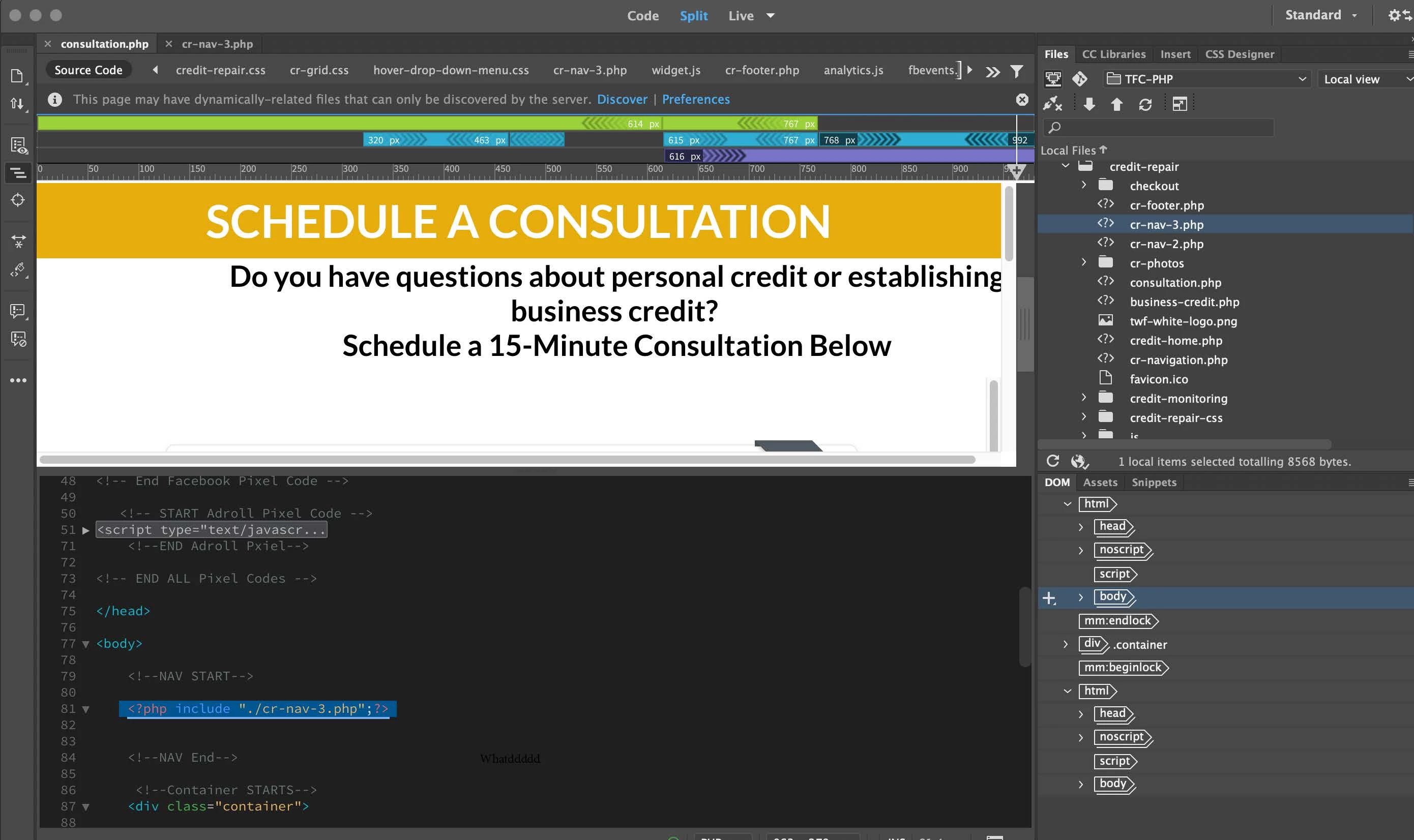
    I am not sure why Adobe only posted the picture, but here is the explanation I wrote out to go with the picture.  My apologies for the confusing:
    Hello,

    I used a PHP shortcode -  <?php include "./cr-nav-3.php";?>  - for every page of my site that I wanted the menu displayed on.  However, now Dreamweaver is no longer recognizing my PHP tags for my menu. 


    When I upload the files to my server, everything renders fine.  However, in Dreamweaver, my menu does not display.  My CSS styles come from my menu as well so the layout looks funky.


    I retyped the shortcode and my menus came up and I thought everything was resolved.  But as soon as I closed DW down and re-opened, the styles were gone.  Now when I retype/re-insert the PHP code, nothing happens.  Everything has worked up until about a couple of months ago when I noticed this.


    I read that PHP shortcodes have to be "enabled".  I am still very much a PHP novice, only knowing enough to do what I need to be done.  So I don't even know where to look to "enable" these tags if that is the issue.


    Thank you!


    Nancy OShea
    Community Expert
    Community Expert
    June 11, 2021

    Which local testing server do you have?


    Is it running and is it defined in DW?


    Does your local site folder reside inside the local testing server's default web directory (see screenshots)?


    Nancy O'Shea— Product User & Community Expert
    Inspiring
    June 11, 2021

    Hi Nancy,

    My styles are on an external sheet in my navigation menu.  Since I am linking the same menu to several pages (via PHP), the external sheet on my Navigation page affects whatever page I place the PHP shortcode on.
