
emmag56408455
Participant
June 29, 2018
Answered

Dreamweaver on new PC - can't put files

  • June 29, 2018
  • 4 replies
  • 648 views

I've just had Dreamweaver installed on a new PC, and although I can see the files for my two websites, they won't "put".  The sites don't appear in Manage Sites - do I need to get them in here first? Total Dreamweaver novice - please help!!!

    This topic has been closed for replies.
    Correct answer Nancy OShea

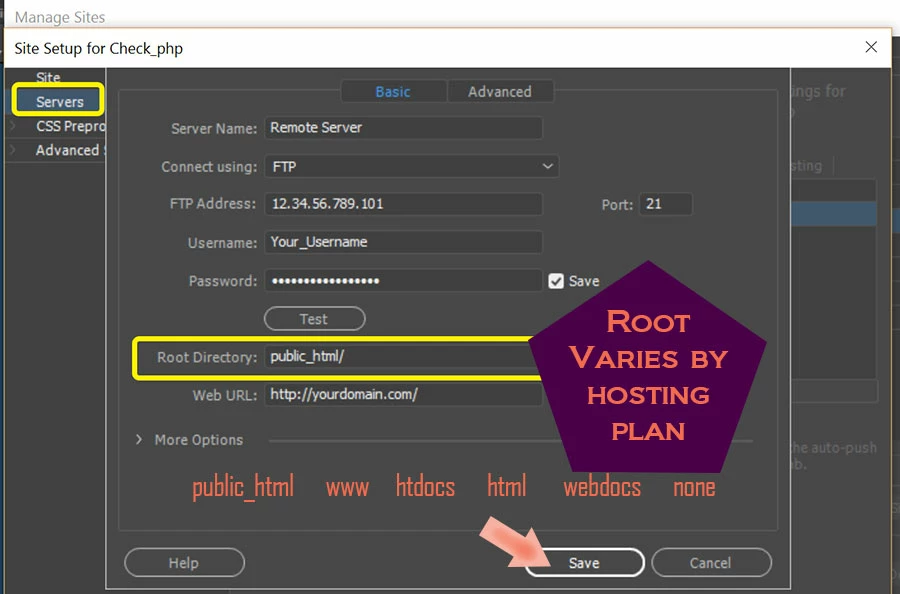
    If you don't have access to the old computer, you could create a new site definition & enter your server's FTP log-in credentials.  Site > New Site..,  Server's tab.

    4 replies

    emmag56408455
    Participant
    July 2, 2018

    Thanks for the replies.  No I don't have access to the old PC, so will Nancy's suggestion solve the problem of not having the settings?? I'm accessing the files through a shared folder. Thanks again.

    Nancy OShea
    Community Expert
    Community Expert
    July 2, 2018

    If you don't have your log-in details stored somewhere, contact your hoasting provider to get them.

    Nancy O'Shea— Product User & Community Expert
    Nancy OShea
    Community Expert
    Nancy OSheaCommunity ExpertCorrect answer
    Community Expert
    June 29, 2018

    If you don't have access to the old computer, you could create a new site definition & enter your server's FTP log-in credentials.  Site > New Site..,  Server's tab.

    Nancy O'Shea— Product User & Community Expert
    Community Manager
    June 29, 2018

    Hi,

    Thanks for reporting.

    Please read below link for export and import of sites in DW

    How to import and export Dreamweaver site settings

    Thanks

    Jon Fritz
    Community Expert
    Community Expert
    June 29, 2018

    It sounds like you copied over the individual site files, but left the settings behind.

    You will need to export your site definitions (basically your site settings) from the old machine to the new, it's pretty simple...

    1. On the old machine, open DW and go to Site > Manage Sites
    2. Click the site you want and choose Export. That will create a .ste file of the site settings (no actual site files come with it)

    3. Copy that .ste to the new machine

    4. From the new machine's DW, choose Site > Manage Sites > Import to bring in the .ste