.Buko.
Known Participant
November 21, 2017
Answered

Dreamweaver opening full screen after 2018

  • November 21, 2017
  • 2 replies
  • 1394 views

Dreamweaver opening full screen after 2018 upgrade. This is annoying.

2017 opened the last size used. Why does Adobe do this to us? this happened in 2015 but they fixed it.

Now its broken again.

Am I missing something?

I'm on a Mac running El Capitan

    This topic has been closed for replies.
    Correct answer Nancy OShea

    My operating system remembers my Workspace settings when I close the application and reopen it. 

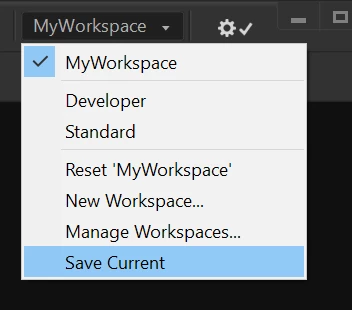
    Try resetting your Workspace or create a new one. 


    Adjust Workspace as desired. Go to Workspace and select Save Current. 

    Close DW.


    If your computer doesn't remember your settings, there may be a permissions problem at the OS level.

    https://macpaw.com/how-to/repair-disk-permissions


    2 replies

    Known Participant
    March 24, 2022

    Yes, I would love to know how to stop it opening full size. It used to remember the last used size for the page but now it just maximizes the page to the full extent and on a mac this annoying as it crunches against the bar along the bottom, making it hard to edit the text at the bottom, 

    Nancy OShea
    Community Expert
    Nancy OSheaCommunity ExpertCorrect answer
    Community Expert
    March 24, 2022

    My operating system remembers my Workspace settings when I close the application and reopen it. 

    Try resetting your Workspace or create a new one. 


    Adjust Workspace as desired. Go to Workspace and select Save Current. 

    Close DW.


    If your computer doesn't remember your settings, there may be a permissions problem at the OS level.

    https://macpaw.com/how-to/repair-disk-permissions


    Nancy O'Shea— Product User & Community Expert
    Known Participant
    March 24, 2022

    thank you. Solved !! Saving current workspace and I now get the documents open at the size I want which is not crunched against the bottom of the screen

    Community Manager
    November 21, 2017

    Hi Buko,

    We regret the inconvenience you are facing with DW. We tried at our end but couldn't recreate the issue.

    • Could you share a gif/video of the issue happening?
    • Also is it happening every time for you?
    • Could you try restoring preferences

    Unusual behavior in Dreamweaver? Try restoring preferences.

    Thanks,

    Lalita

    .Buko.
    .Buko.Author
    Known Participant
    November 21, 2017

    Yes it happens every time. I'll try reseting prefs but since this is only the second time I've used DW 2018 2 twice and it does not hold over my DW 2017 prefs another annoyance, I'm not sure how deleting will help as they haven been used enough to be corrupted.

    I do not use the application frame, as I'm on a Mac, I prefer my windows loose and free of the application. Its when I open a new file It takes up the full screen. DW 2017 remembered the last open window size.

    Community Manager
    November 23, 2017

    Thanks Buko for update but we couldn't recreate this locally. Checked on Mac 10.11.6 and Mac 10.12

    We don't see any other user reporting same and that's why we felt that it might be related to preferences.

    Could you share a video of the problem if you see it consistently?