
daveg36843733
Participant
January 18, 2018
Answered

Dreamweaver update 2018 Code Coloring.. Themes gone?

  • January 18, 2018
  • 3 replies
  • 836 views

     HELP! I have used a dark them in Dreamweaver for a few years now and after doing an update this morning the code back ground is white and it hurts my eyes. I noticed there is no option to have a dark theme any more. Is there anyway to go back to what i had before without changing them one by one?

Thanks
    This topic has been closed for replies.
    Correct answer Jon Fritz

    What version are you using?

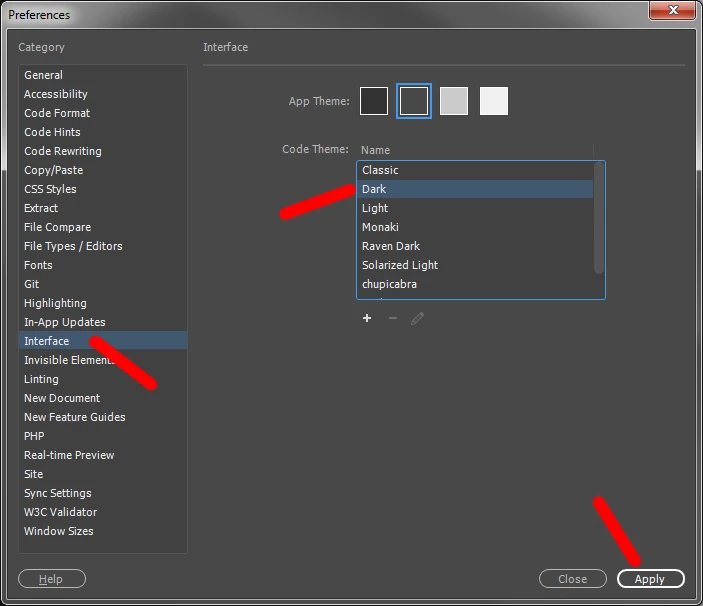
    The Dark theme should be available under Edit > Preferences > Interface in anything after CC 2015.

    It's not controlled in the 4 swatch colors across the top, you would need to choose and Apply the Theme...

    3 replies

    Participating Frequently
    June 28, 2020

    Hi All,


    We have started working on “Code Color Customization” improvements by adding support for customization of generic and language specific colors.


    We have further stabilized the code coloring feature in our latest Prerelease build 15333.

    
You can refer to below thread for more details on code coloring customization improvements.
https://forums.adobeprerelease.com/dwalpha/discussion/467/dreamweaver-build-15333-is-now-available#l...


    Please join Dreamweaver beta program from below link and try out the feature.

    https://www.adobeprerelease.com/beta/9EB451B5-D2E8-46E5-AFA2-78C85442FFA2/participate/CD0C95AA-6274-...


    Please go ahead and try out the build and let inflow your thoughts/suggestions. Looking forward to your valuable feedback.


    Thanks

    
Dreamweaver Team

    Nancy OShea
    Community Expert
    Community Expert
    January 18, 2018

    Did you sync your settings to the Cloud before you upgraded?  See Preferences screenshot for Importing Sync Settings from the cloud.

    Nancy O'Shea— Product User & Community Expert
    Jon Fritz
    Community Expert
    Jon FritzCommunity ExpertCorrect answer
    Community Expert
    January 18, 2018

    What version are you using?

    The Dark theme should be available under Edit > Preferences > Interface in anything after CC 2015.

    It's not controlled in the 4 swatch colors across the top, you would need to choose and Apply the Theme...