FunkDrSpot420
Participating Frequently
August 16, 2017
Answered

Dreamweaver - Videos play in preview, not when published

  • August 16, 2017
  • 1 reply
  • 601 views

OK, I've seen various answers to this problem but none of them have worked for me.  When I add videos to a website they work fine in the preview.  Then when I upload it, none of the videos work.  The url is www.roberttaylorfamily.com/limited.html.  Please let me know what's wrong. When I open in another window, I get a 404 error however I don't know why the links would be broken since I used the media/html video command.  Let me know.  Thanks

Robert

    This topic has been closed for replies.
    Correct answer Nancy OShea

    Yes


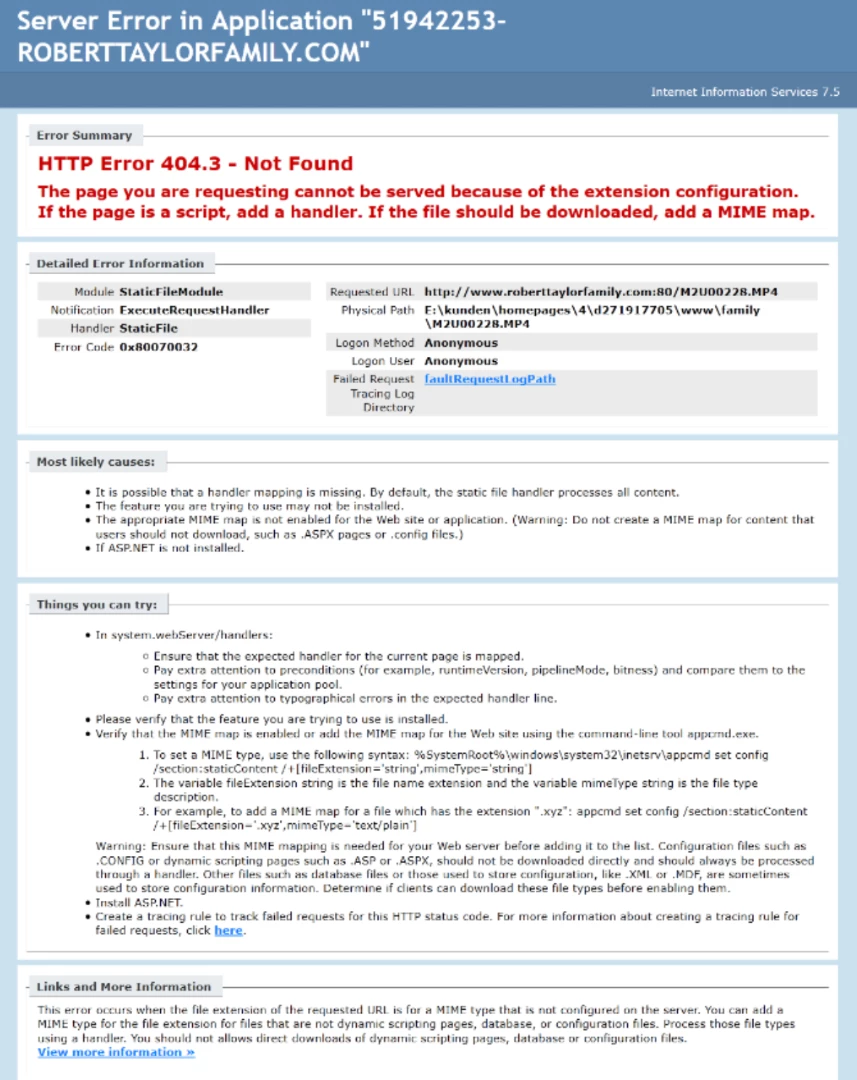
    When I go directly to this URL : www.roberttaylorfamily.com/M2U00228.mp4

    This is what I see.   This says the MIME type is not mapped.  Looks like you're on Windows hosting.  Contact your hosting provider to help you.

    1 reply

    BenPleysier
    Community Expert
    Community Expert
    August 16, 2017

    This is what I get

    HTTP Error 404.0 - Not Found

    The resource you are looking for has been removed, had its name changed, or is temporarily unavailable.

    The most common reason is that the files have not been uploaded to the correct location. Check the files on the server, e.g. the 'extras' link points to E:\kunden\homepages\4\d271917705\www\family\hats.html , meaning that hats.html should be located in in the 'family subdirectory under the 'www' root directory.

    Wappler is the DMXzone-made Dreamweaver replacement and includes the best of their powerful extensions, as well as much more!
    FunkDrSpot420
    Participating Frequently
    August 16, 2017

    Thanks for your reply Ben.  I didn't think that extra links would determine whether or a not a video played.  However, I took your advice and just deleted the links entirely.  The videos still do not play.  Also, I took Nancy O'Shea's template from another discussion and made it my index page (www.roberttaylorfamily.com) and I still do not have video.  Any other reasons for this?

    Nancy OShea
    Community Expert
    Community Expert
    August 16, 2017

    It's the same problem with that URL.  Your video is not on the server.

    Incidentally, you don't need other fallback files anymore.  MP4 is supported by all browsers and mobile devices.

    Missing Video File:

    <source src="M2U00228.mp4" type='video/mp4' />

    The link to video is relative to the page.   In this case, you must upload video to your server's root folder.

    Nancy

    Nancy O'Shea— Product User & Community Expert