


loviec27919221
Participant
October 3, 2017
Answered

Drop Down Menu & Hyperlinks stopped working in Chrome

  • October 3, 2017
  • 2 replies
  • 2475 views

I created a website with Dreamweaver and it worked well for a while. Then after Google Chrome updates, the drop down menu (navbar) and hyperlinks stopped working on both Tablet PC & Android. My website is www.africantrailblazers.com. It still works on Microsoft Edge 38.14393.1066.0 (Tablet PC) and Puffin (Android). Is there a fix? Thanks!

This topic has been closed for replies.
Correct answer Nancy OShea

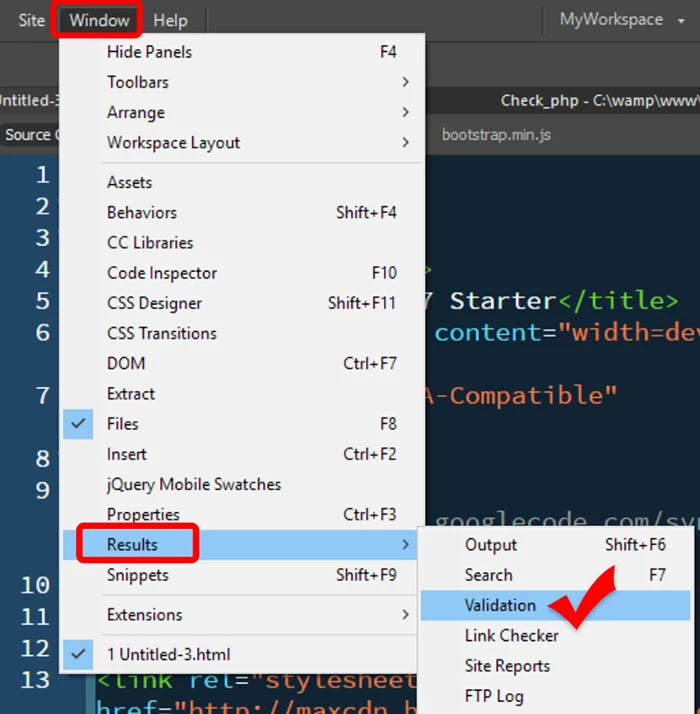
Each new update brings the browsers closer to modern standards.  Critical code errors that might have been tolerated in the past won't be in the future.  Always check your code & fix reported errors.  

Nancy

2 replies

Nancy OShea
Community Expert
Nancy OSheaCommunity ExpertCorrect answer
Community Expert
October 3, 2017

Each new update brings the browsers closer to modern standards.  Critical code errors that might have been tolerated in the past won't be in the future.  Always check your code & fix reported errors.  

Nancy

Nancy O'Shea— Product User & Community Expert
loviec27919221
Participant
October 27, 2017

Dear Ben & Nancy,

Thank you so much for your help. Now I know to clean up my act! It'll be a long process since I'm not a web programmer / designer, just a self-taught Dreamweaver user. However, I sent the problem everywhere and the guys at Chromium told me to update the smoothscroll.js file and sent me to github: 

https://github.com/flesler/jquery.localScroll/issues/38.

I did as instructed and it now works fine. I still have no idea why, but I thought I’d drop by to let you guys know, and considering that you guys are the experts, maybe you can figure it out based on what the Chromium guys said and help someone else with the same problem: https://bugs.chromium.org/p/chromium/issues/detail?id=771054

I also wanted to drop by to say THANKS, because people like you try to make the world a better place, and a little more hopeful for people like me – we sure could use a whole lot more like you guys!

Community Expert
October 3, 2017

I was able to re-produce 1 of the 2 errors you were experiencing.  The menu was working for me in the latest version of chrome, so I am able to click and see the sub menu with the links.  The hyperlinks within the menu are not working though as you describe. In running your page through the validator I noticed a lot of errors being returned with duplicate ID tags, missing tags, etc.  I would recommend going through that since it's only Chrome giving this issue.

The W3C Markup Validation Service