Inspiring
March 6, 2019
Answered

Dropdown Menu CSS question

  • March 6, 2019
  • 4 replies
  • 2438 views

Hello,

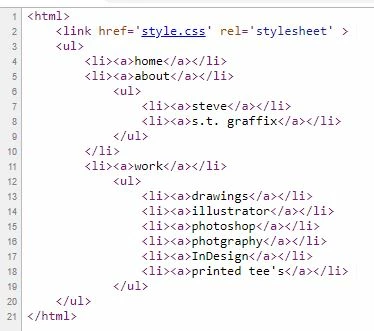
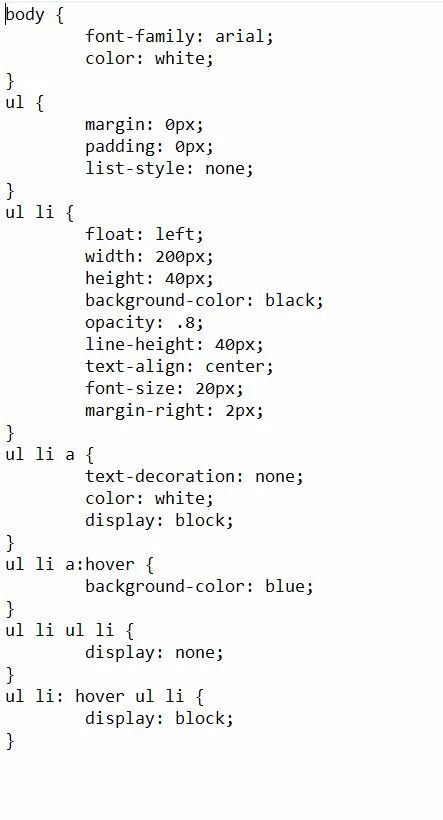
I'm not that great at coding to be completely honest and would love some help with this one. sorry folks. lol Trying to create a dropdown menu for my website, but alas its not working as planned. I followed this online tutorial on youtube: How to Create Transparent Drop Down Navigation Menu with CSS and HTML - YouTube but not getting the desired results I want. Here is an image of whats going on, along with HTML code and CSS code. Much help would be appreciated. Thanks. Once again, sorry for asking folks. lol

This topic has been closed for replies.
Correct answer Nancy OShea

For starters, your HTML document is incomplete and your unordered list is malformed.  Also what thought have you given to  how this  menu should work on mobile phones and small tablets that a) don't have a mouse and b) don't have enough real estate for a complex menu?

  Below is my revised version of your code.

<!doctype html>

<html lang="en">

<head>

<meta charset="utf-8">

<title>Navigation Demo</title>

<meta name="viewport" content="width=device-width, initial-scale=1">

<meta http-equiv="X-UA-Compatible" content="IE=edge">

<style>

body {

font-family: arial;

color: white;

}

nav ul {

margin: 0px;

padding: 0px;

list-style: none;

}

nav ul li {

float: left;

width: 200px;

height: 40px;

background-color: black;

opacity: .8;

line-height: 40px;

text-align: center;

font-size: 20px;

margin-right: 2px;

}

nav ul li a {

text-decoration: none;

color: white;

display: block;

}

nav ul li a:hover {  background color: blue;

}

nav ul li ul li { display: none; }

nav ul li:hover ul li { display: block; }

</style>

</head>

<body>

<nav>

<ul>

<li><a>home</a></li>

<li><a>about</a></li>

<li><a>steve</a>

<ul>

<li><a>s.t. graffix</a></li>

</ul>

</li>

<li><a>work</a>

<ul>

<li><a href="drawings.html">drawings</a> </li>

<li><a href="illustrator.html">illustrator</a></li>

<li><a href="photography.html">photograhy</a></li>

<li><a href="photoshop.html">photoshop</a></li>

<li><a href="indesign.html">indesign</a></li>

<li><a href="printed-tees.html">printed tee's</a></li>

</ul>

</li>

</ul>

</nav>

</body>

</html>

4 replies

SteveTadAuthor
Inspiring
March 6, 2019

I shall try both of your examples and write back and let you all know how it panned out. thank you all for the help.

Nancy OShea
Community Expert
Community Expert
March 6, 2019

Just a head's up so you know the 3rd menu won't work on small screens.  That's why I said you must consider how this should work on mobile & touch screen devices.  Desktop users are the minority.

Nancy O'Shea— Product User & Community Expert
gossipf44514187
Participant
March 6, 2019

Please be specific so that we can help you

SteveTadAuthor
Inspiring
March 6, 2019

I'm trying to create a 3 button drop down menu using the youtube link/video i sent from the beginning of this forum. home will have nothing on it as it will be a link going straight to the home page, about will drop down as Steve and S.T. Graffix (separate links), work will drop down as drawings, illustrator, photography, photoshop, indesign and printed tee's (separate links). i've provided a video link on what I would like help on, imagery and info explaining whats going on, and code from both html and css, and not great at coding what so ever, so I'm not quite sure how specific you want me to be.

Legend
March 6, 2019

SteveTad  wrote

I'm trying to create a 3 button drop down menu using the youtube link/video i sent from the beginning of this forum. home will have nothing on it as it will be a link going straight to the home page, about will drop down as Steve and S.T. Graffix (separate links), work will drop down as drawings, illustrator, photography, photoshop, indesign and printed tee's (separate links). i've provided a video link on what I would like help on, imagery and info explaining whats going on, and code from both html and css, and not great at coding what so ever, so I'm not quite sure how specific you want me to be.

This is the code you need see below. Your css is fine.  Be aware 'hover' does not work on mobile devices.

<ul>

<li><a href="#">home</a></li>

<li><a href="#">about</a>

<ul>

<li><a href="#">Steve</a></li>

<li><a href="#">S.T. Graffix</a></li>

</ul>

<li><a>work</a>

<ul>

<li><a href="#">Drawings</a></li>

<li><a href="#">Illustrator</a></li>

<li><a href="#">Photoshop</a></li>

<li><a href="#">InDesign</a></li>

<li><a href="#">Printed Tees</a></li>

</ul>

</li>

</ul>

SteveTadAuthor
Inspiring
March 6, 2019

HTML Code

<html>

  <link href='style.css' rel='stylesheet' >

  <ul>

  <li><a>home</a></li>

  <li><a>about</a></li>

  <ul>

  <li><a>steve</a></li>

  <li><a>s.t. graffix</a></li>

  </ul>

  </li>

  <li><a>work</a></li>

  <ul>

  <li><a>drawings</a></li>

  <li><a>illustrator</a></li>

  <li><a>photograhy</a></li>

  <li><a>photoshop</a></li>

  <li><a>indesign</a></li>

  <li><a>printed tee's</a></li>

  </ul>

  </ul>

</html>

CSS Code

body {

  font-family: arial;

  color: white;

}

ul {

  margin: 0px;

  padding: 0px;

  list-style: none;

}

ul li {

  float: left;

  width: 200px;

  height: 40px;

  background-color: black;

  opacity: .8;

  line-height: 40px;

  text-align: center;

  font-size: 20px;

  margin-right: 2px;

}

ul li a {

  text-decoration: none;

  color: white;

  display: block;

}

ul li a:hover {

  background color: blue;

}

ul li ul li {

  display: none;

}

ul li: hover ul li {

  display: block;

}

Copy and pasted via Dreamweaver

SteveTadAuthor
Inspiring
March 6, 2019

sorry, I think I should have been more specific about it. Wanting it to be a 3 btn drop down menu. Under About should be: Steve and S.T. Graffix. Under Work should be: Dawings, Illustrator, Photography, Photoshop, InDesign and Printed Tee's.

BenPleysier
Community Expert
Community Expert
March 6, 2019

Rather than use an image, please copy and paste the code here. That way we can copy the code to make the changes.

Wappler is the DMXzone-made Dreamweaver replacement and includes the best of their powerful extensions, as well as much more!