Known Participant
March 28, 2019
Answered

DW 19: Problem with upload of file to the remote server

  • March 28, 2019
  • 1 reply
  • 1617 views

Hi.

I get the following error message, when I try to upload a file to the remote server:

Gestartet: 28.03.19 08:27

/text/28/ - Fehler aufgetreten - Der Serverordner /text/28/ kann nicht erstellt werden.  Zugriff verweigert. Möglicherweise gibt es die Datei nicht, oder die Ursache ist ein Problem bei den Berechtigungen.  Vergewissern Sie sich, dass Sie für diesen Server die erforderlichen Rechte haben und dass der Server ordnungsgemäß konfiguriert ist.

text:28:index.html - Vorgang durch Benutzer abgebrochen

Vorgang abgebrochen.

Dateien mit Fehlern: 1

/text/28/

Translation:
"Probably there's a problem with the rights of the folder /text/28 "

When I open the remote server in the file manager of DW I can edit for example the file name without a problem.

Do you have an idea how I can find the cause why I cannot upload files?

The rights of the folder is (in the octal notation) 775.

Thank you.

This topic has been closed for replies.
Correct answer Nancy OShea

My hosting provider, a friend of mine, has no idea.

He supposes that it is a problem of DW.


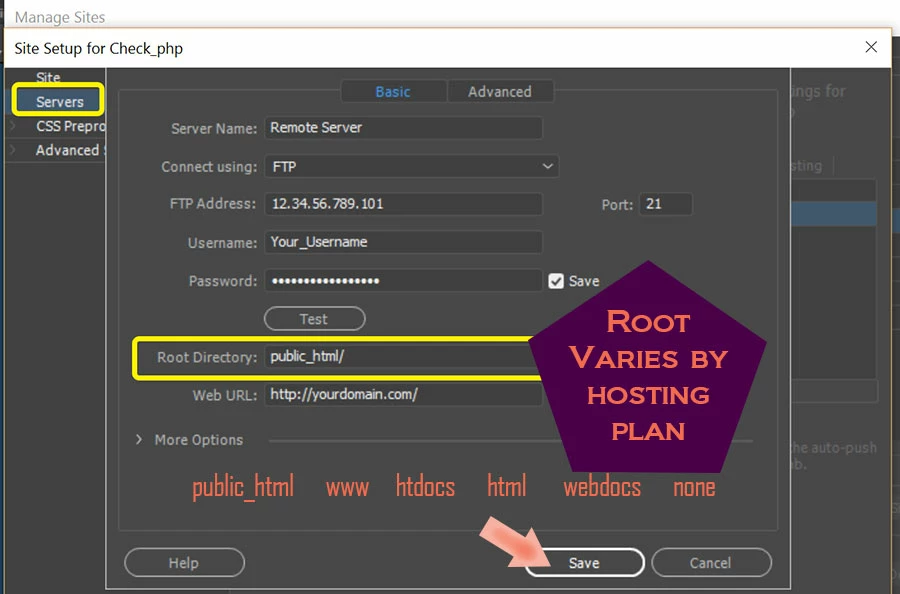
Go to Site > Manage Sites.

Have you entered your server's root directory?

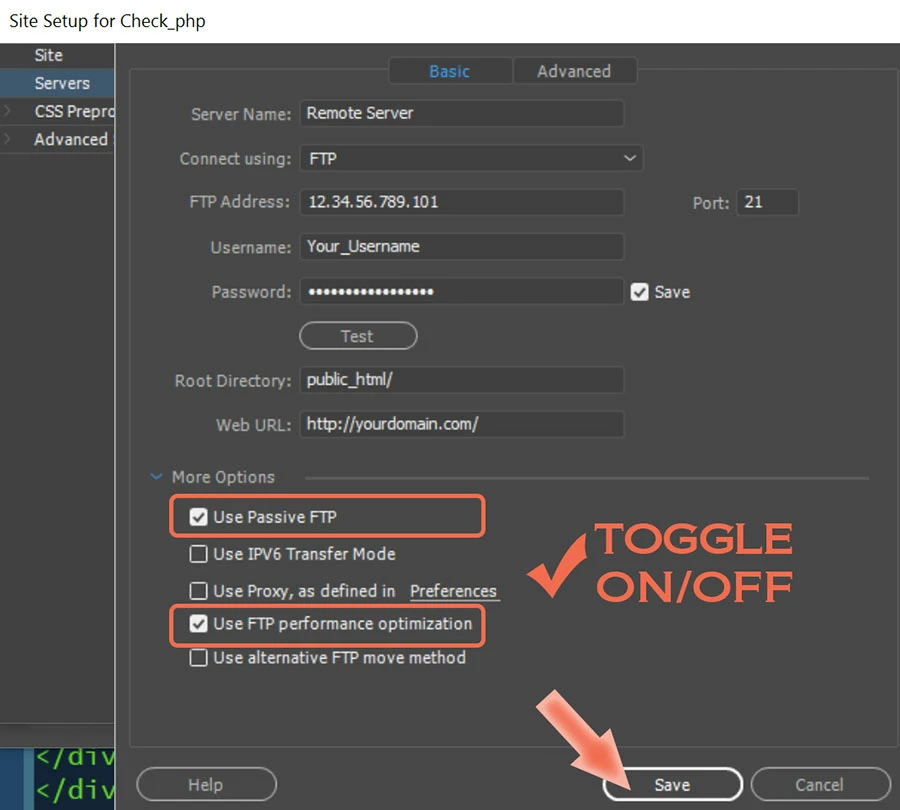
Under More Options

1 reply

Community Expert
March 28, 2019

It could be the Adobe translation, but there are 2 different things in file manager, permissions and ownership. While the 775 permissions controls the access of the file, the rights actually have to do with the ownership of the file. In Linux there are groups and users that have access rights to a file.  I would check with the host to make sure your user has the necessary rights on the file.  Usually this can be corrected also via ssh or some ftp clients which have access to update the ownership.

Known Participant
March 28, 2019

Thanks for your answer Ben.

I don't know how to check "who is my user and if he has the permissions".

I only see the permissions of the host (it is the same as the finder shows):

And, as I mentioned: I can rename the folders on the server with the DW remote file manager.

So I don't understand, why I can rename a folder, but cannot upload files.

In the finder I get ID of the owner and the group. But I don't know how to use that information to solve the problem.

Nancy OShea
Community Expert
Community Expert
March 29, 2019

When a server suddenly stops accepting new file uploads, that could mean the server is full.  You would need to remove some old files before uploading new ones.

Nancy O'Shea— Product User & Community Expert