
mycc3
Known Participant
July 20, 2020
Answered

DW 20.2: deactivating the html help

  • July 20, 2020
  • 2 replies
  • 330 views

Hi,

how can I disable this, hmm, blue bar with the orange rectangle?

A new feature after the latest update to 20.2? I see it the first time, but don't need it.
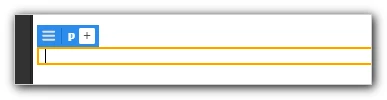


Where does it came from? Do I've pressed a wrong shortcut?


Thanks, mycc

This topic has been closed for replies.
Correct answer Jon Fritz

Those are the Live View Displays for the newish Live View Editor.

Switching to Design View is the easiest way to make it go away.


2 replies

mycc3
mycc3Author
Known Participant
July 20, 2020

THANKS a lot!


Then maybe I pressed a shortcut or clicked accidentally on a wrong "area" of DW to activate this strange view ...


This was the reason that I could not paste a Word document from the clipboard without loosing the formatting...

... hours later 😞


Jon Fritz
Community Expert
Community Expert
July 20, 2020

The Live View Editor doesn't offer the same functions as Design View.


It has been getting better over the handful of versions that have it, but there are still more than a few functions that haven't been brought into Live View yet.

Legend
July 20, 2020

Waste of time for anyone that wants to work in WYSIWG, performance issues & glitchy IMO .....

Paul-M - Community Expert
Jon Fritz
Community Expert
Jon FritzCommunity ExpertCorrect answer
Community Expert
July 20, 2020

Those are the Live View Displays for the newish Live View Editor.

Switching to Design View is the easiest way to make it go away.