Participating Frequently
November 11, 2016
Answered

DW 2017 change sort order

  • November 11, 2016
  • 2 replies
  • 2123 views

In 2016 I used to have my files sort by date so when I updated it went to the top. I don't see where I select that option in 2017

    This topic has been closed for replies.
    Correct answer Nancy OShea

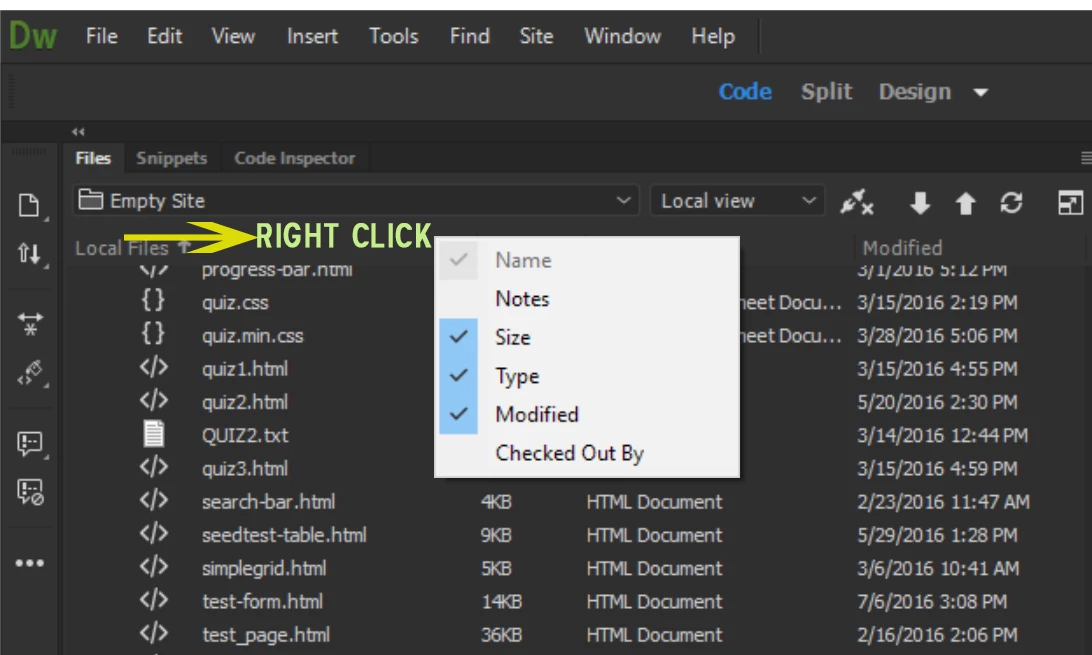
    See screenshot.

    Then click on the Modified heading to sort in ascending or descending order.

    Nancy O.

    2 replies

    Nancy OShea
    Community Expert
    Nancy OSheaCommunity ExpertCorrect answer
    Community Expert
    November 11, 2016

    See screenshot.

    Then click on the Modified heading to sort in ascending or descending order.

    Nancy O.

    Nancy O'Shea— Product User & Community Expert
    Participating Frequently
    November 11, 2016

    this is way obtuse compared to before as you need to command click on a Mac to even see these things and the menu has type white on white so you cannot read the Size, Type, Modified boxes and only your screen shot showed me what was what.. So many thanks to you and Unthanks to Adobe

    Nancy OShea
    Community Expert
    Community Expert
    November 11, 2016

    You can change the interface brightness under Preferences > Interface. 

    Nancy O.

    Nancy O'Shea— Product User & Community Expert
    John Waller
    Community Expert
    Community Expert
    November 11, 2016