


DW 2018 - using Properties panel for Format - puts tags in unexpected place...
I have a page on a site that I'm copying / pasting text from a .pdf file into a div. The text is pasting into the .html file like this (bringing over <br> tags):
<div>
A HEADER HERE
Random text here <br>
More text here <br>
Some more text here <br>
ANOTHER HEADER HERE
Random text here <br>
More text here <br>
Some more text here <br>
</div>
When I highlight the first bit, A HEADER HERE, and click the FORMAT drop down within the Properties panel and select an H tag, this is what it does:
<div>
<h6>A HEADER HERE
Random text here <br>
More text here <br>
Some more text here <br>
ANOTHER HEADER HERE
Random text here <br>
More text here <br>
Some more text here <br> </h6>
</div>
And what I expect, what I believe used to happen when I had DW 2015 (I just updated to 2018), would be this:
<div>
<h6>A HEADER HERE</h6>
Random text here <br>
More text here <br>
Some more text here <br>
ANOTHER HEADER HERE
Random text here <br>
More text here <br>
Some more text here <br>
</div>
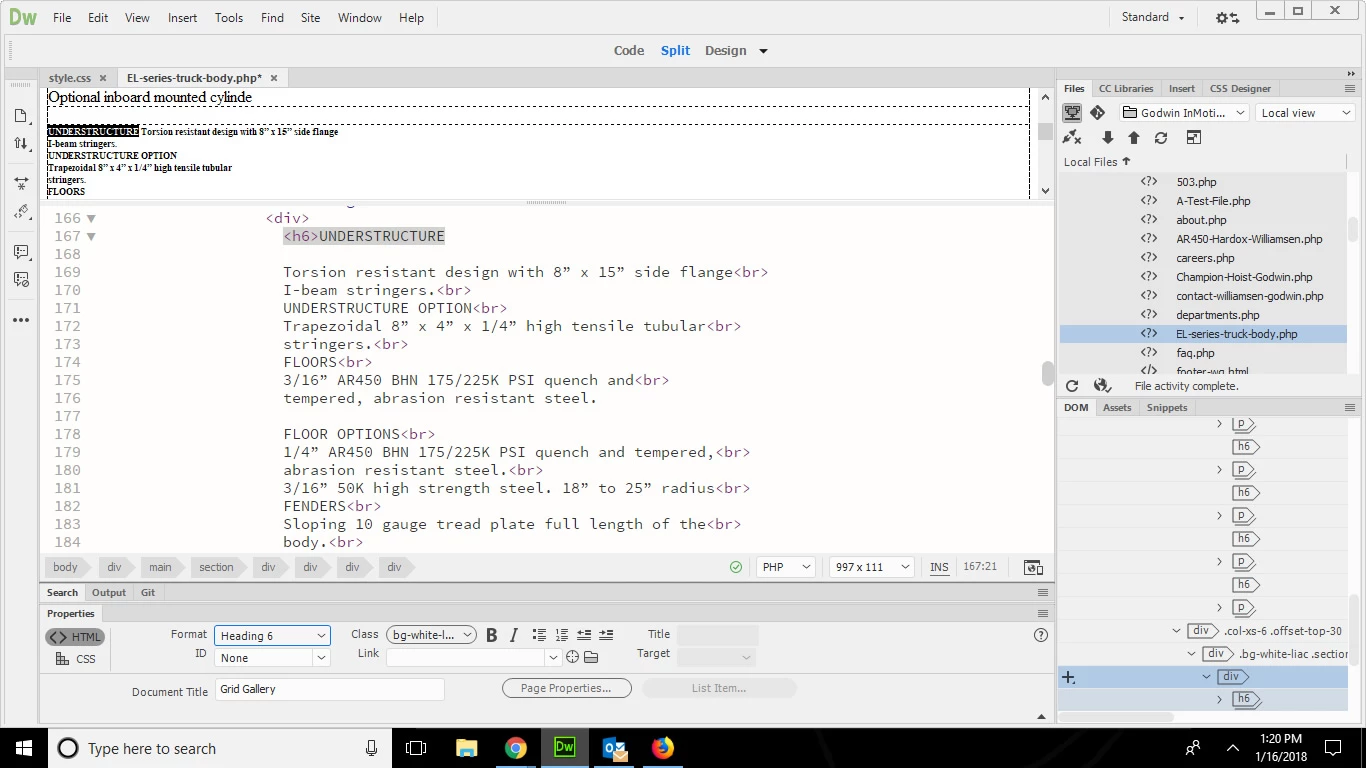
I came back to edit / add that even if I paste the text into Dreamweaver from the .pdf to notepad, then to DW as plain text (no accompanying BR tags) it still does the same thing. It puts the H tag at the start of the text I have highlighted, but puts the ending H tag at the end of all the text I just pasted... down to the next closing DIV.



 AdChoices