
dv8kiwi
Inspiring
October 21, 2020
Question

DW 2021 won't sync settings or import from previous version

  • October 21, 2020
  • 2 replies
  • 645 views

This is an ongoing problem with every DW update. I have tried uninstalling/reinstalling; uninstalling/removing all references to Dreamweaver 2021 in AppData/restarting/reinstalling. Doing all this while making sure files palette is left open (historical post on this issue). It is just an ongoing frustrating bug. 
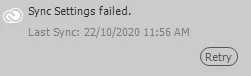
What is the workaround? Is it OK to just copy and paste the settings from the previous version in AppData>Adobe>Dreamweaver 2020 and App settings>Adobe>Dreamweaver>20.0 to corresponding 2021 folders? (Windows 10)


This topic has been closed for replies.

2 replies

Community Manager
October 25, 2020

Hi


Thanks for reporting. Could you please try below steps and let us know if your issue is resolved:


1) Quit all Adobe applications
2) Sign-out from Creative cloud desktop app and
3) Sign-in again with your adobe id
4) Launch Dw and check for sync settings.


Please let us know if the above steps doesn't work for you, we can further investigate the issue.


Thanks

Dreamweaver Team

dv8kiwi
dv8kiwiAuthor
Inspiring
October 25, 2020

Thanks, I had also tried this and it hasn't made a difference. I just tried it again to be sure but no It doesn't help.

Nayan_Kankariya
Community Manager
Community Manager
October 26, 2020

Hi,


Thanks for trying the previous work-arounds shared. Since the issue is with sync settings on your machine, can you please let us know if you can join us for a remote connect session(details sent via email) to investigate and resolve the issue on your machine.


Regards,

Nayan

Dreamweaver Team

Nancy OShea
Community Expert
Community Expert
October 21, 2020
  1. Go to Edit > Preferences.
  2. Import Synced settings from the cloud.
  3. Apply Updates button.
  4. Close.
  5. Restart Dreamweaver.


Failing that, copy settings from your old version.


Nancy O'Shea— Product User & Community Expert
dv8kiwi
dv8kiwiAuthor
Inspiring
October 21, 2020

Thank you. Yes that it exactly what I tried. As you can see I tried everything. So this is a DW bug then. I will copy settings in the AppData folders.