


Participant
September 4, 2017
Answered

DW 8.0.2 Reinstall -- No Site Management Buttons

  • September 4, 2017
  • 4 replies
  • 437 views

I am thoroughly confused.  Just updated to Win10.  Reinstalled Dreamweaver 8.0 and upgraded to 8.0.2.  Where are my site management buttons?
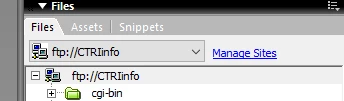
Every other time I have loaded DW 8, I have them... what am I totally missing?

This topic has been closed for replies.
Correct answer Jon Fritz

You don't appear to have an actual DW Site Definition selected in your dropdown menu.

The "Manage Sites" link will be replaced with the View dropdown (Local, Remote, Repository), and the Files toolbar will appear when a Defined Site is selected.

4 replies

Jon Fritz
Community Expert
Jon FritzCommunity ExpertCorrect answer
Community Expert
September 5, 2017

You don't appear to have an actual DW Site Definition selected in your dropdown menu.

The "Manage Sites" link will be replaced with the View dropdown (Local, Remote, Repository), and the Files toolbar will appear when a Defined Site is selected.

jamiersAuthor
Participant
September 4, 2017

It is definitely running.  I'm just wondering if I missed an option somewhere that gets those "put" and "get" buttons back on that bar.

Nancy OShea
Community Expert
Community Expert
September 4, 2017

I'm guessing the old icons are not supported by your OS.

Can you use keyboard shortcuts?

     Ctrl+Shift+U = upload

     Ctrl+Alt+D = download

Nancy O'Shea— Product User & Community Expert
Nancy OShea
Community Expert
Community Expert
September 4, 2017

Legacy DW 8 was designed to run on Win 98 & XP.   You might try running DW8 in Compatibility mode but nobody can guarantee success with that either.  Win10 and DW8 are just too far apart.

If you need a basic code editor that is compatible with Win10, download Brackets.  It's free.

Brackets - A modern, open source code editor that understands web design.

Nancy O'Shea— Product User & Community Expert
Inspiring
September 4, 2017

By "Dreamweaver 8" do you mean the version that was published by Macromedia--before it was purchased by Adobe? If so, your computer is likely trying to connect to Macromedia servers which were decommissioned over a decade ago. Therefore, a clean install is going to fail, and your only option for a fully functioning version is to upgrade to the Creative Cloud subscription model. (Support for most of the successor Adobe Creative Suite versions has also been suspended.) You should also understand at the outset that jumping from DW8 to Creative Cloud is likely to be a big learning curve for you.

Chris