


Inspiring
January 18, 2017
Answered

DW CC 2017 Click Lag

  • January 18, 2017
  • 2 replies
  • 1223 views

I am using DW CC 2017 in Code View and sometimes it can take up to 5 seconds to select a part of the scrren or the screen to respond to typing.

Its very frustrating to click the screen and nothing happens for a few seconds and I would expect code view to act like a text editor ie: fast and responsive.

  • I have a monthly paid subscription.
  • I am on mac with 16gb ram and samsung pro ssd drive
  • I am using DW Version 2017.0.01 Release
  • I do not have cache enabled in Advanced Settings > Local Info > Enable Cache


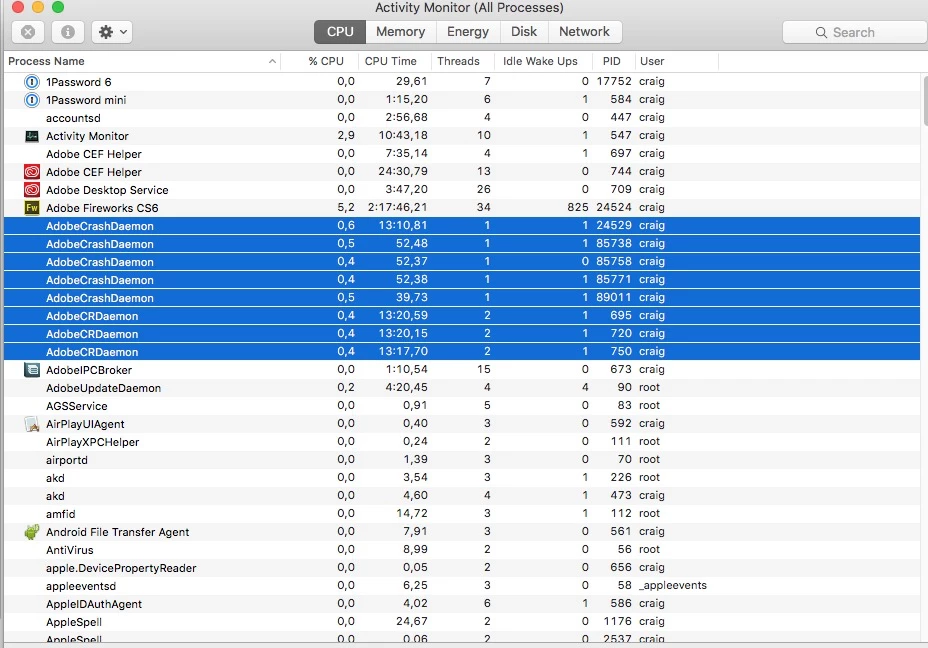
Another thing I notice in the Activity Monitor is several processes called "Adobe Cash Daemon" so not sure if thats anything to do with it.
This topic has been closed for replies.
Correct answer jucra

I "think" I might have resolved the lag issue on my mac.

On my mac I am running a nice firewall  called "Little Snitch" and noticed that CC 2015 was added but CC 2017 was not in any of the rules.

So I added CC 2017 to the list of rules, went back to CC 2017 and no more lag during typing or clicking/selecting.

Hopefully this has resolved my issue for now!

2 replies

mbk28
Known Participant
January 20, 2017

Are you sure, you don't use all your memory?

jucraAuthor
Inspiring
January 22, 2017

mbk28​ - memory or cpu not an issue as cpu is running at 10-20% and free memory is 6GB out of 16GB (according to cleanmymac). I am also running Samsung Pro SSD drive so would not be a disk issue.

@Jon Fritz II -  I might try that and see, however I really love the new "developer layout" in the 2017 version.

jucraAuthorCorrect answer
Inspiring
January 23, 2017

I "think" I might have resolved the lag issue on my mac.

On my mac I am running a nice firewall  called "Little Snitch" and noticed that CC 2015 was added but CC 2017 was not in any of the rules.

So I added CC 2017 to the list of rules, went back to CC 2017 and no more lag during typing or clicking/selecting.

Hopefully this has resolved my issue for now!

Jon Fritz
Community Expert
Community Expert
January 18, 2017

Does this lag happen with all files in all sites?

Any change working with a new blank html page?

Did it ever work correctly in the current version and machine?

jucraAuthor
Inspiring
January 18, 2017

Does this lag happen with all files in all sites?

(CE) Yes.

Any change working with a new blank html page?
(CE) When I create a new php page it seems to be fine. If I move the code from the problem pages there is some lag. The only real difference I can see is the pages that have an issue have php includes in them EG: include "functions.php"; so am wondering if DW is reading those external include files. Its starting to become unworkable at the moment.

Did it ever work correctly in the current version and machine?

(CE) Its been fine in the past.

Jon Fritz
Community Expert
Community Expert
January 18, 2017

Are those external files in the local site definition?

Are all of the site's files on the same local drive as the program is installed on?

Since a new fresh page works, it might be worth looking at your html to see if you have any structural errors DW isn't a fan of. Try running the output of the page (not the local .php file, but the page the browser is putting together) through the validator at http://validator.w3.org/nu and see if there are any goof ups like extra/missing <body> tags or unclosed <div> tags coming in from your includes.