lcg_2012
Inspiring
November 13, 2016
Answered

DW CC 2017 File View

  • November 13, 2016
  • 3 replies
  • 2361 views

I've been using Dreamweaver since it was a Macromedia product. Each update things change, and that's good.

2017 has many changes that I am trying to get used to. One of which the File View window. In previous versions, I would see my local and hosted files along with their date and size. Those details are no longer in the window I am looking at currently. This information was very helpful.

Is there a way to get them to show up again? I looked in preferences but do not see a way.

This topic has been closed for replies.
Correct answer Nancy OShea

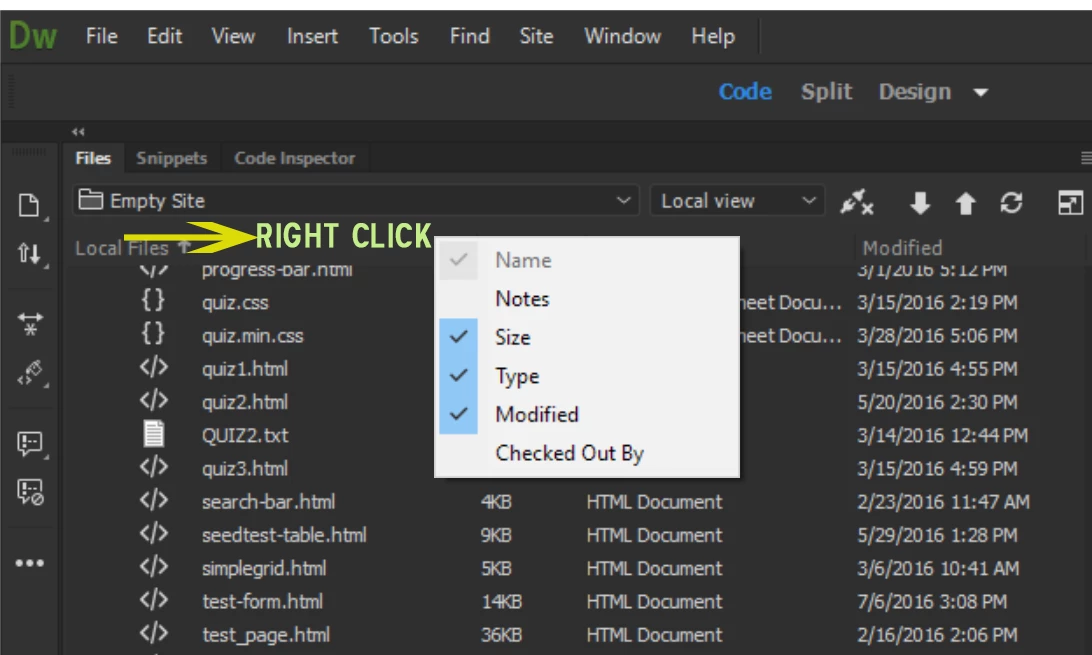
Right click next to Local files.  See screenshot.

Also see this post:

CC 2017 Issues people are having.

Nancy O.

3 replies

Known Participant
February 10, 2017

I'm so glad to find this well hidden item.  And making a change causes Dreamweaver to crash.  ugh.  Dammit.  I don't want ANY features if it makes the program crash.

Nancy OShea
Community Expert
Community Expert
February 10, 2017

That should not happen. What does your Crash Log or Windows Event Viewer say is the faulting module?

Nancy O'Shea— Product User & Community Expert
Nancy OShea
Community Expert
Nancy OSheaCommunity ExpertCorrect answer
Community Expert
November 13, 2016

Right click next to Local files.  See screenshot.

Also see this post:

CC 2017 Issues people are having.

Nancy O.

Nancy O'Shea— Product User & Community Expert
lcg_2012
lcg_2012Author
Inspiring
November 13, 2016

Thanks! That did the trick.

Participating Frequently
November 13, 2016

Hi Kirk,

By default, Dreamweaver CC 2017 only displays the list of files and folders within your site. For more details, such as notes, file size and type, and change details, right-click the Local Files toolbar and select the options you want displayed.

More details are available at below kink

Learn about all the changes in the Files panel in Dreamweaver CC 2017.

Hope this helps.

Thanks,

Lalita