Participant
November 22, 2016
Answered

DW CC 2017 Format Source Code NOT to auto remove blank lines?

  • November 22, 2016
  • 2 replies
  • 2001 views

Format source code automatically removes blanks lines. Get that it makes code smaller...

I'd like to learn how to keep the blank for code in development and readability sake.

Under code formatting preferences can keeping blank line numbers be set?
    This topic has been closed for replies.
    Correct answer Nancy OShea

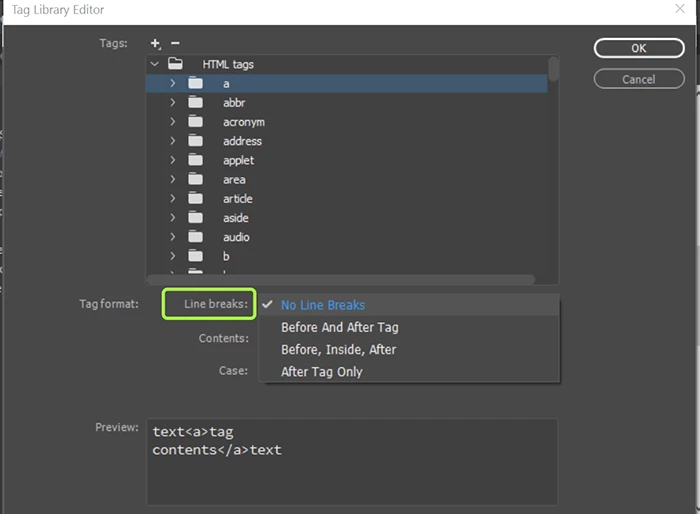
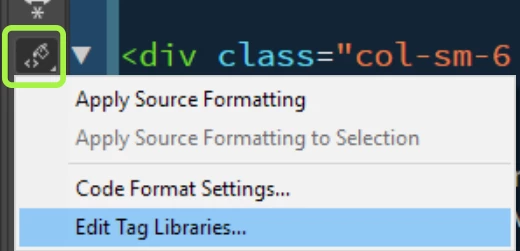
    Line Breaks are defined under Preferences > Code Format > Tag Libraries.  You can also access this from your Common Toolbar.  See screenshots.

    Once your formatting options are all defined as desired, click Apply Source Formatting.

    Nancy O.

    2 replies

    Nancy OShea
    Community Expert
    Nancy OSheaCommunity ExpertCorrect answer
    Community Expert
    November 22, 2016

    Line Breaks are defined under Preferences > Code Format > Tag Libraries.  You can also access this from your Common Toolbar.  See screenshots.

    Once your formatting options are all defined as desired, click Apply Source Formatting.

    Nancy O.

    Nancy O'Shea— Product User & Community Expert
    Jon Fritz
    Community Expert
    Community Expert
    November 22, 2016

    Oh hey, sweet, they didn't remove it entirely, they just moved it to move it.

    If I understand the OP, they actually want to add a blank line between each line of code (basically a double-spaced code view is what I gathered from the original post), that is still not available, right?

    Nancy OShea
    Community Expert
    Community Expert
    November 22, 2016

    Never tried it.   I don't like empty space in my code except between sections & divisions tags.

    Nancy O'Shea— Product User & Community Expert
    Jon Fritz
    Community Expert
    Community Expert
    November 22, 2016

    Unfortunately, DWCC2017 is completely missing the Tag Libraries option under Preferences.

    As far as I can tell, there isn't a way to modify the source formatting rules currently (without possibly modifying one of the program's XML files).

    EDIT: There also was not a way to modify blank lines the way you want in previous versions either.