

Participating Frequently
February 4, 2021
Answered

DW CC 2021: Issue centering text within a div or wrapper

  • February 4, 2021
  • 3 replies
  • 452 views

Please excuse the long post. I'm trying to clearly describe this issue. Thanks in advance for your tips and solutions.


I'm working a major update for a longtime client's website to make it mobile friendly and responsive. I designed the original site in GoLive CS2 v8.0.1 (before Adobe decided to kill it off).


The new version of the site is built in DW CC v21.1. You can visit it here: https://chuckwild.com


It's been a long and frustrating slog, but the new version looks almost as good as the original version — with the exception of one page.


On the Concert Music page, I'm having trouble centering text within a div/wrapper. As you scroll down the page, you'll notice that text below each blue subtitle isn't properly centered. I'm attaching a screen shot to help illustrate this issue (I added the red arrows).
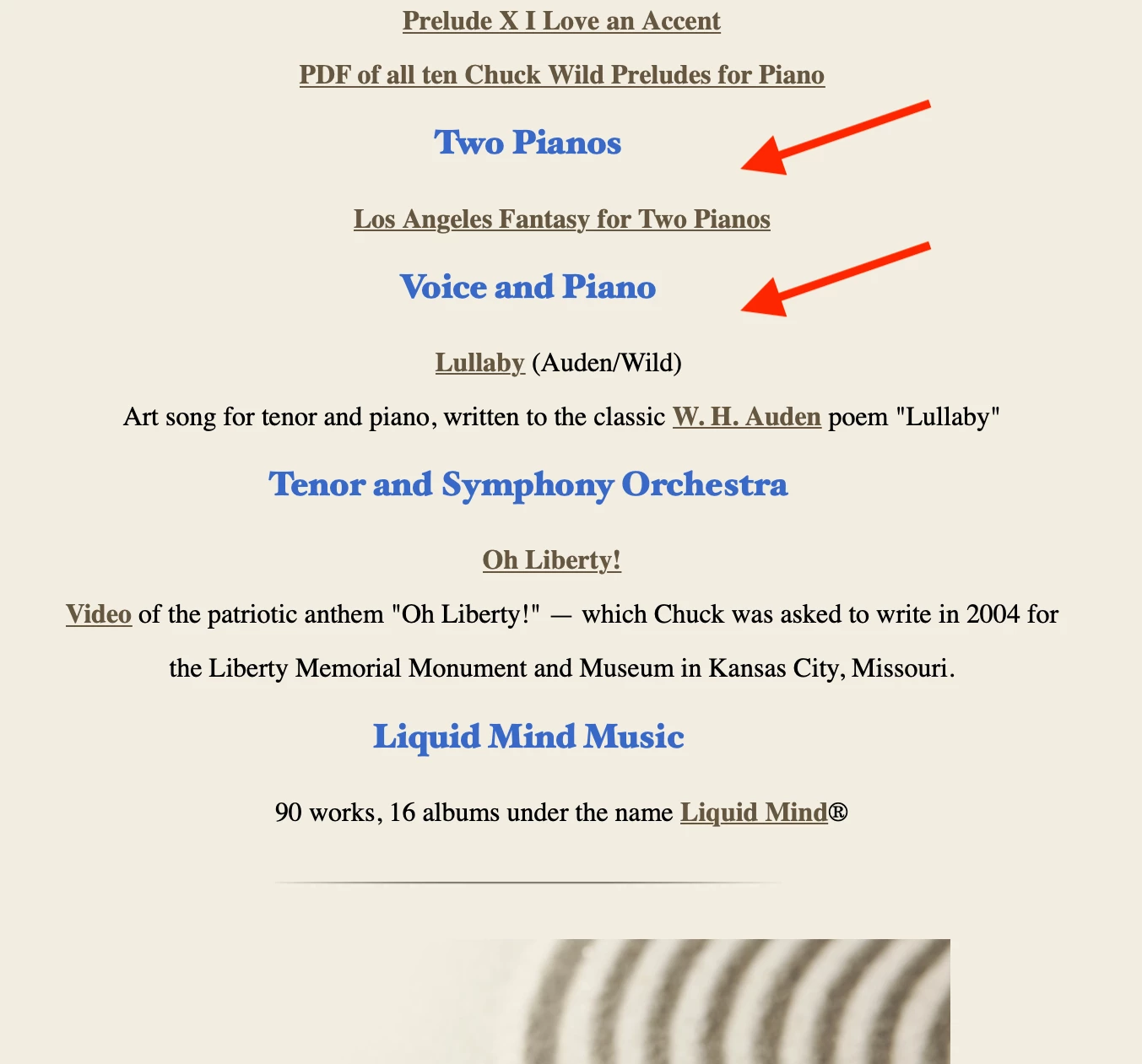


It's driving me bonkers. There's probably a simple fix somewhere in the code.

Thanks again for any tips and solutions. Feel free to drop me a line with any questions.

This topic has been closed for replies.
Correct answer Jon Fritz

It's actually the browser default padding of the <ul> tag that's causing the misalignment.

You can add this to the end of your stylesheet to fix it...

ul {padding:0;}

3 replies

Participant
February 4, 2021

If there's a chance you might also use unordered lists in a conventional way elsewhere in the site, you can target that particular list (and any others you want to render in a similar way) with a CSS class. I usually leave a little head and foot room for lists by setting the top-bottom and side margins separately like this:


ul.reallyCentered {

  margin: .25em 0; /* (same as .25em 0 .25em 0) */

  padding: 0;

  text-align:center

}


... and for the list items, I think the standard indent is three spaces so I do this in the CSS to correct the specific problem that's bothering you:


ul.reallyCentered li {

  margin-left: -3em  /* I think this "negative margin" solution is frowned upon, but it always works */

}


Then the only change needed in the HTML is this:


<ul class="reallyCentered">

  <li>Et Cetera</li>

...

</ul>

Participating Frequently
February 5, 2021

Thanks, WVvocrehab. I appreciate your time and consideration. Jon Fritz II offered a solution that solved the problem with less effort... one snippet of code added to the CSS file. That pesky Concert Music page seems to be working fine on all major browsers with this quick fix. Text is centered, just like my client wants it. Thanks again and all the best.

Art, like morality, consists of drawing the line somewhere.
Nancy OShea
Community Expert
Community Expert
February 4, 2021

I'm working a major update for a longtime client's website to make it mobile friendly and responsive.


===============

Hi @Andy Markley - Art101,

Unfortunately, this layout is NOT responsive because a max-width of 775px looks like a tiny postage stamp on large and x-large devices.  By not accommodating 1200+ px, you're alienating all people on HiRes displays.


Try again with a Bootstrap Starter Template.  File > New > Starter Templates > Bootstrap Templates.  Choose a layout and hit Create button.  You'll get better results across a wider range of devices without having to code your own media queries.


For more on Bootstrap: https://www.w3schools.com/bootstrap4/


Nancy O'Shea— Product User & Community Expert
Participating Frequently
February 5, 2021

Thanks for your comment, Nancy, but I don't have the budget or time to completely rebuild this site with a bootstrap compliant template.


BTW, I use a reliable site to test website designs on various devices. You might find it as helpful as I do. Here's a link to Multi Screen Test, which includes an emulation of how the site looks on big computer monitors and TV sets.


Thanks again for your time and consideration.

Art, like morality, consists of drawing the line somewhere.
Jon Fritz
Community Expert
Jon FritzCommunity ExpertCorrect answer
Community Expert
February 4, 2021

It's actually the browser default padding of the <ul> tag that's causing the misalignment.

You can add this to the end of your stylesheet to fix it...

ul {padding:0;}

Participating Frequently
February 5, 2021

Thanks much, Jon. Problem solved! A simple, elegant solution.


I should have remembered your snippet, but my tired old brain shuts down after hours of rummaging through miles of code.


Everything on the Concert Music page is now properly centered, just like my client wants it. You are hereby awarded 5 gold stars from Art101 Global Command. Thanks again.

Art, like morality, consists of drawing the line somewhere.