



John_Allred
Inspiring
Apr 19, 2020 4:07 PM UTC
Answered

DW Copy paste (and other menu functions) not working

Using DW v 20.1 under Windows 10 64-bit, many menu functions are grayed out/nonfunctional. Includes copy, cut, paste, about Dreamweaver, open, close, close all, etc.


With a file open and with text selected, this is the status of my Edit menu:
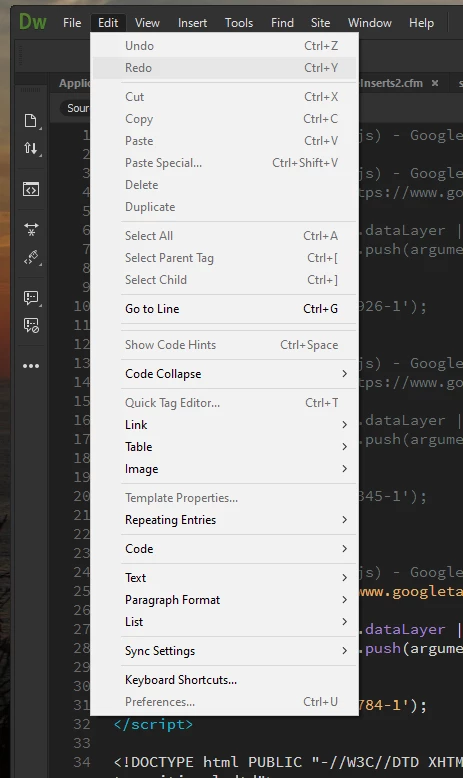
I have uninstalled and reinstalled DW. This issue does not occur in other Adobe CC apps.


I saw this issue cropped up a bit in 2017 and 2018, but I haven't seen more recent complaints. Advice would be greatly appreciated.

This topic is closed to new replies. Start a new post to keep the conversation going.
Nancy OShea
Nancy OSheaCorrect answer
Community Expert
Apr 20, 2020 12:27 AM UTC

Yes, ma'am.


Try Restore Preferences.

https://helpx.adobe.com/dreamweaver/kb/restore-preferences-dreamweaver.html


Nancy O'Shea— Product User & Community Expert

8 replies

John_Allred
Inspiring
Apr 19, 2020 4:16 PM UTC

For whatever insight it may provide, here is the status of my File menu:


Translate
Nancy OShea
Community Expert
Community Expert
Apr 19, 2020 9:26 PM UTC

1. Switch to Live View from your Document Toolbar.

2. Make certain the active tab is Source Code, not a dependent file tab.

3. Ensure that underlying code is error-free, denoted by a green checkmark in a circle. 

See screenshot.


Post back if you still need help.


Translate
Nancy O'Shea— Product User & Community Expert
John_Allred
Inspiring
Apr 19, 2020 11:04 PM UTC

Thanks, Nancy. That didn't do it for me. To get a green check mark, I created a new HTML file with only doctype, html, head, and body tags. Plus, an H1 and a P. Most of my menus are still grayed out.

Translate