Participant
August 6, 2017
Answered

DW CS6 Text over an Image? (Beginner)

  • August 6, 2017
  • 4 replies
  • 644 views

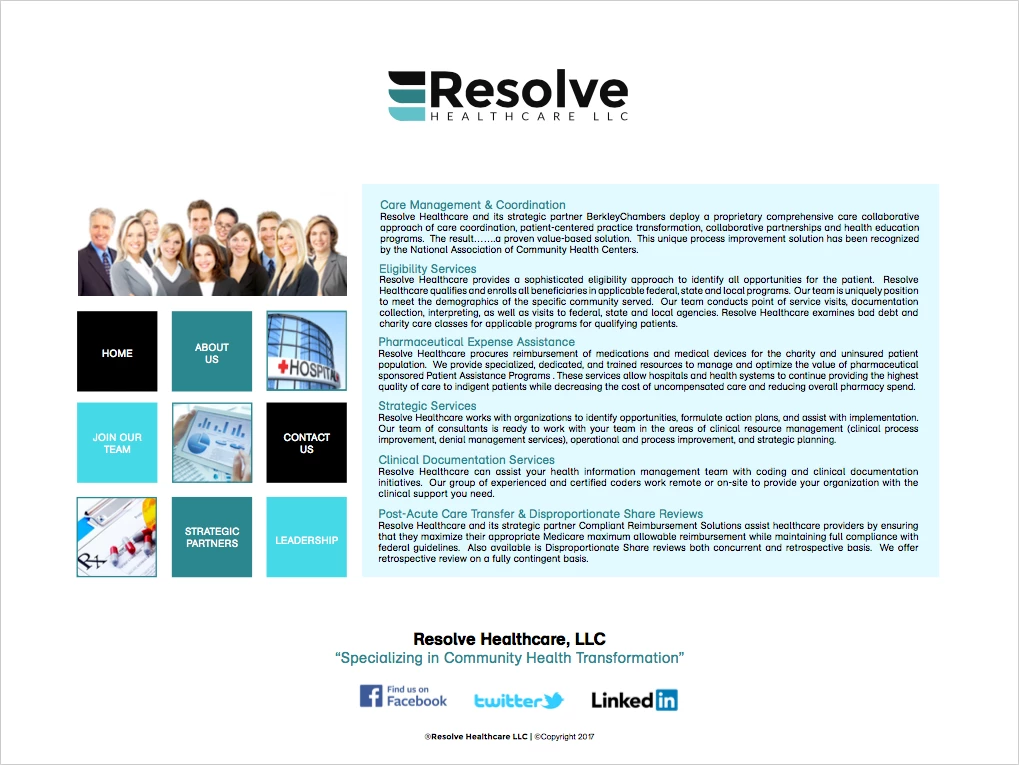
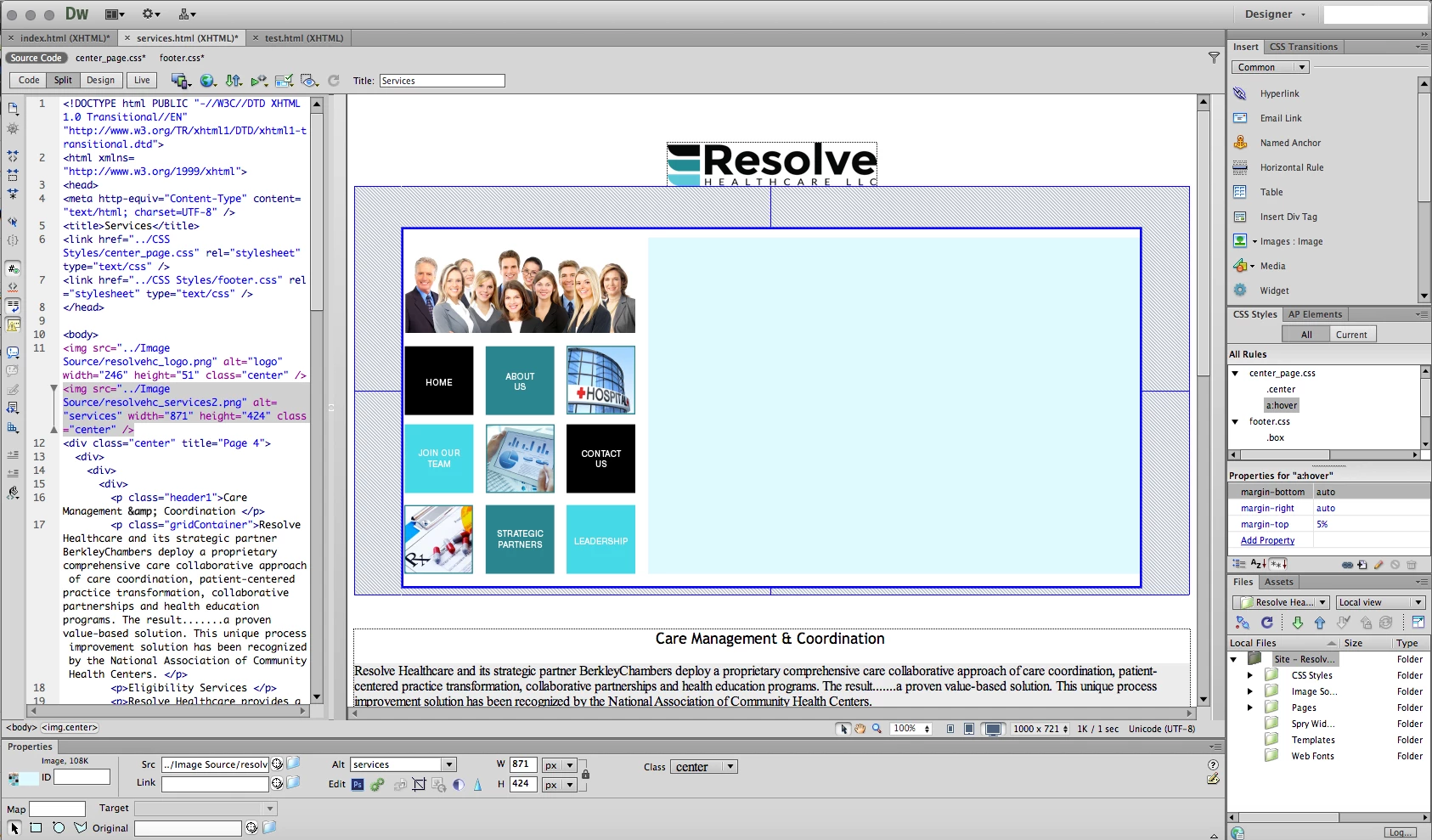
Hey everyone. First time posting and first time using Dreamweaver CS6 (refuse to go over to CC) and I'm having some difficulty with placing text over an image. I've been searching around the web and still cannot come to a solid answer for what I'm trying to do. The way I'm going about this is I'm trying to take any objects from a pdf I have in the first screen shot (using the images on the left and the light blue background behind the text on the right) and turn them into one image. Then I want to place a text box or text area where the light blue box is located, but that is where I start to struggle. I don't want to make it all one image (including the text as part of it) since the text gets messed up, but I don't want to make the image a background either because I'm using the white space for it and applying margins to center it. I apologize for my ignorance/lack of understanding of this program, but I thought it would help to at least try here for any possible solutions/advice.

This topic has been closed for replies.
Correct answer Nancy OShea

#1 PDF is a print format, not a web format.

#2 You need a suitable web layout that is responsive for ALL devices -- mobile, tablet & desktop.  Anything less is unsatisfactory  these days because Google demands mobile friendly websites & penalizes sites that aren't.

I think it's best to segment your image in Photoshop from the background & saveAs a JPG.  Then Use HTML & CSS to define the blue background area & insert real HTML text that can be indexed, searched and translated by robots.

Since your don't have CC 2017 & you want to stick with 6 year old legacy software, fine.  I think it's a mistake but here goes.

Copy & paste this code into a new, blank document.   Save & preview in browsers. 

<!doctype html>

<html lang="en">

<head>

<meta charset="utf-8">

<title>Bootstrap 3.3.7 Starter</title>

<meta name="viewport" content="width=device-width, initial-scale=1">

<meta http-equiv="X-UA-Compatible" content="IE=edge">

<!-- Latest compiled and minified Bootstrap CSS-->

<link rel="stylesheet" href="https://maxcdn.bootstrapcdn.com/bootstrap/3.3.7/css/bootstrap.min.css" integrity="sha384-BVYiiSIFeK1dGmJRAkycuHAHRg32OmUcww7on3RYdg4Va+PmSTsz/K68vbdEjh4u" crossorigin="anonymous">

<style>

.center-block {float:none}

.blue {background-color:#A9D9F0 }

</style>

</head>

<body class="container">

<header class="row">

<div class="jumbotron center-block">

<h1>My Awesome Website</h1>

<h2>Some Pithy Slogan....</h2>

<p>Lorem ipsum dolor sit amet, consectetur adipisicing elit. Suscipit quod autem repudiandae placeat consequatur debitis.</p>

</div>

</header>

<section class="row">

<div class="col-sm-4">

<img class="img-responsive" src="http://dummyimage.com/500x600" alt="description">

</div>

<div class="col-sm-8 blue">

<h3>Heading 3</h3>

<p>Lorem ipsum dolor sit amet, consectetur adipisicing elit. Voluptatibus repellendus, laudantium aliquam tempore, quisquam quaerat provident neque voluptas sapiente beatae quidem vitae aut omnis accusamus reiciendis ipsum aperiam? Provident, atque.</p>

<h3>Heading 3</h3>

<p>Lorem ipsum dolor sit amet, consectetur adipisicing elit. Voluptatibus repellendus, laudantium aliquam tempore, quisquam quaerat provident neque voluptas sapiente beatae quidem vitae aut omnis accusamus reiciendis ipsum aperiam? Provident, atque.</p>

<h3>Heading 3</h3>

<p>Lorem ipsum dolor sit amet, consectetur adipisicing elit. Voluptatibus repellendus, laudantium aliquam tempore, quisquam quaerat provident neque voluptas sapiente beatae quidem vitae aut omnis accusamus reiciendis ipsum aperiam? Provident, atque.</p>

</div>

</section>

<footer class="row">

FOOTER GOES HERE....

</footer>

<!--jQuery Core-->

<script src="https://code.jquery.com/jquery-1.12.2.min.js" integrity="sha256-lZFHibXzMHo3GGeehn1hudTAP3Sc0uKXBXAzHX1sjtk=" crossorigin="anonymous">

</script>

<!--Bootstrap JS-->

<script src="https://maxcdn.bootstrapcdn.com/bootstrap/3.3.7/js/bootstrap.min.js" integrity="sha384-Tc5IQib027qvyjSMfHjOMaLkfuWVxZxUPnCJA7l2mCWNIpG9mGCD8wGNIcPD7Txa" crossorigin="anonymous"></script>

</body>

</html>

Good luck with your project!

Nancy

4 replies

hans-g.
Legend
August 6, 2017

... and here the screenshot from Ben's solution:

hans-g.
Legend
August 6, 2017

Hello mr_miggles,

in my library I found another solution, so too made from Ben. (Hello ) He used this, where I integrated some informations about the OP.

    <!DOCTYPE html> 

    <html lang="en"> 


    <head>

        <meta charset="utf-8"> 

        <meta name="viewport" content="width=device-width, initial-scale=1.0"> 

        <link rel="stylesheet" media="screen" href="https://cdnjs.cloudflare.com/ajax/libs/twitter-bootstrap/3.3.5/css/bootstrap.min.css"> 

        <title>Text on image</title> 

        <style> 

            .text-on-image { 

                position: relative; 

            }


            .text-on-image div { 

                position: absolute; 

                top: 150px; 

                padding: 15px; 

                color: navajowhite; 

            }

        </style> 

    </head> 


    <body class="container"> 

    <div class="text-on-image row"> 

            <div class="col-md-6 col-md-offset-4"> 

              <img src="http://lorempixel.com/400/200" /> 

                <div> 

                    <h3>This is my title</h3> 

                </div>

            </div> 

        </div> 

        <p>

          <script src="https://cdnjs.cloudflare.com/ajax/libs/jquery/1.11.3/jquery.min.js"></script>

          <a href="https://forums.adobe.com/message/8526748#8526748">Hey, I would like to move a bit of text (in this case the h1) on to an image. I know you can have a background image on a piece of text but if I do it that way I can't make a transition for the text. Which is what I want to do. But if I have the text</a></p>

        <p><a href="https://forums.adobe.com/message/8526748#8526748">https://forums.adobe.com/message/8526748#8526748</a></p>

        <p> </p>

        <p> </p>

        <p>

          <script src="https://cdnjs.cloudflare.com/ajax/libs/twitter-bootstrap/3.3.5/js/bootstrap.min.js"></script>

        </p> 

    </body> 


    </html>

Hans-Günter

BenPleysier
Community Expert
Community Expert
August 6, 2017

Not sure if this is what you mean. Copy the code and paste it into a new document.

<!doctype html>

<html>

<head>

<meta charset="utf-8">

<title>Untitled Document</title>

<style>

html {

box-sizing: border-box;

}

*, *:before, *:after {

box-sizing: inherit;

}

body {

max-width: 70em;

margin: auto;

}

.left-col {

width: 35%;

padding: 1em;

float: left;

}

.right-col {

width: 65%;

padding: 1em;

float: right;

background-color: #e1faff;

text-align: justify;

}

</style>

</head>

<body>

<div class="left-col">

<h3>left column </h3>

<p>The image goes here</p>

</div>

<div class="right-col">

<h3>right column </h3>

<p>Lorem ipsum dolor sit amet, consectetur adipisicing elit. Velit aspernatur mollitia at, nemo voluptas. Impedit, minus asperiores tempore sunt voluptatibus eveniet autem! Laudantium beatae perferendis, reiciendis minima facere quae culpa. Velit reprehenderit quis cum magni ex nesciunt eum natus placeat fugit a. Reiciendis harum, aut esse? Quae error, aliquam consequatur eum delectus? Consequuntur suscipit delectus sint, quia minus officia atque. Earum dolore aliquam voluptates sequi hic nisi corrupti officia distinctio aperiam quam quas aspernatur, ducimus nam aut ex beatae ab, aliquid dolor, nobis nulla cumque! Laudantium eligendi commodi ipsum impedit! Quidem deleniti provident odit dolore, illo iusto, veritatis repellendus. Quos fuga nobis distinctio quod, optio nihil, ipsam sapiente voluptatibus facilis ex eum a at unde vitae, vel, neque hic est. Perspiciatis odit debitis fuga, nemo voluptas maiores, molestiae dolorem saepe soluta, rerum perferendis iure quod. Accusantium, atque error obcaecati, placeat sed voluptate, tempore veritatis quibusdam unde nemo perspiciatis magnam vero!</p>

</div>

</body>

</html>

Edit: My apologies, I did not realise that Nancy had already answered your question. May I add that using Bootstrap would be my option as well. It's up to you.

Wappler is the DMXzone-made Dreamweaver replacement and includes the best of their powerful extensions, as well as much more!
Nancy OShea
Community Expert
Nancy OSheaCommunity ExpertCorrect answer
Community Expert
August 6, 2017

#1 PDF is a print format, not a web format.

#2 You need a suitable web layout that is responsive for ALL devices -- mobile, tablet & desktop.  Anything less is unsatisfactory  these days because Google demands mobile friendly websites & penalizes sites that aren't.

I think it's best to segment your image in Photoshop from the background & saveAs a JPG.  Then Use HTML & CSS to define the blue background area & insert real HTML text that can be indexed, searched and translated by robots.

Since your don't have CC 2017 & you want to stick with 6 year old legacy software, fine.  I think it's a mistake but here goes.

Copy & paste this code into a new, blank document.   Save & preview in browsers. 

<!doctype html>

<html lang="en">

<head>

<meta charset="utf-8">

<title>Bootstrap 3.3.7 Starter</title>

<meta name="viewport" content="width=device-width, initial-scale=1">

<meta http-equiv="X-UA-Compatible" content="IE=edge">

<!-- Latest compiled and minified Bootstrap CSS-->

<link rel="stylesheet" href="https://maxcdn.bootstrapcdn.com/bootstrap/3.3.7/css/bootstrap.min.css" integrity="sha384-BVYiiSIFeK1dGmJRAkycuHAHRg32OmUcww7on3RYdg4Va+PmSTsz/K68vbdEjh4u" crossorigin="anonymous">

<style>

.center-block {float:none}

.blue {background-color:#A9D9F0 }

</style>

</head>

<body class="container">

<header class="row">

<div class="jumbotron center-block">

<h1>My Awesome Website</h1>

<h2>Some Pithy Slogan....</h2>

<p>Lorem ipsum dolor sit amet, consectetur adipisicing elit. Suscipit quod autem repudiandae placeat consequatur debitis.</p>

</div>

</header>

<section class="row">

<div class="col-sm-4">

<img class="img-responsive" src="http://dummyimage.com/500x600" alt="description">

</div>

<div class="col-sm-8 blue">

<h3>Heading 3</h3>

<p>Lorem ipsum dolor sit amet, consectetur adipisicing elit. Voluptatibus repellendus, laudantium aliquam tempore, quisquam quaerat provident neque voluptas sapiente beatae quidem vitae aut omnis accusamus reiciendis ipsum aperiam? Provident, atque.</p>

<h3>Heading 3</h3>

<p>Lorem ipsum dolor sit amet, consectetur adipisicing elit. Voluptatibus repellendus, laudantium aliquam tempore, quisquam quaerat provident neque voluptas sapiente beatae quidem vitae aut omnis accusamus reiciendis ipsum aperiam? Provident, atque.</p>

<h3>Heading 3</h3>

<p>Lorem ipsum dolor sit amet, consectetur adipisicing elit. Voluptatibus repellendus, laudantium aliquam tempore, quisquam quaerat provident neque voluptas sapiente beatae quidem vitae aut omnis accusamus reiciendis ipsum aperiam? Provident, atque.</p>

</div>

</section>

<footer class="row">

FOOTER GOES HERE....

</footer>

<!--jQuery Core-->

<script src="https://code.jquery.com/jquery-1.12.2.min.js" integrity="sha256-lZFHibXzMHo3GGeehn1hudTAP3Sc0uKXBXAzHX1sjtk=" crossorigin="anonymous">

</script>

<!--Bootstrap JS-->

<script src="https://maxcdn.bootstrapcdn.com/bootstrap/3.3.7/js/bootstrap.min.js" integrity="sha384-Tc5IQib027qvyjSMfHjOMaLkfuWVxZxUPnCJA7l2mCWNIpG9mGCD8wGNIcPD7Txa" crossorigin="anonymous"></script>

</body>

</html>

Good luck with your project!

Nancy

Nancy O'Shea— Product User & Community Expert