
khari joshuah44175973
Participant
July 30, 2018
Answered

DW Templates [Issues with saving my files]

  • July 30, 2018
  • 4 replies
  • 649 views

i just started using dream weaver. I created a home page and save it on my desktop. Then I saved that as a template. I then attempted to add additional pages That will function as my links. So I created a new page for our work, about us etc.  then tried to do a hyperlink on the home page that takes me to one of my test pages. I went into live view, clicked on my first link text on the Home page. after Highlighted I clicked hyperlink, then it asked me for the destination folder And told me to save my new page first. I tried to save it under site templates where My home page was now located and it didnt work. Then I moved all of my files that I had just created to the original folder that they were in on the desktop. Then when I tried to open them back up, it is pulling the html and css of each page as two seperate pages instead of combining them under one tab. I’m lost and need help. Im just trying to link all my pages together So that my navigation flows.

    This topic has been closed for replies.
    Correct answer Nancy OShea

    That's not how you work with Dreamweaver Templates. 

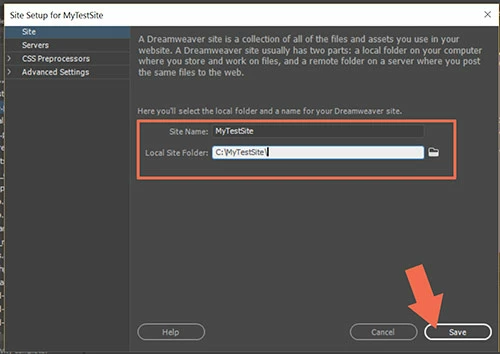
    If you haven't already, define your local site folder.   Site > New Site > give it a name,.  For example, myTestSite.   See screenshot.

    Then read this quick tutorial on Templates.

    Alt-Web Design & Publishing: Working With Dreamweaver Templates (.dwt files)

    4 replies

    khari joshuah44175973
    Participant
    August 21, 2018

    new question, I am trying to use a dreamweaver template that comes with the software (ecommerce template) this thing is a beast. The single page ones are smaller so I can change anything, the ecommerce template has an 8000 line css page. I understand that they don’t want us making many changes or taking parts of the code but that’s intense.

    My Question, the search bar on the top doesnt work and I am wondering do I need to add a different j query to be able to search the site? otherwise It’s just a button. Also I need to power the ecommerce side. what kind of database do I link This page to in order to take actually orders and except payments/ ship orders once invoices come in?

    Also i Want to do a contact form so they can write their name with additional information on their requests to us along with their email. Is this also a database that needs to be linked?

    my site is so close to being finished and looks amazing With what I’ve done on dreamweaver so please Don’t send me to a drag and drop site I take pride in learning this for real

    khari joshuah44175973
    Participant
    August 21, 2018

    Accept payments*

    khari joshuah44175973
    Participant
    August 1, 2018

    I figured out my issue. when you completely close out of dreamweaver and open it up on the start you have to define the site name and source folder. I was trying to edit a site outside of the original that it was pulling my content from. When I correctly linked the site with my correct folder everything worked fine. Thank you for the info about the templates as well that was helpful. I know there are a million sites out there that can do templates like wix but I want to know how to do this on my own and dreamweaver is a great teaching tool to see The code and juxtapose with  the simple paste here Perspective on live view. I am very pleased with my progress 

    ALsp
    Legend
    July 30, 2018

    In addition to Nancy's advice...

    Using our Page Layout tools will give you the ability to use DW Templates in ways you cannot otherwise come close to.

    To get an idea... please see this:

    Using Dreamweaver Templates with PVII Harmony

    Our products are not free. However, they are incomparable and you pay only once

    Nancy OShea
    Community Expert
    Nancy OSheaCommunity ExpertCorrect answer
    Community Expert
    July 30, 2018

    That's not how you work with Dreamweaver Templates. 

    If you haven't already, define your local site folder.   Site > New Site > give it a name,.  For example, myTestSite.   See screenshot.

    Then read this quick tutorial on Templates.

    Alt-Web Design & Publishing: Working With Dreamweaver Templates (.dwt files)

    Nancy O'Shea— Product User & Community Expert