Participating Frequently
June 28, 2022
Answered

DWT files didn't export with the rest of the site

  • June 28, 2022
  • 1 reply
  • 342 views

I'm finally switching from CS3 (yes, CS3) to Creative Cloud. In Dreamweaver, I've exported a few of my sites, but when I import the sites on another computer, I don't see any template files (.dwt) as part of the import. Any idea why not or where they can be found?
    This topic has been closed for replies.
    Correct answer L e n a

    cool to hear that all is fine now, in fact playing with the top right contextual menu, should have had the same result as closing and restarting DW, but without having to do it 😉


    the panel I talk about, can be accessed from the menu Windows > Assets

    don't forget to select the second icon from bottom on the left (Template)


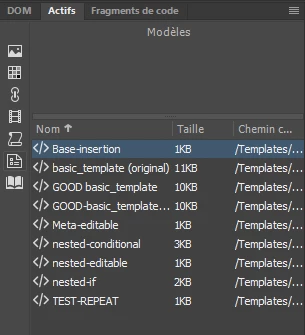
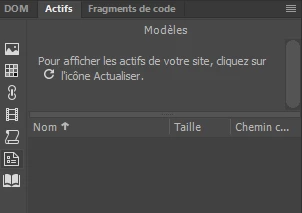
    so before...

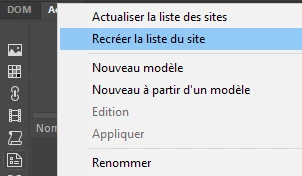
    playing with the menu

    after


    1 reply

    Community Expert
    June 28, 2022

    In order to avoid any confusion, let me rephrase your question.


    When you talk about exporting, then importing your sites, we are talking about exporting, importing STE files that contain the various parameters of your sites, and not the site files themselves (HTML, CSS, JS, DWT, LBI, PHP ... etc ...)

    These local files are in fact left on your hard disk, and will be visible again when the imported STE file tells DW where the local site is.


    The same goes for the test server files if there is one, and the online files defined by the remote server.

    If we are talking about the same thing, and your DWT files still don't show up ... where do you think they should show up :

    • in the file panel, then check your site settings, local part, and server settings (test and remote)
    • in the assets panel, Template section (second last icon on the bottom left side), from the contextual menu on the top right of the assets panel select rebuild site


    If nothing appears, send us a step by step of what you have done and obtained or not.

    Participating Frequently
    June 28, 2022

    Thanks for your response. Yes, I was referring to the .ste file.


    I use an online drive for storage, and both the "old" and "new" should be drawing from the same drive. Once I imported the .ste file, I can see many of my local files in the panel on the right (I don't know what it's called), but I now see that I also don't have several other files besides the template folder. I'm confident that it's user error, as I just started using it this morning. I'm just trying to figure out how to retrieve the rest of my files.

    Community Expert
    June 28, 2022
    quote

    Thanks for your response. Yes, I was referring to the .ste file.

    By @MICHAEL25046626hjog


    you're welcome


    quote

    I can see many of my local files in the panel on the right (I don't know what it's called),


    that is the files panel, the one I was talking about