Participating Frequently
July 16, 2024
Answered

Edit Dreamweaver Template

  • July 16, 2024
  • 1 reply
  • 487 views

I recently was forced to switch from Dreamweaver CS3 to DW 21, kind of a big jump. I'm trying to edit a template. I only have one template in the site, but when I open it, it's not editable. I've viewed the help files with Adobe (open and edit a template file), but no matter how I open the template, it's not editable. I've not doubt that I'm missing something simple, but any insight would be most appreciated.

    This topic has been closed for replies.
    Correct answer Nancy OShea

    Go to View > SPLIT > Code-Design, Split-Vertically (see screenshot).
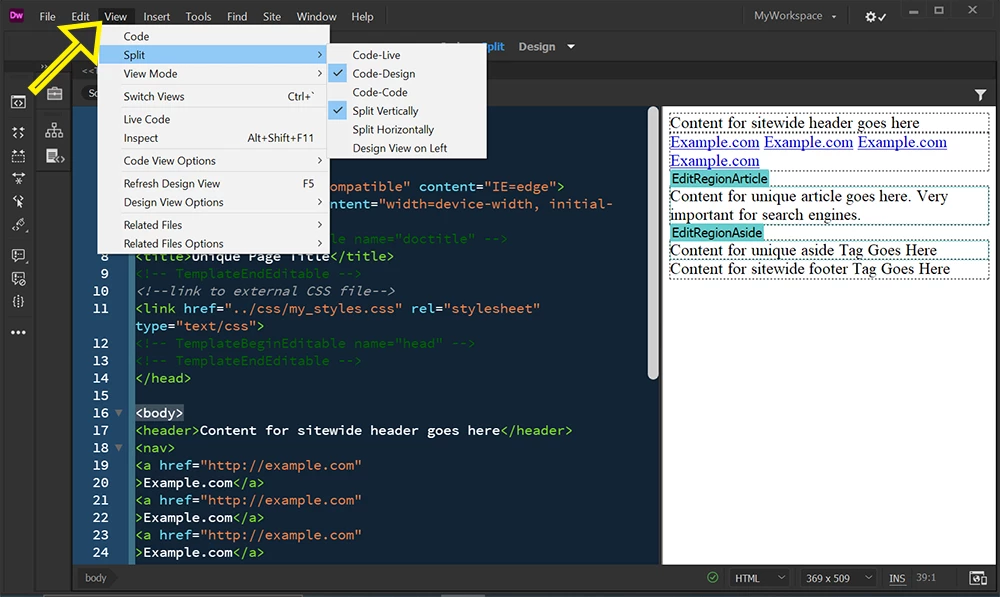


    Assuming your .dwt file is a correctly formed Template and free of code errors (denoted by a green checkmark), you should be able to edit in either Code or Design view panels.


    A properly designed Template contains Editable Regions for content that changes on child pages.  Something like this:

    <!doctype html>
    <html lang="en">
    <head>
    <meta charset="utf-8">
    <meta http-equiv="X-UA-Compatible" content="IE=edge">
    <meta name="viewport" content="width=device-width, initial-scale=1">
    <!-- TemplateBeginEditable name="doctitle" -->
    <title>Unique Page Title</title>
    <!-- TemplateEndEditable -->
    <!--link to external CSS file-->
    <link href="../css/my_styles.css" rel="stylesheet" type="text/css">
    <!-- TemplateBeginEditable name="head" -->
    <!-- TemplateEndEditable -->
    </head>
    
    <body>
    <header>Content for sitewide header goes here</header>
    <nav>
    <a href="http://example.com"
    >Example.com</a>
    <a href="http://example.com"
    >Example.com</a>
    <a href="http://example.com"
    >Example.com</a>
    <a href="http://example.com"
    >Example.com</a>
    </nav>
    
    <!-- TemplateBeginEditable name="EditRegionArticle" -->
    <article>Content for unique article goes here. Very important for search engines.  
     </article>
    <!-- TemplateEndEditable --> 
    
    <!-- TemplateBeginEditable name="EditRegionAside" -->
    <aside>Content for unique aside Tag Goes Here</aside>
    <!-- TemplateEndEditable -->
    
    <footer>Content for sitewide footer Tag Goes Here</footer>
    </body>
    </html>


    Hope that helps.

     

    1 reply

    Community Expert
    July 16, 2024

    Was this a new computer in addition to an updated version of DW? Did you migrate the site (ste) file and open the site in the new version? Is the site locally on the computer or remote? Are you editing the DWT file? Can you share screenshots of what you are seeing?

    Participating Frequently
    July 16, 2024

    Yes, it was a new computer. All my files are on a remote drive, so I simply set up each site again using the existing files. Yes, I'm trying to edit the dwt file. Below is a screenshot of the template itself, and I didn't notice this before, but there's not "body" in the template either (not that I'm having difficulty in editing individual files).


    Nancy OShea
    Community Expert
    Nancy OSheaCommunity ExpertCorrect answer
    Community Expert
    July 16, 2024

    Go to View > SPLIT > Code-Design, Split-Vertically (see screenshot).


    Assuming your .dwt file is a correctly formed Template and free of code errors (denoted by a green checkmark), you should be able to edit in either Code or Design view panels.


    A properly designed Template contains Editable Regions for content that changes on child pages.  Something like this:

    <!doctype html>
    <html lang="en">
    <head>
    <meta charset="utf-8">
    <meta http-equiv="X-UA-Compatible" content="IE=edge">
    <meta name="viewport" content="width=device-width, initial-scale=1">
    <!-- TemplateBeginEditable name="doctitle" -->
    <title>Unique Page Title</title>
    <!-- TemplateEndEditable -->
    <!--link to external CSS file-->
    <link href="../css/my_styles.css" rel="stylesheet" type="text/css">
    <!-- TemplateBeginEditable name="head" -->
    <!-- TemplateEndEditable -->
    </head>
    
    <body>
    <header>Content for sitewide header goes here</header>
    <nav>
    <a href="http://example.com"
    >Example.com</a>
    <a href="http://example.com"
    >Example.com</a>
    <a href="http://example.com"
    >Example.com</a>
    <a href="http://example.com"
    >Example.com</a>
    </nav>
    
    <!-- TemplateBeginEditable name="EditRegionArticle" -->
    <article>Content for unique article goes here. Very important for search engines.  
     </article>
    <!-- TemplateEndEditable --> 
    
    <!-- TemplateBeginEditable name="EditRegionAside" -->
    <aside>Content for unique aside Tag Goes Here</aside>
    <!-- TemplateEndEditable -->
    
    <footer>Content for sitewide footer Tag Goes Here</footer>
    </body>
    </html>


    Hope that helps.

     

    Nancy O'Shea— Product User & Community Expert

