geotso
Inspiring
March 22, 2025
Answered

Edit keyb shortcuts

  • March 22, 2025
  • 1 reply
  • 306 views

I'm trying to add keyboard shortcuts for DL, DT and DD in DW 21.3 as I used to use in DW CS6.

I find the DL under Edit / List section, but I can't find its components DT and DD. 

Some help please?

    Correct answer Nancy OShea

    Preferences > Code Formatting:  Set Tab size to 1 space.

    Emmet commits short codes to full sized HTML or CSS when you hit the Tab key. 

    https://helpx.adobe.com/dreamweaver/using/setting-coding-preferences.html


    Writing Code with Emmet Short Codes:

    https://helpx.adobe.com/dreamweaver/using/writing-editing-code.html#emmet


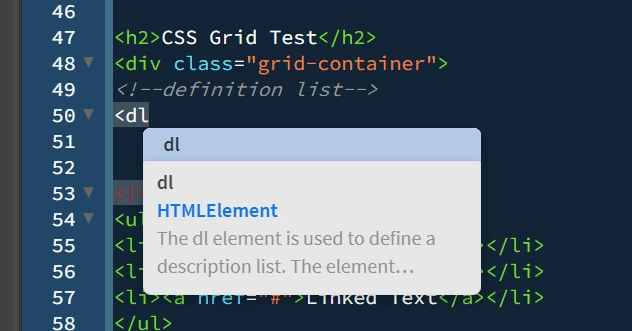
    Or just use Code Hints with autocompletion. Start typing code and DW shows you hints.


    A third option is to open the Snippets panel and create custom Snippets for things you use frequently.

    https://helpx.adobe.com/dreamweaver/using/reuse-code-with-snippets.html


    I keep whole blocks of re-usable code stored in Snippets for quick insertion into projects.


    1 reply

    BenPleysier
    Community Expert
    Community Expert
    March 22, 2025

    Short cuts???  Use Emmet instead like most experienced web developers!


    Emmet is a fantastic tool for speeding up your HTML workflow, and it can definitely help with <dl>, <dt>, and <dd> tags in Dreamweaver. Here's how you can use it:

    Using Emmet for <dl>, <dt>, and <dd>:

    1. Basic Structure: You can quickly generate a basic <dl> structure using Emmet syntax. For example:

      • Typing dl>dt+dd and pressing the Emmet expand shortcut (usually Tab or Ctrl+E, depending on your setup) will produce:
        <dl>
          <dt></dt>
          <dd></dd>
        </dl>
        
    2. Repeating Multiple Items: If you want to create multiple <dt> and <dd> pairs:

      • Type dl>(dt+dd)*3 and expand. It will generate:
        <dl>
          <dt></dt>
          <dd></dd>
          <dt></dt>
          <dd></dd>
          <dt></dt>
          <dd></dd>
        </dl>
        
    3. Adding Content: You can include text content directly within the tags. For example:

      • dl>(dt{Term}+dd{Definition})*2 expands to:
        <dl>
          <dt>Term</dt>
          <dd>Definition</dd>
          <dt>Term</dt>
          <dd>Definition</dd>
        </dl>
        

    Setting Up Emmet in Dreamweaver:

    Emmet comes pre-installed in modern versions of Dreamweaver, so you should be able to use it right away. Just ensure that Emmet is enabled in your preferences:

    • Go to Edit > Preferences > Code View.
    • Look for the Emmet settings and make sure they're turned on.

    With Emmet, you can quickly generate complex HTML structures with minimal typing—it’s like a productivity superpower!


    You can find an Emmet cheatsheet on the official Emmet documentation website here. It provides a comprehensive guide to Emmet syntax and shortcuts, including examples for HTML and CSS. There's also a printable PDF version available here. If you're looking for a GitHub-hosted version, you can check it out here.


    Wappler is the DMXzone-made Dreamweaver replacement and includes the best of their powerful extensions, as well as much more!
    geotso
    geotsoAuthor
    Inspiring
    March 23, 2025

    Please define "modern versions of  Dreamweaver", because I'm just trying DW CC 2021 v.23.1 and I don't even see a Code view section under Edit > Preferences. There are Code format, Code hints and Code Rewritting, but not Code view.


    Thanks.

    Nancy OShea
    Community Expert
    Nancy OSheaCommunity ExpertCorrect answer
    Community Expert
    March 23, 2025

    Preferences > Code Formatting:  Set Tab size to 1 space.

    Emmet commits short codes to full sized HTML or CSS when you hit the Tab key. 

    https://helpx.adobe.com/dreamweaver/using/setting-coding-preferences.html


    Writing Code with Emmet Short Codes:

    https://helpx.adobe.com/dreamweaver/using/writing-editing-code.html#emmet


    Or just use Code Hints with autocompletion. Start typing code and DW shows you hints.


    A third option is to open the Snippets panel and create custom Snippets for things you use frequently.

    https://helpx.adobe.com/dreamweaver/using/reuse-code-with-snippets.html


    I keep whole blocks of re-usable code stored in Snippets for quick insertion into projects.


    Nancy O'Shea— Product User & Community Expert