

Participating Frequently
January 15, 2024
Answered

Editor crashed when css gets a bit complex

  • January 15, 2024
  • 9 replies
  • 996 views

Lates version of DW on updated Windows 11.
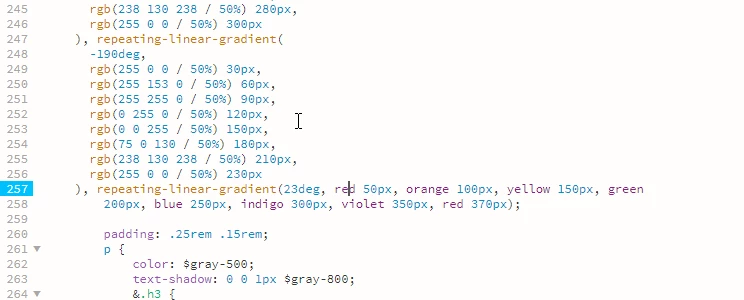


See the cursor, when it is positioned there the editor crashes. Every time.

This topic has been closed for replies.
Correct answer L e n a
quote

I found out it has to do with the linebreak.

By @vincnet


Thank you for your feedback, it's true that porting between Linux and Windows sometimes causes problems when using DW, for that purpose, here at the studio we're used to always having an instance of NotePad++ open, to transfer our pasted copies between OS (and even between applications) this tool has the particularity of respecting encoding (and its permutation) which is quite remarkable.

9 replies

L e n aCommunity ExpertCorrect answer
Community Expert
January 23, 2024
quote

I found out it has to do with the linebreak.

By @vincnet


Thank you for your feedback, it's true that porting between Linux and Windows sometimes causes problems when using DW, for that purpose, here at the studio we're used to always having an instance of NotePad++ open, to transfer our pasted copies between OS (and even between applications) this tool has the particularity of respecting encoding (and its permutation) which is quite remarkable.

Community Expert
January 19, 2024
quote

It's part of SCSS so that's allowed.

And in anyways, it should not crash the editor.

By @vincnet


Sorry, I didn't realize you were using SCSS, but in any case, I prefer to use blocks that are closed.


Indeed, the error, if there is one, shouldn't bring down the editor. Perhaps the debugging context should be extended to include other parameters linked to the context of use.


Could you please make your files available, so that we can try to reproduce this crash?

vincnetAuthor
Participating Frequently
January 20, 2024

I found out it has to do with the linebreak.


  • In my Preferences, long time ago, I remember I have set that to LF (Unix) because of issues on a Linux server with the other settings.
  • It appears I have to set it to CR LF (Windows) for having a copied piece of code that contains a linebreak not freezing the editor.
  • But I'm afraid then I re-introduce the problems on the Linux server.


Now if my first step is going to position 0 on the line after the break and I do Backspace, so the linebreak is removed, it goes well.

Nancy OShea
Community Expert
Community Expert
January 21, 2024

1. There should be no line breaks inside a continuous code string. 

2. Use the correct line break for your server.

3. When copying & pasting,  use Edit > Paste Special > Text Only to remove unwanted formatting from code.


Nancy O'Shea— Product User & Community Expert
Community Expert
January 19, 2024
quote

To resolve the error, I inserted commas between values like this.

rgb(255, 0, 0) 50% 40px

By @Nancy OShea


In fact, it's DW that's in trouble: the fact that it hasn't been updated means that its code corrector doesn't integrate the higher levels of CSS.

The way @vincnet is coded is correct, there's no need to resort exclusively to comma-based syntax to describe a color in rgb or rgba, https://docs.w3cub.com/css/color_value/rgba.html

Jon Fritz
Community Expert
Community Expert
January 19, 2024

Have you tried any of the more general troubleshooting steps, like Restoring Preferences yet?

That can clear up all kinds of program oddities.

Nancy OShea
Community Expert
Community Expert
January 18, 2024

SCSS is preprocessed code for advanced developers. It's used in SASS or LESS files to create global site mixins, variables & functions

Have you designated a preprocessor to compile SCSS into standard CSS code?

Dreamweaver supports the following:

  • Sass: 3.4.25
  • LESS: 2.7.2
  • Compass: 1.0.3
  • Bourbon: 4.2.6
  • Bourbon Neat: 1.7.3
  • Bourbon Bitters: 1.2.0


See below for more details.

https://helpx.adobe.com/dreamweaver/using/css-preprocessors.html


Nancy O'Shea— Product User & Community Expert
vincnetAuthor
Participating Frequently
January 18, 2024

Dear Nancy,


Are you wrinting this reply to me or for the whole community? Thank you for your suggestions, but it is not an answer to my bug report.


I know what SCSS is. I use it for almost a decade. And in my case it is compiled to CSS on the server.


I use DW as editor for years now to edit the SCSS files, without issues.


What happens is simple: I copied the lines of code into my SCSS file and when I clicked into the lines of code, the editor freezes. Every time. I suggest you do the same to reproduce the issue. No compiling, just copy paste it and see what happens if you try to chenge the word "red" for instance.


I hope your response will be more to the point now.

Nancy OShea
Community Expert
Community Expert
January 19, 2024

I am unable to reproduce the lock-up problem on my end.  But I see a code error reported on line 5.


OUTPUT PANEL: 

ERROR: Wrong number of arguments (1 for 3) for 'rgb'


To resolve the error, I inserted commas between values like this.

rgb(255, 0, 0) 50% 40px


Nancy O'Shea— Product User & Community Expert
vincnetAuthor
Participating Frequently
January 18, 2024

It's part of SCSS so that's allowed.

And in anyways, it should not crash the editor.

Community Expert
January 18, 2024

We can see on your screen grab that the declaration containing repeating-linear-gradient seems to be missing a closing curly brace, just after the declaration of padding.

vincnetAuthor
Participating Frequently
January 18, 2024

Thank you for your reaction.


It is a CSS file (SCSS) and the code is validated. It is an example from https://developer.mozilla.org/en-US/docs/Web/CSS/CSS_images/Using_CSS_gradients (see code below) and validated on https://jigsaw.w3.org/css-validator/validator (see image below).


But even if it's not valid CSS, the editor should not crash.


.multi-repeating-linear {
  background: repeating-linear-gradient(
      190deg,
      rgb(255 0 0 / 50%) 40px,
      rgb(255 153 0 / 50%) 80px,
      rgb(255 255 0 / 50%) 120px,
      rgb(0 255 0 / 50%) 160px,
      rgb(0 0 255 / 50%) 200px,
      rgb(75 0 130 / 50%) 240px,
      rgb(238 130 238 / 50%) 280px,
      rgb(255 0 0 / 50%) 300px
    ), repeating-linear-gradient(
      -190deg,
      rgb(255 0 0 / 50%) 30px,
      rgb(255 153 0 / 50%) 60px,
      rgb(255 255 0 / 50%) 90px,
      rgb(0 255 0 / 50%) 120px,
      rgb(0 0 255 / 50%) 150px,
      rgb(75 0 130 / 50%) 180px,
      rgb(238 130 238 / 50%) 210px,
      rgb(255 0 0 / 50%) 230px
    ), repeating-linear-gradient(23deg, red 50px, orange 100px, yellow 150px, green
        200px, blue 250px, indigo 300px, violet 350px, red 370px);
}


Nancy OShea
Community Expert
Community Expert
January 17, 2024

What kind of file is this?

I can't tell much from your screenshot. 


If this is a CSS file, validate and fix reported errors:

https://jigsaw.w3.org/css-validator/


Nancy O'Shea— Product User & Community Expert